Story Mountain | Plan Creative Writing with KidsGPT
Use KidsGPT to explore the Story Mountain framework, plan stories, and build stronger plots. A kid-safe creative writing tool for young writers.
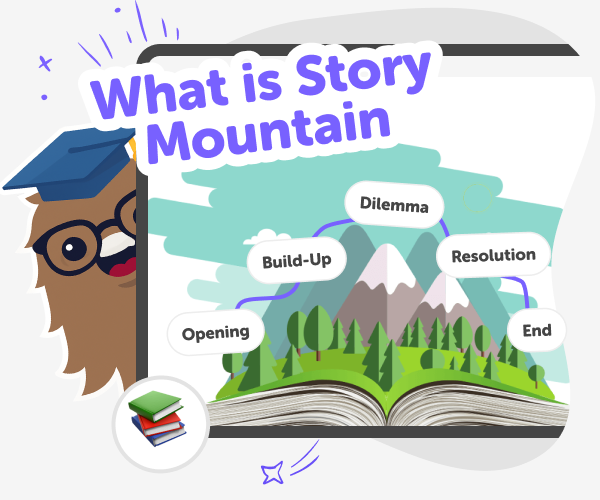
What Is a Story Mountain?
Story Mountain is a simple, visual five-part framework that helps writers plan the rise and fall of a story’s plot. It breaks a story into stages — beginning, build-up, climax, falling action, and ending — so ideas can grow into scenes that feel connected and purposeful. Teachers and young writers use Story Mountain because it turns an abstract story into a clear map. Instead of guessing where a plot should go, kids can place events on the mountain, see how tension builds, and plan satisfying endings. It’s a friendly way to turn ideas into a full story.
KidsGPT supports Story Mountain as a kid-safe helper for planning and writing. Ask KidsGPT to explain each stage in simple language, give concrete examples, or suggest actions for rising and falling sections. It can brainstorm twists, spot plot gaps, and offer short scene starters a child can expand. Prompts are easy to change, so kids experiment with tone, characters, and pacing to see how choices reshape the plot. Using KidsGPT keeps the process hands-on and iterative: kids pick prompts, try different twists, and get step-by-step suggestions for scenes. Parents can feel reassured because interactions are age-appropriate, optional to share, and focused on learning by doing.
How does Story Mountain help young writers?
Story Mountain helps by giving a clear structure that makes plotting less scary. It teaches kids to think about cause and effect: why an event happens and what it leads to next. Using the mountain, writers practise building tension, deciding when things should get more exciting, and planning satisfying resolutions. It also encourages planning before writing, which saves time and reduces rewrites. For classrooms, Story Mountain supports group brainstorming and helps children to describe story beats in simple terms, building confidence and making creative writing feel more like solving a fun puzzle.
Is Story Mountain kid-friendly and safe to use?
Yes. Story Mountain itself is a planning idea, not a content source, so it’s naturally kid-friendly. When used with KidsGPT on DIY.org, the experience is kept appropriate for children. KidsGPT answers at a child-friendly reading level and guides young writers without exposing them to unsafe material. The assistant helps by asking questions, suggesting age-appropriate plot ideas, and offering step-by-step prompts that encourage learning. Parents and teachers can feel reassured because DIY.org’s tools are designed for safe creativity and focus on helping children learn by making stories themselves.
Can I use Story Mountain with KidsGPT?
Absolutely. Kids can tell KidsGPT their idea and ask it to place events on each mountain stage, suggest rising actions, or generate short scene starters. KidsGPT acts like a friendly writing tutor, offering examples and asking follow-up questions to deepen the plot. It won’t write full stories for the child but will give stepwise help so the child learns plotting and writing skills. Children can also ask for alternative endings, character motivations, or sensory details to make scenes more vivid, and saving drafts lets them return later to develop and revise their work.
Plan a Story with KidsGPT
Learn the Story Mountain Parts
Ask KidsGPT to explain the five parts of Story Mountain and show how a simple story fits into each stage.
Map Your Story Ideas
Brainstorm characters, goals, and problems. Tell KidsGPT your ideas and ask it to place them on the Story Mountain stages.
Get Writing Prompts from KidsGPT
Use KidsGPT to write short scene prompts for each mountain stage, then expand prompts into paragraphs or dialogue for your draft.
Make the most of Story Mountain
Try different ideas Ask KidsGPT for alternative rising actions and plot twists to see how different choices change the story. Iterate scenes Rewrite key scenes with KidsGPT’s suggestions, then adjust voice, pacing, and details until it feels right. Build character arcs Use prompts to explore how characters grow across the mountain, making emotions clearer. Share safely Post drafts using DIY.org’s moderation tools or print them for family feedback without sharing personal information.
Frequently asked questions
What age is Story Mountain best for?
It works well for kids aged 5–15. Younger kids use simple maps, while older kids can add more detail and subplots.
Do kids need to be good at writing first?
No. Story Mountain helps writers of all levels by breaking stories into small, manageable stages to practise step by step.
How do I start using KidsGPT with Story Mountain?
Tell KidsGPT a basic idea, ask it to place events on the mountain, and request short scene prompts for each stage.
Can KidsGPT write the whole story for my child?
KidsGPT guides and suggests ideas but encourages the child to write and learn. It acts like a tutor, not a substitute.
Is Story Mountain useful for group projects?
Yes. Groups can brainstorm together, assign stages to different kids, and combine scenes into a shared story plan.
Is using KidsGPT safe for kids?
Yes. KidsGPT is designed for children, answers at an appropriate level, and supports safe, creative learning on DIY.org.
Do children need an account to save plans?
An account lets kids save drafts and return later, but they can also try ideas without signing up first.
Can I use Story Mountain for other story types?
Yes. It works for short stories, comics, scripts, and even school assignments that need a clear beginning, middle, and end.
More tools
Build a Snowball IO Game
Build a snowball io game and explore how a simple winter idea can turn into an interactive project. Kids can imagine how players move, aim, collect points, and keep the game fair and fun while practicing creativity and problem-solving.
Build a Solar Smash Game
Build a solar smash game by turning space ideas into an interactive project where kids can imagine planets, test what happens, and improve their game step by step. It is a creative way to explore coding, science-inspired play, and problem-solving while making something fun and original.
Build a Sonic Game
Build a sonic game by creating a fast, playful interactive project where kids can imagine levels, obstacles, characters, and sound as they learn by doing. This page explains the idea in a clear, kid-first way and shows how guided creative coding can help children turn a game concept into something they can test, change, and improve.
Build a Sonic Soundboard
Build a sonic soundboard by making a playful sound project that lets kids explore rhythm, timing, and creative audio effects. With guided support from Vibe Coding, kids can turn ideas into an interactive soundboard, test different sounds, and improve how it feels to use.
Ready to start creating?
Join hundreds of thousands of kids already building cool stuff on DIY.ORG.
Your first game is on us.
Describe a game below - no sign-up needed to try.
Powered by AstroSafe
Make real games - not just chat