Learn StopMotion Animation
Create a stop motion animation using toys or clay, a smartphone or tablet, and simple frame by frame techniques to tell a moving story.


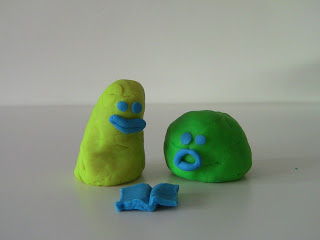

Step-by-step guide to create stop-motion animation
Step 1
Pick a short story idea and write three simple sentences for beginning middle and end.
Step 2
Draw three tiny thumbnail pictures showing the main shot for each sentence.
Step 3
Lay the background paper or fabric flat on your stable surface.
Step 4
Place props and set your toys or clay characters in the starting positions.
Step 5
Put your device on the stack of books or tripod so the camera points steadily at the scene.
Step 6
Turn on the lamp and arrange it so the scene is evenly lit with no moving shadows.
Step 7
Open the camera app or a stop motion app on your device.
Step 8
Take the first photo showing the starting pose.
Step 9
Move a character a tiny amount about 0.5 to 1 cm from its previous position.
Step 10
Take another photo to record the small movement.
Step 11
Repeat moving a tiny bit and taking a photo until your story scenes are finished and you have about 100 photos for a smooth 10 second video at 10 frames per second.
Step 12
Play the photos in the app to preview how your animation looks.
Step 13
Fix the timing or remove any blurry frames you do not like.
Step 14
Export or save the finished video to your device.
Step 15
Share your finished creation on DIY.org
Help!?
What can we use if we don't have a tripod, lamp, or background paper?
If you don't have a tripod, tape your device to a sturdy box on the stack-of-books setup, use bright window daylight instead of the lamp (but keep curtains fixed to avoid moving shadows), and substitute a plain bedsheet or poster board for the background paper or fabric.
My animation is jumping or has blurry frames—what should I check and fix?
Check that the device is firmly secured to the stack of books or tripod and not touched between photos, make sure the lamp or window light is steady with no moving shadows, move characters only about 0.5–1 cm each shot, and remove any blurry frames in the app as the instructions suggest.
How can I adapt the activity for younger children or make it more challenging for older kids?
For younger kids simplify the story step to one-word captions and use larger movements with 30–40 photos, while older kids should write richer beginning-middle-end sentences, draw detailed thumbnails, make smaller moves (under 0.5 cm) and aim for ~100–200 photos for smoother or longer videos at 10 fps.
What are easy ways to make the stop-motion more creative or shareable?
Enhance the project by decorating the background paper with handmade scenery, customizing toys or clay characters as props, recording a voiceover or adding music after you export the video, and then share the finished creation on DIY.org as the final step.
Watch videos on how to create stop-motion animation
Easy Stop Motion Animation: Step by Step for Beginners
4 Videos
Easy Stop Motion Animation: Step by Step for Beginners
How to Make a Stop-Motion Animation | Tate Kids
How to make Stop Motions for Beginners Part 1 (Stop Motion Tutorial)

How to Make Stop Motion Animations: Essential Tools & Tips for Beginners
Facts about animation and filmmaking for kids
🎞️ Stop-motion dates back to the very early days of cinema (late 1800s) when filmmakers photographed tiny movements frame-by-frame to make toys and puppets appear alive.
⏱️ Film standard is 24 frames per second — so a 10-second stop-motion clip needs about 240 photos for very smooth motion (or around 120 at 12 fps for a simpler look).
🧸 Clay animation (claymation) lets animators reshape models slightly between frames; teams like Aardman made beloved characters this way.
🎬 Ray Harryhausen pioneered creature effects and a technique called "Dynamation," bringing stop-motion monsters into live-action films like Jason and the Argonauts.
📱 Today kids can make award-worthy stop-motion on a smartphone or tablet with simple apps, a steady tripod, and lots of patience — many shorts started as bedroom projects.
How do I create a stop motion animation with toys or clay?
What materials do I need to make stop motion animation at home?
What ages is stop motion animation suitable for?
What are the benefits of making stop motion animation for kids?
