All Articles

Google Street View

Google Street View Facts For Kids

Google Street View is a feature in Google Maps and Google Earth that provides interactive panoramas from many streets around the world, enabling virtual exploration right from your home.

🎨 Reading age for 6-8
Background blob
Google Street View
Facts for Kids!

Do more with AI

Introduction

Google Street View is a fun and super cool feature in Google Maps and Google Earth! 🌍It lets you explore places around the world as if you were walking down the street. You can see real photos of neighborhoods, parks, and buildings right from your computer or phone. You can look at famous places like the Eiffel Tower in Paris 🇫🇷 or the beaches in Hawaii 🌊. To use it, just drag the little yellow person (called Pegman) onto a street on the map, and voila, you’re there! It’s like taking a virtual vacation without leaving home! 🏡

Images of Google Street View

Photos of Google Street View
Google Street View car in GermanyImage by This image is a work by Wikipedia and Wikimedia Commons user C.Suthorn. When reusing, credit me as described in the Licensing information below. I would appreciate being notified ( wikimail , talk page , email , Social Media ) if you use my work outside Wikimedia. Do not copy this image illegally by ignoring the terms of the license below, as it is not in the public domain. If you would like special permission to use, license, or purchase the image please contact me to negotiate terms. More of my work can be found in my personal gallery or at my Peertube channel . A prepared attribution especially for use in Social Media and Print (newspapers, flyers, books, murals, mousepads, mugs, posters, t-shirts) can be copied here, licensed under Creative Commons Attribution-Share Alike 4.0

Google Street View car in Germany

.mw-parser-output .legend{page-break-inside:avoid;break-inside:avoid-column}.mw-parser-output .legend-color{display:inline-block;min-width:1.25em;height:1.25em;line-height:1.25;margin:1px 0;text-align:center;border:1px solid black;background-color:transparent;color:black}.mw-parser-output .legend-text{} Countries and dependencies with mostly full coverage Countries and dependencies with partial coverage Countries and dependencies with official coverage planned Countries and dependencies with unofficial coverage planned Countries and dependencies with views of selected businesses and/or tourist attractions only Countries and dependencies with views of third party images of streets and/or landmarks Countries and dependencies without current or planned coverage

.mw-parser-output .legend{page-break-inside:avoid;break-inside:avoid-column}.mw-parser-output .legend-color{display:inline-block;min-width:1.25em;height:1.25em;line-height:1.25;margin:1px 0;text-align:center;border:1px solid black;background-color:transparent;color:black}.mw-parser-output .legend-text{} Countries and dependencies with mostly full coverage Countries and dependencies with partial coverage Countries and dependencies with official coverage planned Countries and dependencies with unofficial coverage planned Countries and dependencies with views of selected businesses and/or tourist attractions only Countries and dependencies with views of third party images of streets and/or landmarks Countries and dependencies without current or planned coverage

Street View camera

Street View camera

A Google Street View trikeImage by Javi info, licensed under Creative Commons Attribution-Share Alike 3.0

A Google Street View trike

A Street View Trekker backpack-mounted cameraImage by ALMA (ESO/NAOJ/NRAO), licensed under Creative Commons Attribution 4.0

A Street View Trekker backpack-mounted camera

Google Maps Street View Trekker backpack being implemented on the sidewalk of the Hudson River Greenway in New York CityImage by Andrew Henkelman, licensed under Creative Commons Attribution-Share Alike 4.0

Google Maps Street View Trekker backpack being implemented on the sidewalk of the Hudson River Greenway in New York City

The Matterport Pro2, a popular third-party "Street View Ready" camera, being used for environmental mapping at Dal Lake, Srinagar.

The Matterport Pro2, a popular third-party "Street View Ready" camera, being used for environmental mapping at Dal Lake, Srinagar.

A Google Street View car was showcased on the Google campus in Mountain View, California, in October 2010.

A Google Street View car was showcased on the Google campus in Mountain View, California, in October 2010.

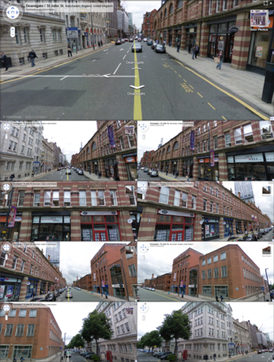
Photos of Google Street ViewImage by z22, licensed under Creative Commons Attribution-Share Alike 3.0

International Availability

Google Street View isn't just for the United States! 🗺️ It’s available in over 100 countries across the globe, including Canada, Mexico, Australia, Japan, and many more! 🇨🇦🇲🇽🇦🇺🇯🇵 You can explore popular cities like Tokyo, London, and Berlin right from your couch! 🛋️ You can even look at natural wonders like the Amazon Rainforest in Brazil 🇧🇷 or beautiful beaches in Greece 🇬🇷. Some remote places may not have Street View coverage yet, but Google keeps working to add more areas every year! 🌳

History Of Google Street View

Google Street View started as a project in 2007 to help people see the world better. 🌍Google sent out special cars with cameras on top to take 360-degree photos of streets from all over the globe. The first cities to get Street View were in the United States, like San Francisco and New York City 🇺🇸. Since then, Street View has expanded to cover over 100 countries and millions of miles of roads! 🚗You can even visit amazing places like the Great Wall of China 🇨🇳 and the Taj Mahal 🇮🇳 thanks to this cool technology!

Uses In Education And Research

Google Street View can be a powerful tool for learning! 📚👩‍🎓 Teachers can use it to show students places like museums, historical sites, or even different countries. This helps kids learn about geography and different cultures without leaving their classrooms! 🌏It can also be used by scientists and researchers to study environments, urban developments, and more. For example, they can examine changes in cities or explore wildlife habitats. This way, learning becomes interactive and exciting—just like an adventure! 🏞️

Impact On Mapping And Navigation

Google Street View has changed how we think about maps! 🗺️ With Street View, you can see what a place looks like before you visit. This helps people know where they are going and find cool spots to explore, like fun parks or tasty restaurants. 🍔It also helps delivery drivers, tourists, and even emergency services to find the quickest routes. 📦🚑 Since it shows real images, it makes navigating easier and more enjoyable, making traveling and discovering new places super fun and exciting! ✈️

Privacy Concerns And Controversies

While Google Street View is amazing, it has also raised some questions about privacy. 📸Some people didn’t want their houses to be shown on the internet, so Google has worked to blur faces and license plates to help protect people's privacy. 🕵️‍♂️ If someone sees something they don't like, they can even ask Google to remove it! There were some discussions, especially in places like Germany and the United Kingdom, about how to keep people safe while allowing everyone to see the world. ⚖️ Balancing fun and privacy is important!

Future Developments And Innovations

What does the future hold for Google Street View? 🌟Google is always looking for new ways to improve! They might start using drones! 🛩️ Drones could take pictures of places that can't be reached by cars, like mountains, forests, or even underwater! 🌊They also plan to make Street View more interactive, allowing you to click on markers to learn about things around you. This way, exploring the world online will become even more engaging and fun! Keep your eyes peeled for these exciting changes coming soon! 👀

Technology Behind Google Street View

The magic of Google Street View happens through special cameras and computers! 📸🚗 The cars that take the pictures have 15 cameras on them that capture images from different angles. These images are then stitched together to create a 360-degree view of the street. Google uses special software to process these images and make them look good! 🖥️ After that, they add everything to Google Maps so anyone can explore these places online. It's kind of like puzzle pieces coming together to give you a full picture of the street!

Comparisons With Other Mapping Services

While Google Street View is popular, it’s not the only mapping service out there! 🗺️ Other services, like Apple Maps and Bing Maps, also provide street views, but Google is known for having the most extensive coverage and the best images. 📸Apple's Maps lets you explore with a similar feature, but some users say Google's version is easier to use. 🛣️ Each service has its own strengths, like different interfaces or extra features, so people can choose which one they like best for their adventures! 🚀

User Contributions And Community Engagement

Google Street View is not just created by Google; people can help too! 🌍With a feature called "Google Map Maker," users can share pictures and places they love. ⭐This helps Google improve their maps by adding local knowledge from around the world! People can also use the “Local Guides” program to provide reviews and tips. This way, everyone can make the map more colorful and exciting, just like a giant community scrapbook! 🎉So next time you explore Street View, remember, you can be part of it too!

Google Street View Quiz

Q1
Question 1 of 10

Learn more about Google Street View

Ready to create?

Drop Files here
Make

To create a safe space for kid creators worldwide!

Create

Vibe Coding

ChatDino

All Tools

Kibu

Resources

Worksheets

SafeTube

Blog

FAQ

Account

Pricing

Log-in

Sign-up

Data Deletion

Company

About

Community Guidelines

Privacy Policy

Terms of Service

2025, URSOR LIMITED. All rights reserved. DIY is in no way affiliated with Minecraft™, Mojang, Microsoft, Roblox™ or YouTube. LEGO® is a trademark of the LEGO® Group which does not sponsor, endorse or authorize this website or event. Made with love in San Francisco.