Find a place to record your Podcast
Find and prepare a quiet, cozy spot to record your podcast using a smartphone or tablet; test sound, reduce noise, and speak clearly.


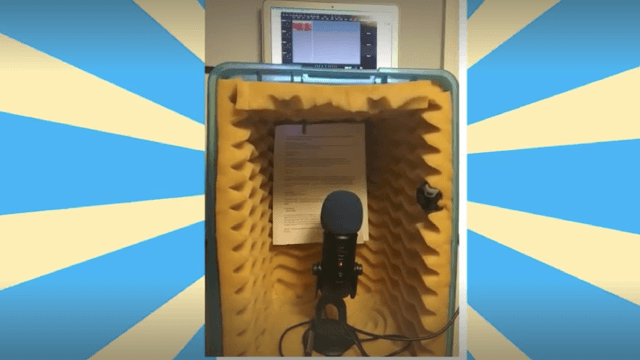
Step-by-step guide to find and prepare a quiet spot to record your podcast
Step 1
Choose a quiet room in your home where you can sit without many interruptions.
Step 2
Pick a time when the house is usually calm like early morning or after dinner.
Step 3
Bring a blanket or pillows into the room.
Step 4
Arrange the blanket or pillows to make a cozy seat to sit in comfortably.
Step 5
Place the small table or hard surface in front of your cozy seat to hold your device.
Step 6
Close the room door to keep outside sounds away.
Step 7
Close the windows to block street noise.
Step 8
Turn off nearby noisy devices like fans TVs or toys.
Step 9
Drape the blanket over the table and around you to make a soft sound tent.
Step 10
Put your phone or tablet on the table aimed toward your face at about one hand's distance.
Step 11
Open your recorder app and make a 10 second test recording saying your name in a normal voice.
Step 12
Play back the test recording and listen for background noises echoes or popping sounds.
Step 13
Move your device a little closer or a little farther until your voice sounds clear without loud pops.
Step 14
Say two practice lines slowly and clearly using your regular speaking voice.
Step 15
Upload or share your finished recording on DIY.org to show your cozy podcast spot.
Help!?
What can we use if we don't have a small table, blanket, or a phone/tablet?
Use a stack of books or a sturdy box as the small table, a heavy towel or coat instead of a blanket, couch cushions for pillows, and a computer or basic voice-recorder instead of a phone or tablet.
My recording still has echoes or popping despite following the steps—what should I try?
After making the 10-second test recording, tighten the blanket 'sound tent' around the table, move the device a couple of inches farther to reduce popping, and make sure the door and windows are closed and noisy devices are turned off before re-testing.
How can we adapt this activity for younger kids or teens?
For younger kids, set up the cozy seat and drape the blanket together and have an adult operate the recorder app while the child practices the two lines, while teens can choose quiet times, adjust device distance themselves, record multiple takes, and edit before uploading to DIY.org.
How can we personalize or improve our cozy podcast spot beyond the basic setup?
Decorate the blanket tent, add a small name sign on the table, record a short custom intro or simple sound effects using the device aimed toward your face, and upload multiple episodes to DIY.org to make a series.
Watch videos on how to find and prepare a quiet spot to record your podcast
How to Record a Podcast // Step-by-Step [2021]
4 Videos
![How to Record a Podcast // Step-by-Step [2021]](https://img.youtube.com/vi/9LLxXovGLFM/mqdefault.jpg)
How to Record a Podcast // Step-by-Step [2021]
How To Record a Podcast from Two Different Locations (with video)

How to Start a Podcast in 2025 (Start to Finish)

How to Record A Podcast for School | Start to Finish Tutorial
Facts about podcasting for kids
🎙️ Positioning a microphone close (but not touching) your mouth reduces room noise and makes voices sound clearer.
🤫 Soft furnishings—blankets, pillows and rugs—absorb echoes, so a cozy blanket fort can improve your audio!
📱 Many smartphones record at CD-quality or better (commonly 44.1–48 kHz), so a phone is often enough to start a podcast.
🗣️ Speaking slightly slower and enunciating clearly helps listeners understand you and cuts down editing time.
🔍 Do a short test recording first—fridge hum, fans or traffic can sneak into audio and are easiest to fix before you record.
How do I help my child find and prepare a quiet, cozy spot to record a podcast?
What materials do I need to record a podcast with a smartphone or tablet?
What ages is this podcast recording activity suitable for?
What are the benefits and safety tips for kids recording podcasts?
