Design your own lego® kit
Design and build your own LEGO® kit: plan a model, sort bricks, create instructions and box art, then assemble and test your finished design.


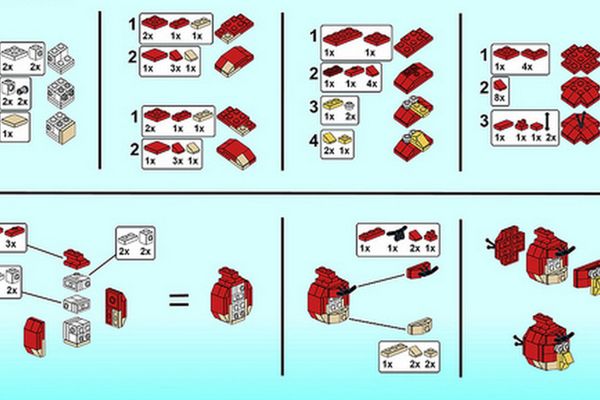

Step-by-step guide to design and build your own LEGO kit
How to Make a LEGO Modular Building
Step 1
Gather all your LEGO bricks and the paper and pencils in one tidy workspace.
Step 2
Choose a fun theme for your LEGO kit like a race car castle or space rover.
Step 3
Give your kit a catchy name that matches your theme.
Step 4
Sketch a simple plan of your model on paper showing how it should look.
Step 5
Sort the LEGO bricks you need by color and type into small piles or cups.
Step 6
Build a first prototype using your sketch as a guide.
Step 7
Test the prototype by checking its stability and any moving parts.
Step 8
Pick one clear improvement to make based on your test.
Step 9
Make that improvement to your prototype to make it stronger or cooler.
Step 10
Count each brick you used and write a parts list with quantities.
Step 11
Create step-by-step building instructions by drawing or writing each build step in order.
Step 12
Design box art by drawing the finished model and writing the kit name and a short description.
Step 13
Put the counted bricks into the box or bag and add your instructions and box art to make the kit.
Step 14
Share your finished creation on DIY.org
Help!?
What can we use if we don't have enough LEGO bricks or small cups for sorting?
Use Duplo or other interlocking blocks as substitutes for LEGO bricks and sort pieces into muffin tin compartments or labeled zip-top bags instead of small cups while following the 'Sort the LEGO bricks...into small piles or cups' step.
My prototype keeps falling apart when I test stability—what should I try?
To fix a weak model from the 'Build a first prototype' and 'Test the prototype by checking its stability and any moving parts' steps, reinforce the base with a larger baseplate or interlocking plates, add cross-bracing bricks, and simplify or tighten moving parts so they connect more securely.
How can I adapt this kit activity for different age groups?
For ages 3–5 use big Duplo pieces, pre-sorted piles and a very simple sketch to build a prototype, for 6–8 let them sketch, sort, build and count bricks with some help, and for older kids have them write a full parts list, create detailed step-by-step instructions and professional box art to share on DIY.org.
How can we make the finished kit more exciting or personal?
Enhance and personalize your kit by adding stickers or small LED lights, numbering bricks to match your 'parts list', creating a printed instruction booklet and custom 'box art', and including a spare-brick bag before you 'Put the counted bricks into the box or bag' and 'Share your finished creation on DIY.org'.
Watch videos on how to design and build your own LEGO kit
Create YOUR OWN Lego Sets! | BrickLink Studio
3 Videos
Create YOUR OWN Lego Sets! | BrickLink Studio
How to create a LEGO model for BrickLink Designer Program Series 8
Build any LEGO SET for FREE with BrickLink Studio (Tutorial)
Facts about LEGO building and model design for kids
🧱 The modern LEGO brick's stud-and-tube clutch design was patented in 1958 — that's why builds hold together so well!
🧑🎨 Official LEGO instructions usually use pictures instead of words so builders around the world can follow them.
🎨 The largest LEGO set by piece count (as of 2021) is the LEGO Art "World Map" with 11,695 pieces — perfect for practicing sorting!
🧪 LEGO bricks have been made mainly from ABS plastic since the 1960s, giving them their bright colors and durability.
💡 Fans can submit ideas on LEGO Ideas — community-supported projects can become official LEGO sets.
How do I design and build my own LEGO® kit?
What materials do I need to create a LEGO® kit?
What ages is designing a LEGO® kit suitable for?
What are the benefits of designing my own LEGO® kit?
