Create a storyboard for one scene of an animation
Draw a storyboard for one animation scene by sketching key frames, adding arrows, notes, dialogue, and timing to plan motion and camera moves.


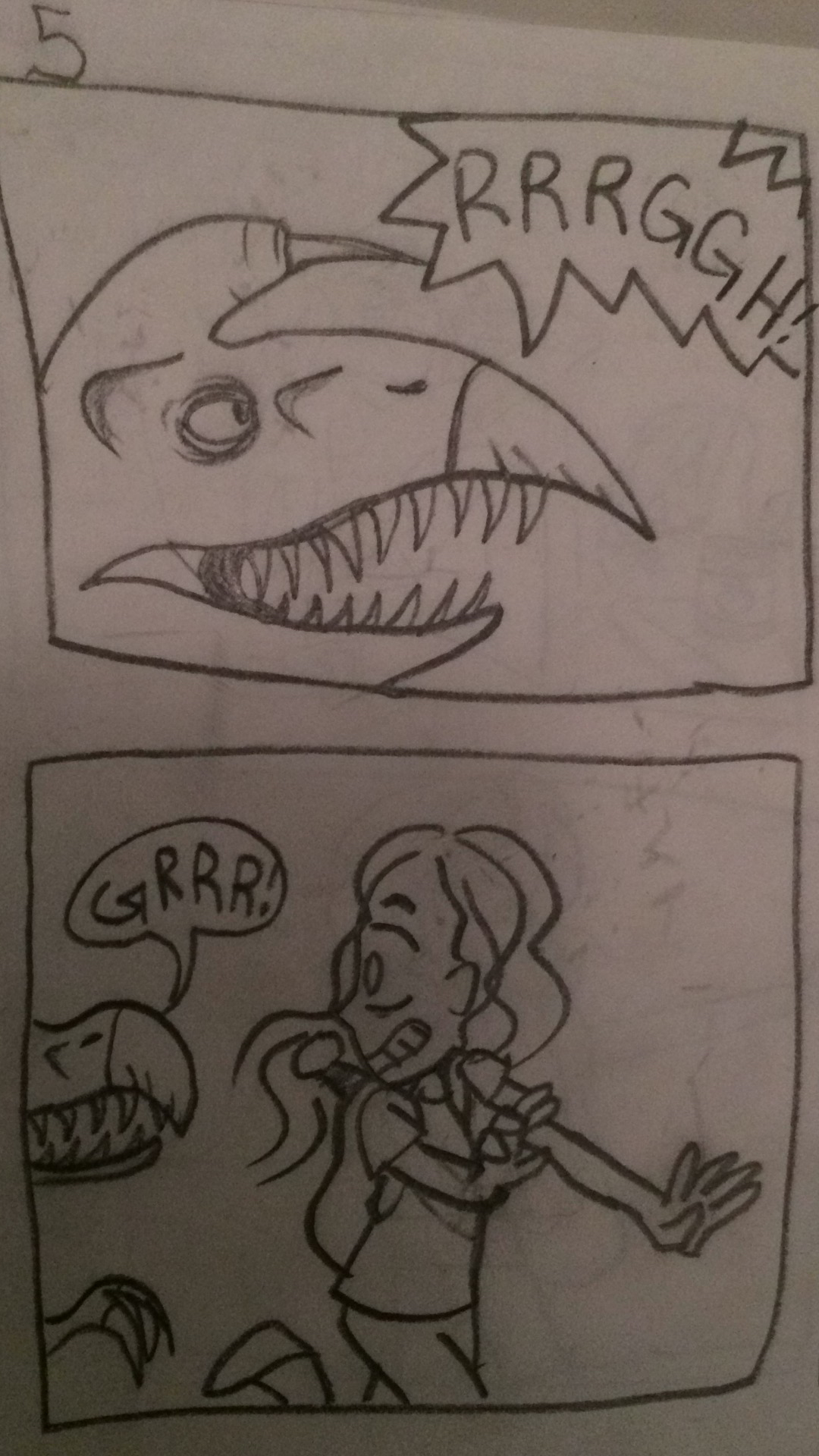

Step-by-step guide to create a storyboard for one animation scene
Step 1
Pick one short moment from an animation idea and write one sentence about what happens in that scene.
Step 2
Use your ruler to draw a panel grid on your paper with 4 to 6 empty boxes for each key frame.
Step 3
Write the scene title and a shot number at the top of the page so you know what this storyboard is for.
Step 4
Sketch the main poses for the scene by drawing 4 to 6 key frames, one pose per panel.
Step 5
Draw arrows in each panel to show how characters or objects move between the poses.
Step 6
Write short camera instructions under panels like "PAN LEFT" or "ZOOM IN" to show camera moves.
Step 7
Add timing numbers under each panel such as “0.5s” or frame counts to plan how long each shot lasts.
Step 8
Write any dialogue or sound effects in speech bubbles or below the panels so you know what is heard.
Step 9
Use sticky notes to jot short notes about facial expressions or important details and stick them near the panels.
Step 10
Color key parts of each panel with your coloring materials to make characters and important objects stand out.
Step 11
Flip through the panels with your finger to see the action flow and watch the movement in order.
Step 12
Erase and redraw any panel that feels confusing or slows the action until the sequence reads clearly.
Step 13
Share your finished storyboard on DIY.org
Help!?
What can I use if I don't have a ruler, sticky notes, or coloring markers?
Use a straight edge like a credit card or cereal box edge instead of a ruler, small squares of scrap paper or tape labels in place of sticky notes, and colored pencils or crayons instead of markers to color key parts.
My scene looks confusing when I flip through the panels — how can I fix it?
Lightly sketch the main poses with pencil, draw clear movement arrows in each panel, add short timing numbers under panels, and erase and redraw any panel that feels confusing until the flip-through reads smoothly.
How should I change this activity for younger or older kids?
For younger kids use fewer, larger panels (2–3), help write the scene title/shot number and use stickers for expressions, while older kids can add 4–6 detailed key frames, precise frame counts, and camera instructions like PAN LEFT or ZOOM IN.
How can we extend or personalize the storyboard to make it more creative or turn it into an animation?
Color key parts, add dialogue and exact timing numbers, take photos of each panel to create a stop-motion or digital sequence, and then share the finished storyboard on DIY.org.
Watch videos on how to create a storyboard for one animation scene
How to draw a smiling sun and buddies | Easy step-by-step for kids
4 Videos
How to draw a smiling sun and buddies | Easy step-by-step for kids
Fun Smiling Sun Drawing for Kids | Draw and Colour a Cute Sun | Easy Sun Drawing
How to draw happy Sun cartoon | Learn to Draw step by step

Cute Smiling Sun Drawing and Coloring | Easy Sun Drawing for Kids | Step by Step Art
Facts about animation and storyboarding
🎬 Disney studios helped popularize modern storyboarding in the 1930s to plan entire animated sequences.
✏️ Storyboards often use quick sketches or stick figures — they show action and timing, not finished art.
⏱️ Animators commonly measure timing in frames or seconds; 24 frames-per-second is a frequent animation standard.
🎥 Many animated films begin with hundreds or even thousands of storyboard panels to map out the story and camera work.
🧭 Arrows, camera labels (pan/tilt/zoom), and short notes on a board instantly communicate motion and shot ideas.
How do I create a storyboard for one animation scene?
What materials do I need to draw a storyboard for an animation scene?
What ages is drawing a storyboard for one animation scene suitable for?
What are the benefits of making a storyboard for an animation scene?
