Create a LEGO® animation using 15 FPS
Make a short LEGO stop-motion animation at 15 frames per second, planning scenes, moving minifigures slightly between photos, and playing back the finished movie.



Step-by-step guide to create a LEGO® stop-motion animation at 15 FPS
Step 1
Pick a short fun story idea for your LEGO movie.
Step 2
Decide how many seconds long your movie will be (keep it under 30 seconds).
Step 3
Draw a simple three-panel storyboard that shows the main actions in your story.
Step 4
Write the number of seconds for each storyboard panel so you know how long each scene will be.
Step 5
Multiply each panel's seconds by 15 to find how many frames you need for that panel (frames = seconds × 15).
Step 6
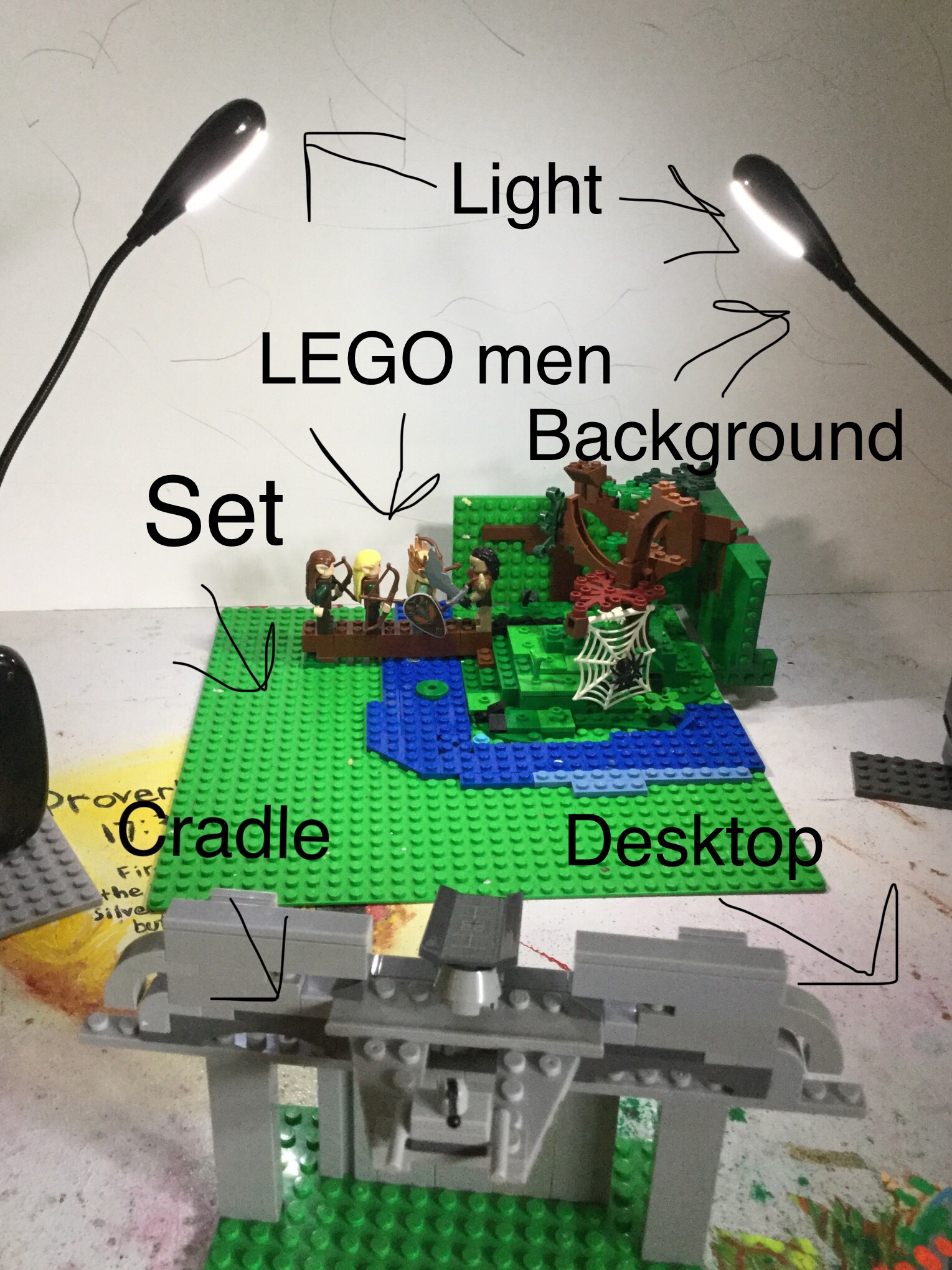
Build your LEGO set on the baseplate and add the props for the first panel.
Step 7
Put your plain background behind the set and tape it so it will not move.
Step 8
Make a steady camera mount using a tripod or stacked books and mark the camera spot with tape so it stays in the same place.
Step 9
Turn on the desk lamp and position it so the set has even lighting that will not change between photos.
Step 10
Place the minifigures in the starting positions and use a tiny piece of tape to mark their feet so you can place them exactly each time.
Step 11
For each frame in the panel move the minifigure a very small amount toward the next pose and take a photo; repeat this move-and-shoot until you have the number of frames needed.
Step 12
Import your photos into a stop-motion app or video editor and set the playback speed to 15 frames per second.
Step 13
Watch the movie and reshoot any jumpy parts by repeating the move-and-shoot for those frames.
Step 14
Share your finished LEGO stop-motion animation on DIY.org
Help!?
I don't have a tripod, baseplate, or plain backdrop — what can I use instead?
Use stacked books and a heavy object as a steady camera mount, build your set on a piece of cardboard or tray if you don't have a LEGO baseplate, and tape up a bedsheet or poster board as the plain background so nothing moves during shooting.
My movie looks jumpy between frames — what should I check and fix?
Check that the camera mount is marked and taped in place, re-tape the minifigures' feet markers, use smaller moves per frame, ensure the desk lamp lighting hasn't changed, and reshoot the jumpy frames as instructed.
How can I adapt this 15 FPS LEGO animation for different ages?
For younger kids simplify to a 10–15 second story with just two easy storyboard panels and bigger moves per frame while an adult handles the camera, and for older kids keep the three-panel storyboard, use frames = seconds × 15 for precise timing, and let them experiment with props and lighting.
What are simple ways to enhance or personalize our LEGO stop-motion movie?
Add a voiceover or music track, create custom painted backgrounds and title cards, try subtle lighting effects with the desk lamp for mood, and post the finished film to DIY.org to share.
Watch videos on how to create a LEGO® stop-motion animation at 15 FPS
Creating 3D LEGO Animations with Naomi Animation App | Full Tutorial Series | Introduction (1)
4 Videos
Creating 3D LEGO Animations with Naomi Animation App | Full Tutorial Series | Introduction (1)
RUN | Lego Stop Motion 15 FPS Running Tutorial | Lego Stop Motion Advanced Run Cycle
ULTIMATE Stop Motion Studio TUTORIAL • LEGO Brickfilm How-To for Beginners!
Lego Animation Tips and Tricks (Beginner)
Facts about stop-motion animation for kids
🎬 Stop-motion animation has been used since the early 1900s to make toys and models appear to move on their own.
🧱 LEGO minifigures were introduced in 1978 and are a favorite subject for brickfilms.
🎞️ At 15 frames per second (FPS), every second of movie needs 15 photos — a 10-second clip requires 150 frames!
🎥 'Brickfilm' is the name fans give to LEGO stop-motion movies, and thousands appear online from creators around the world.
🧩 The LEGO Movie (2014) used CGI but was deliberately designed to look like real stop-motion, inspiring many young animators.
How do I make a LEGO stop-motion animation at 15 FPS?
What materials do I need to make a LEGO stop-motion film?
What ages is LEGO stop-motion animation suitable for?
What are the benefits and safe variations of making LEGO stop-motion movies?
