Raster Graphics Facts For Kids
Raster graphics represent images as a grid of pixels, which can be viewed on screens or printed, allowing for detailed and colorful visuals.
Select reading age

Raster Graphics Facts For Kids
Videos & Quizzesincluded
About this topic
Raster graphics are pictures made up of tiny squares called pixels! 🟦🟥 Each pixel has a color, and when you put them together, they create an image. Think of mosaic art made from colorful tiles! These graphics are often used in digital photography and video games. The images can be small or large, but they always have a specific number of pixels. The more pixels there are in a picture, the clearer the image looks. Raster graphics are everywhere—like in cartoons, websites, and your favorite video games! 🎮Let’s dive deeper into how they work!
Explore with ChatDinoKey Points
Raster graphics work like a grid or a giant checkerboard!
Raster graphics started in the 1960s, when computers were just beginning to be invented!
Raster and vector graphics are two different ways to make pictures!
Pixel density is how many pixels fit in a specific area of an image, usually measured in pixels per inch (PPI).
Raster graphics have many cool uses!
Colors in raster graphics are made using different models, with RGB as the most popular!
Raster graphics come in many file formats, like JPEG, PNG, and GIF!
Editing raster images is super fun!
In digital art, raster graphics play a crucial role!
As technology grows, raster graphics are improving too!
Photos of Raster Graphics
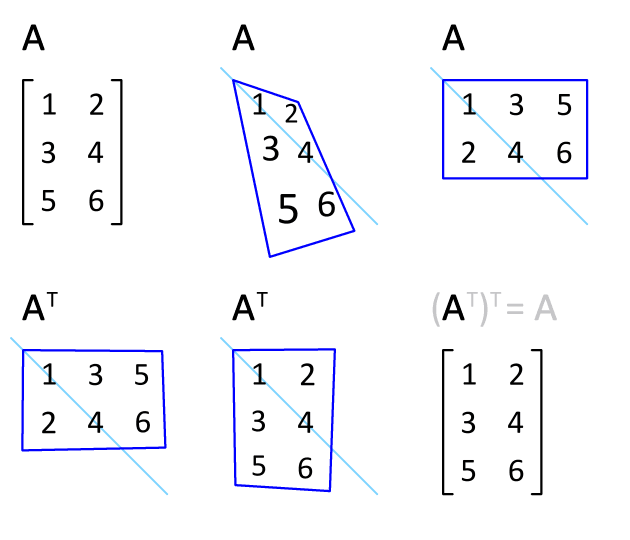
Transposing an image to covert raster organization (a relatively costly operation for packed formats with less than a byte per pixel); composing an additional raster line reflection (almost free), either before or afterwards, amounts to a 90° image rotation in one direction or the other.

A simple raster graphic

Using a raster to summarize a point pattern
🌈 How Raster Graphics Work
Raster graphics work like a grid or a giant checkerboard! Each square (or pixel) is a tiny dot that has its own color. 🌈When you look at a raster image from far away, your eyes blend the colors of these pixels together, making one smooth picture. Imagine if you painted a giant picture but only used dots! The size of the image comes from how many pixels it has. If an image is 800 pixels wide and 600 pixels tall, it has 480,000 pixels! The better the pixel quality, the better the picture! 📷
Go deeper💻 History Of Raster Graphics
Raster graphics started in the 1960s, when computers were just beginning to be invented! 💻One of the first pictures made with these graphics was called "the computer-generated images." In 1972, a scientist named Ivan Sutherland created a program called Sketchpad that let people draw on computer screens. This was a big step! It showed how computers can create pictures with pixels. In the late 1980s, raster graphics became more popular because of home computers. Today, they are used for everything from cartoons to Instagram photos! 📸
Go deeper🖼️ Raster Vs. Vector Graphics
Raster and vector graphics are two different ways to make pictures! 🖼️ Raster graphics use pixels (tiny squares), while vector graphics use lines and mathematical formulas. Think of a raster image like a puzzle made of many small pieces. If you zoom in too much, it can get blurry. 😵On the other hand, vector images can be resized without losing quality, so they always look sharp! 🎯Vector graphics are often used for logos and icons. Both types of graphics are important for different projects and should be used wisely!
Go deeper🖼️ Pixel Density And Resolution
Pixel density is how many pixels fit in a specific area of an image, usually measured in pixels per inch (PPI). 🖼️ Higher pixel density means more details and sharper images. If you have a photo at 300 PPI, it means there are 300 pixels packed into each inch! 🟩🟧 In comparison, a lower pixel density picture may look blurry or pixelated when you zoom in. Resolution is the overall size of images, describing how many pixels wide and tall it is. Higher resolution means more detail, making images look fantastic on screens! ✨
Go deeper🕵️♂️ Applications Of Raster Graphics
Raster graphics have many cool uses! 🕵️♂️ In digital photography, every photo is a raster image. It captures the details of our moments, just like a snapshot! 📸In video games, raster graphics create the characters and backgrounds you see on your screen. Artists use raster graphics to create beautiful digital paintings and illustrations! 🎨You also find them in websites, apps, and animations. Even emojis are raster graphics! In short, raster graphics help us tell stories and show our creativity everywhere! 🌍
Go deeper🌈 Color Models In Raster Graphics
Colors in raster graphics are made using different models, with RGB as the most popular! 🌈RGB stands for Red, Green, and Blue—these are the three main colors of light. By mixing these three colors in various amounts, you can create thousands of different colors! For example, mixing red and green makes yellow! 🎨Another model is CMYK, which stands for Cyan, Magenta, Yellow, and Black. This is often used for printing images on paper. Different colors can be created by mixing these inks, providing the colors we see in books and magazines! 🖍️
Go deeper🖥️ Image Formats For Raster Graphics
Raster graphics come in many file formats, like JPEG, PNG, and GIF! 🖥️ JPEG files are best for photos because they keep file sizes small. 📸But sometimes, they lose some quality. PNG files are great for images with transparent backgrounds, like stickers! 🎉GIFs are fun because they can show animations! 🎞️ Other formats include BMP and TIFF, which are often used in printing and professional photography. Each format has its uses, helping you choose the right one for your project! So, always pick wisely to get the best picture! 👍
Go deeper🖌️ Editing And Manipulating Raster Images
Editing raster images is super fun! 🖌️ With editing software, you can change almost anything in a picture. Want to make the sky bluer? Just select that area, and change the color! Want to resize an image? It's as easy as clicking a button! 🔄You can also crop parts of the image to focus on specific details. Another cool trick is using filters that can give images unique looks, like making them look like a painting! 🎭That way, you can personalize your photos and digital art to express yourself!
Go deeper🎨 The Role Of Raster Graphics In Digital Art
In digital art, raster graphics play a crucial role! 🎨Artists can create amazing works directly on a computer. They use software like Adobe Photoshop and Procreate to draw, paint, and mix colors easily. 🌈Raster graphics allow artists to use brushes, textures, and effects that mimic traditional painting tools. Plus, with layers, they can build their artwork step by step! 🌟The range of possibilities is endless, from digital illustrations to amazing fan art! Raster graphics let imaginations run wild and create incredible visual experiences in the digital world! 💻
Go deeper🚀 Future Trends In Raster Graphics Technology
As technology grows, raster graphics are improving too! 🚀One exciting trend is the development of higher resolutions, like 8K, making images even clearer and more detailed! 📺Another trend is the use of artificial intelligence (AI) to help create and edit images. AI can suggest colors and styles, making it easier for artists! 🤖Additionally, advancements in software now allow for interactive images where you can explore and engage with artwork. The future of raster graphics is bright, giving us tools to create and enjoy stunning images all around us! 🌟
Go deeper