Build a Roblox Soundboard
Build a Roblox Soundboard and learn how kids can turn simple sound ideas into a playful interactive project. This kid-friendly topic page explains what a soundboard is, why people make them, and how Vibe Coding helps young creators plan, test, and improve their own version step by step.
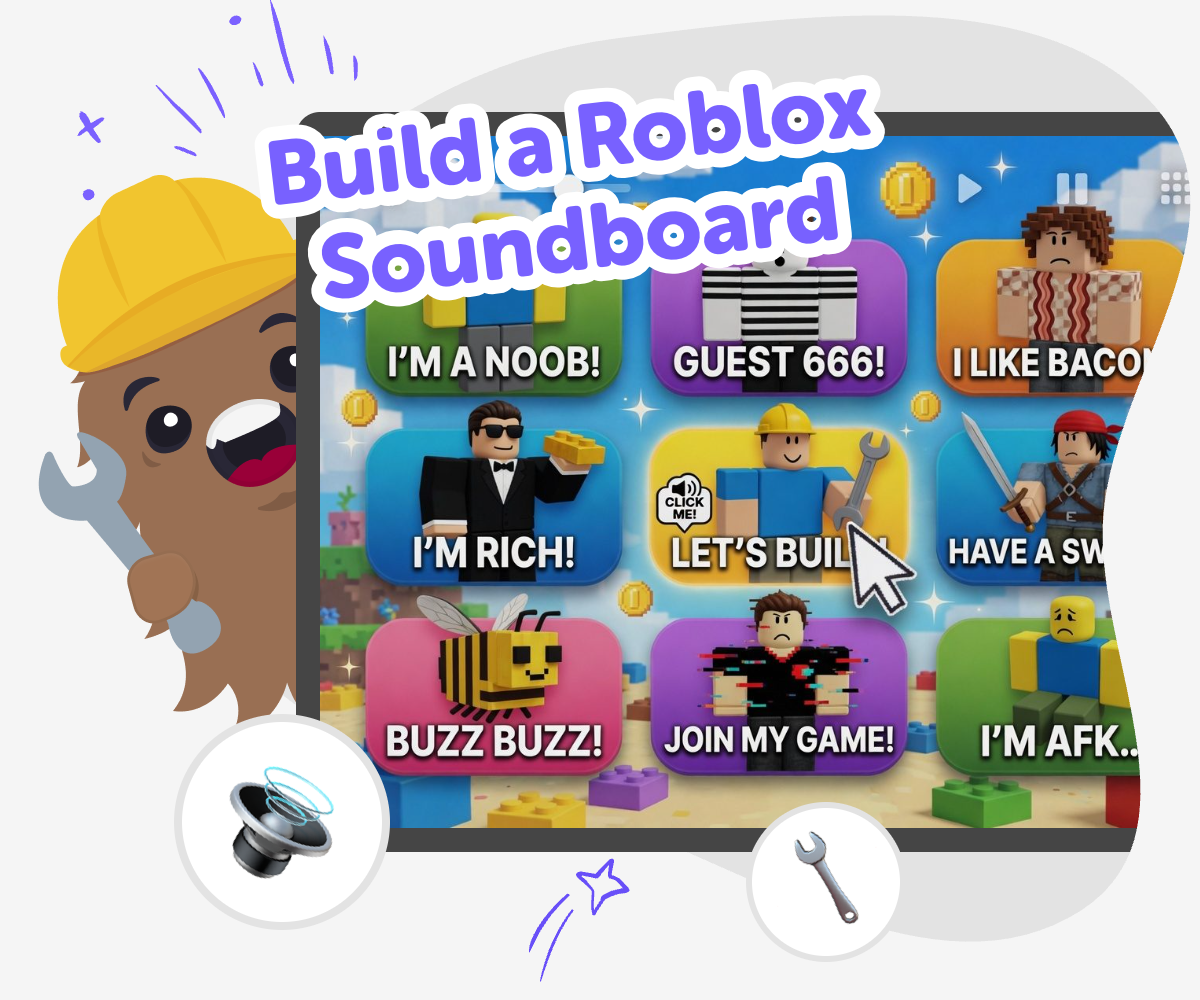
Soundboard ideas for Roblox
A build a roblox soundboard project is a simple way to mix sound, timing, and play into one interactive idea. Kids can think about which sounds belong on the board, what buttons should do, and how people will use it, which makes the project a fun way to practice creativity and clear thinking. Planning a soundboard also helps kids see how small choices change the whole experience. They learn to test what works, fix what feels confusing, and shape a project that feels easy to understand and fun to use.
Vibe Coding gives kids a guided place to work on a Roblox soundboard step by step. They can describe the idea they want, try it out, and make changes as they go without feeling stuck or rushed. That makes it easier to explore sound, timing, and layout in a safe, creative way. Kids stay in control of the choices while the tool helps them build confidence and keep improving their project.
What is a Roblox soundboard?
A Roblox soundboard is a project with buttons that play different sounds when you tap them. Kids often make one to add jokes, reactions, game effects, or character-style audio to a playful experience. It can be as simple as a few buttons or as detailed as a full mini dashboard with themes and labels. The most important part is that the soundboard makes choices clear: each button should feel easy to understand and fun to press. That helps young makers think about design, timing, and how sound changes the mood of a project. It also gives them a chance to practice building something interactive instead of just watching it happen. When kids create a soundboard, they learn that sound can be part of storytelling, games, and friendly shared play.
Why do soundboards help kids learn?
Soundboards are useful because they turn creative ideas into something kids can test and improve. A child may start with a few fun sounds, then notice that one button is hard to find or that two sounds do not match the theme. Fixing those problems helps build problem-solving skills in a very practical way. It also teaches iteration, which means making a version, trying it, and then making it better. That is a strong skill in coding, art, and game design. Soundboards can also support confidence because kids see their idea become real one step at a time. Instead of needing to know everything first, they learn that small changes can make a big difference. That makes the project feel approachable, playful, and useful for many kinds of learners.
How can kids keep it safe and friendly?
A good soundboard should be fun for other people to use, so kids need to think about safety and kindness while they make it. That means choosing sounds that are not too loud, not scary, and not mean. It also means using labels that are clear and age-appropriate so players know what each button does. If kids share the project, they should keep it friendly and follow the rules of the platform or space where it is used. A safe soundboard is also easier to enjoy because players do not have to guess what is happening. Kids can test with a trusted adult or friend and ask if anything feels confusing, annoying, or too fast. Learning to make careful choices is part of being a thoughtful creator, not just a fast one.
How does Vibe Coding support the project?
Vibe Coding helps kids move from an idea to a real interactive project without making the process feel too hard. A child can describe the soundboard they imagine, then build it piece by piece with guided support. As they work, they can test what happens, change the layout, and improve the project until it feels right. That makes the experience more like making than guessing. The tool supports creative technology skills because kids are not just picking sounds; they are shaping how the whole project works. It also supports confidence because mistakes become part of learning, not a reason to stop. For a Roblox soundboard, that means young makers can focus on the fun parts of planning, experimenting, and polishing their idea while still staying in control of the choices they make.
How to make it
Choose your sounds
Pick a theme for the soundboard, such as game effects, silly reactions, or character-style sounds, and list the sounds you want to include.
Plan the buttons
Decide what each button will do, how many sounds you need, and what labels will help players understand the board quickly.
Build and test
Use Vibe Coding to turn your plan into a working project, then press each button, listen carefully, and fix anything that feels confusing or too loud.
Make the most of testing
Try a remix Change one sound, label, or button order so the board feels easier to use while still matching your idea. Check the timing Press every button in a row and notice whether the sounds play smoothly, pause too long, or overlap in a way that feels messy. Improve the play Keep adjusting the layout, names, and sound choices until the board feels clear, fun, and simple for other kids to enjoy. Share safely Show the finished version to someone you trust, keep it age-appropriate, and make sure the sounds are friendly for the people who will hear them.
Frequently asked questions
What is a Roblox soundboard?
It is an interactive project with buttons or controls that play different sounds when you press them. Kids use it to make game-style reactions, jokes, or themed sound effects.
Why do kids make soundboards?
Kids make soundboards because they are fun, easy to personalize, and a good way to practice creative coding. They also help children learn how buttons, sound, and timing work together.
Can a soundboard have any kind of sound?
A soundboard can include many kinds of sounds, but it is best to choose sounds that fit the theme and are safe for the people who will hear them. Friendly, clear sounds usually work best.
How many buttons should a beginner start with?
A beginner can start small, with just a few buttons. That makes it easier to test each sound, keep the layout simple, and improve the project step by step.
Do kids need to know coding first?
No. Kids can begin with a simple idea and learn as they build. Guided tools like Vibe Coding can help them test and improve the project while they learn the basics.
How can I make my soundboard easy to use?
Use clear labels, keep the layout neat, and choose buttons that are easy to tap. It also helps to test the board with someone else to see what feels confusing.
Is it okay to share a soundboard with friends?
Yes, as long as the sounds are age-appropriate, friendly, and allowed in the place where you share it. It is smart to test it first and ask a trusted adult if you are unsure.
What can kids learn from making one?
Kids can learn coding confidence, problem-solving, and how to improve a project after testing it. They also practice making creative technology that other people can enjoy.
More tools
Build a Parkour Game
Build a parkour game and turn jumping, timing, and level design into a fun creative project. Kids can design moving obstacles, test tricky paths, and keep improving their game until it feels exciting and fair to play.
Build a Paw Patrol Game
Build a Paw Patrol Game by turning a favorite rescue adventure into an interactive project kids can imagine, test, and improve. With guided support from Vibe Coding, kids can create characters, simple goals, and playful game rules while learning coding confidence, problem-solving, and creative technology skills.
Build a Penguin Clicker Game
Build a penguin clicker game and turn a simple idea into a playful interactive project kids can make, test, and improve step by step. With guided support from Vibe Coding, young creators can explore coding confidence, creativity, and problem-solving while building something fun.
Build a Peppa Pig Game
Build a Peppa Pig Game by turning a favourite character idea into a simple interactive project kids can make, test, and improve. With guided support, young creators can explore choices, stories, and playful rules while building coding confidence through hands-on learning.
Ready to start creating?
Join hundreds of thousands of kids already building cool stuff on DIY.ORG.
Your first game is on us.
Describe a game below - no sign-up needed to try.
Powered by AstroSafe
Make real games - not just chat