Stop Motion Challenge
Create a short stop motion animation using toys, clay, or paper, taking many photos and editing them into a smooth moving film.


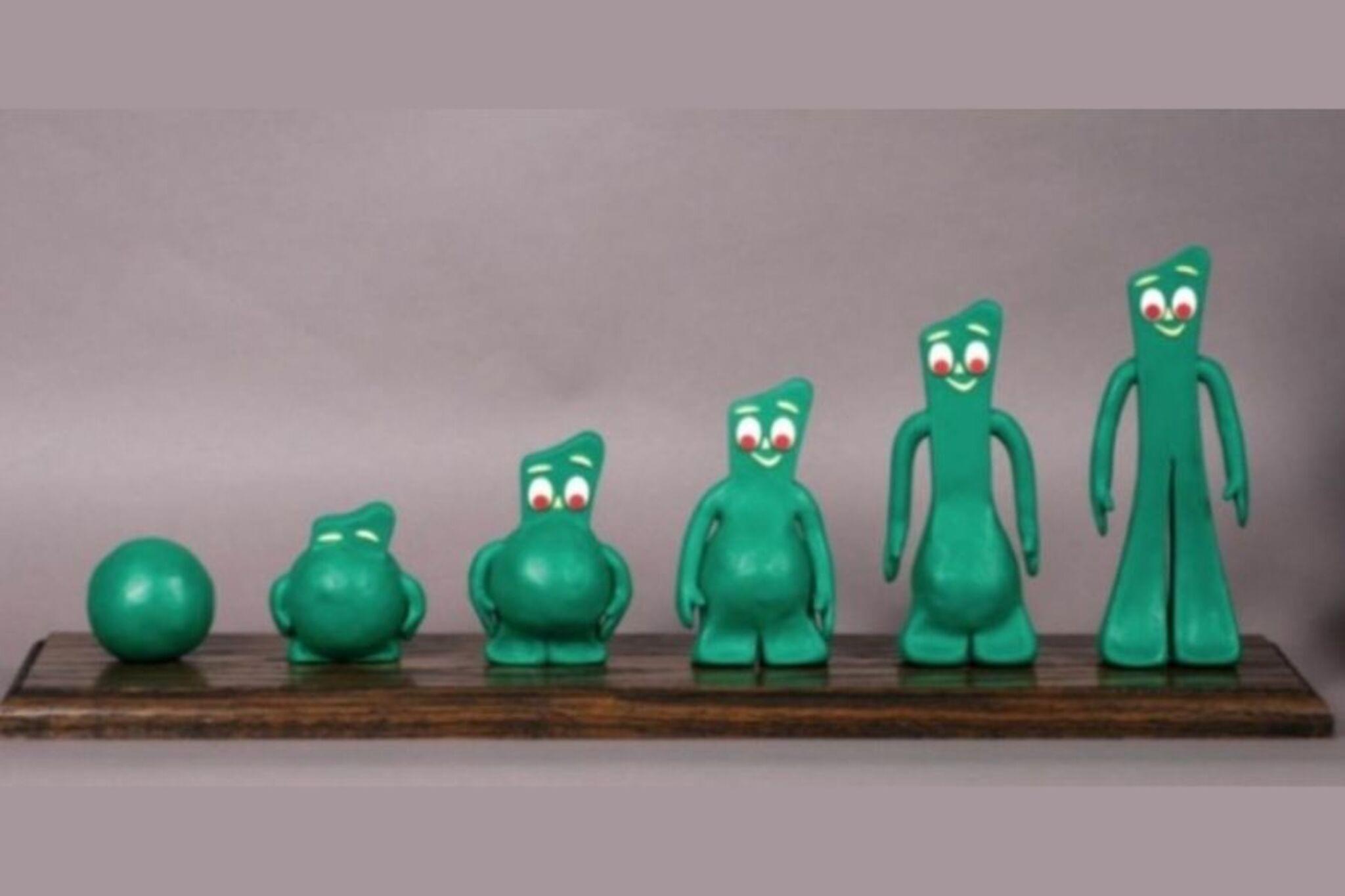

Step-by-step guide to create a stop motion animation
How to Make a Stop-Motion Animation | Tate Kids
Step 1
Pick a short story idea or scene you want to animate and name your main character.
Step 2
Choose whether you will use toys clay or paper characters and gather those items from your materials.
Step 3
Cut or colour any paper characters or props you need so they are ready to use.
Step 4
Lay the cardboard or large paper flat as your background and tape it down so it will not move.
Step 5
Arrange your props and put your character in the starting position on the set.
Step 6
Put your phone or camera on the tripod or on a stack of books and point it at the whole scene so nothing is cut off.
Step 7
Turn on the lamp and move it until the set is bright and evenly lit with no strong shadows.
Step 8
Plan five tiny moves your character will make and decide how small each move will be (about 1 centimeter or a small tilt).
Step 9
Take one test photo and check that the camera is steady and the whole set looks right.
Step 10
Move your character a tiny bit and take another photo; repeat this until you have at least 30 photos for a short smooth film.
Step 11
Import your photos into a stop motion app or video editor on your computer or tablet.
Step 12
Set the frame rate to about 10 to 15 frames per second to make the motion look smooth.
Step 13
Play your movie to check how the movement looks from start to finish.
Step 14
If any part looks jumpy take extra photos of that part and add them to your sequence.
Step 15
Export your finished movie and share your stop motion creation on DIY.org
Help!?
What can I use if I don't have a tripod, cardboard, or a lamp listed in the instructions?
Use a stable stack of books or a shoebox to hold your phone (step: "Put your phone or camera on the tripod or on a stack of books"), substitute poster board or a plain sheet for the cardboard background (step: "Lay the cardboard or large paper flat"), and use a bright desk lamp or steady daylight from a window instead of a studio lamp (step: "Turn on the lamp and move it until the set is bright").
My photos look jumpy or the background shifts — how do I fix this?
Retake the test photo, firmly tape down the cardboard or large paper (step: "Lay the cardboard or large paper flat as your background and tape it down"), secure the camera on the tripod or books so it doesn't move (step: "Put your phone or camera on the tripod or on a stack of books and point it at the whole scene"), and add extra tiny moves and photos where the action looks jumpy (step: "If any part looks jumpy take extra photos of that part").
How can I change the activity for younger children or older kids?
For younger kids, choose larger toy or paper characters, plan bigger moves (more than 1 centimeter) and shoot fewer photos (about 15) with parent help for camera setup (steps: "Choose whether you will use toys clay or paper characters","Plan five tiny moves","repeat this until you have at least 30 photos"), while older kids can use clay or detailed props, aim for 30+ photos at 10–15 fps and edit in a stop motion app for smoother motion (steps: "Choose whether you will use toys clay or paper characters","repeat this until you have at least 30 photos","Set the frame rate to about 10 to 15 frames per second","Import your photos into a stop motion app").
What are simple ways to improve or personalize our stop motion film beyond the basic instructions?
Add a title card with your character's name, create and import sound effects or music when you export the movie, paint or decorate the cardboard background to match the scene, and experiment with extra props or camera angles to extend the story before sharing on DIY.org (steps: "name your main character","Cut or colour any paper characters or props","Lay the cardboard or large paper flat","Export your finished movie and share your stop motion creation on DIY.org").
Watch videos on how to create a stop motion animation
How to start your first Stop Motion Animation | Beginners Guide To Stop Motion | Stop-Motion Fight
3 Videos
How to start your first Stop Motion Animation | Beginners Guide To Stop Motion | Stop-Motion Fight

How to Make Stop Motion Animations: Essential Tools & Tips for Beginners
How to make Stop Motions for Beginners Part 1 (Stop Motion Tutorial)
Facts about animation and filmmaking for kids
🎬 Stop-motion is made by photographing objects one frame at a time — at 24 frames per second a single second of film needs 24 photos!
🧱 Clay animation (or "claymation") uses clay or plasticine models — a 2-minute film at 12 fps requires about 1,440 photos.
🐶 Aardman Animations, the studio behind Wallace and Gromit, hand-sculpted characters and often spent months shooting thousands of frames for each short.
⚔️ Ray Harryhausen's famous stop-motion creatures, like the skeletons in Jason and the Argonauts, were animated one tiny move at a time and inspired generations of filmmakers.
📱 Modern smartphones and stop-motion apps make it easy to create smooth animations — small, consistent position changes and 12–24 fps give the best results.
How do I make a stop motion animation with toys, clay, or paper?
What materials and apps do I need for a stop motion challenge?
What ages is the stop motion challenge suitable for?
What are the benefits, safety tips, and fun variations for stop motion?
