Create Your Own Rhythm by Editing a Loop
Edit and remix a short music loop using simple software or apps to change beats, tempo, and instruments while learning basic rhythm and composition.


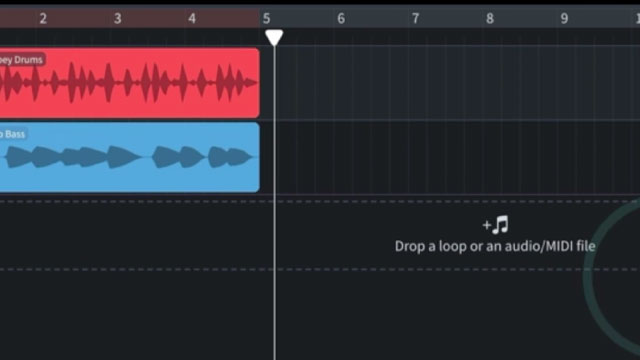
Step-by-step guide to create your own rhythm by editing a loop
Step 1
Open your music app or software and start a new project.
Step 2
Pick a short loop from the app's loop library or import a short loop file into the project.
Step 3
Press play and listen to the whole loop so you know how it sounds now.
Step 4
Change the tempo by moving the BPM slider to make the loop faster or slower.
Step 5
Swap the drum or beat pattern to a different kit or rhythm to change the groove.
Step 6
Replace one instrument sound in the loop by choosing a different instrument patch.
Step 7
Add a new instrument layer like bass or claps to the loop.
Step 8
Duplicate the loop section to make the song longer or to create a chorus part.
Step 9
Mute and unmute different tracks to hear different combinations and choose the best mix.
Step 10
Turn each track's volume up or down so everything sounds balanced.
Step 11
Make one small edit like moving a note or adding a drum hit to improve the remix.
Step 12
Save or export your remix project with a fun name so you can find it again.
Step 13
Share your finished remix on DIY.org so others can hear your awesome rhythm creation.
Help!?
What can we use if we don't have a music app or can't find loops in the app's library?
Use a free online/mobile app like BandLab or GarageBand, or record a short loop with your phone's voice recorder and import that loop file into the new project.
Why does changing the BPM make my instruments sound strange, and how can I fix it?
Enable time-stretching or a 'preserve pitch' option in your app before moving the BPM slider so the loop changes tempo without altering instrument pitch, or convert the loop to a stretched audio clip first.
How can I adapt the steps for a younger child or make the activity harder for older kids?
For preschoolers limit it to pressing play, swapping one instrument patch, and muting/unmuting tracks, while older kids can add a bass or claps layer, duplicate sections to build a chorus, and fine-tune volume and small edits.
What's an easy way to personalize or improve the remix before saving and sharing it on DIY.org?
Add a short vocal or clap recording as a new instrument layer, give each track a little reverb or EQ for clarity, choose a fun export name, and make simple cover art to upload with your remix.
Watch videos on how to create your own rhythm by editing a loop
How to Create Your Own Rhythm Composition
4 Videos
How to Create Your Own Rhythm Composition

A different way to visualize rhythm - John Varney
Rhythm for Kids! | What is Rhythm? | Difference between Rhythm and Pulse | Twinkl USA
How to Teach RHYTHM to Kids in Elementary Music Class
Facts about music production for kids
🥁 The 4/4 time signature, also called "common time", is used in most pop and dance music — it's perfect for looped beats.
🔁 The "Amen break", a 6-second drum solo from 1969, has been sampled in thousands of songs and helped create whole genres.
⏱️ Many pop and dance tracks sit between about 100–130 BPM; 120 BPM is a favorite because it feels great to move to.
🎛️ You can remix and edit loops on free or low-cost apps like GarageBand, BandLab, and Audacity — big tracks sometimes start on a phone!
🧠 Practicing rhythms and editing loops boosts timing, coordination, and listening skills — your brain learns patterns by playing with beats.
How do you edit and remix a short music loop to create your own rhythm?
What materials and apps do I need to edit a music loop with my child?
What ages is this rhythm editing activity suitable for?
What are the benefits and safety tips for kids editing music loops?
