Winter riddles for kids | Create a Kid-Safe Winter Quiz with KidsGPT
Use KidsGPT to write playful winter riddles for kids. Create a kid-safe winter quiz for kids with prompts and creative ideas.
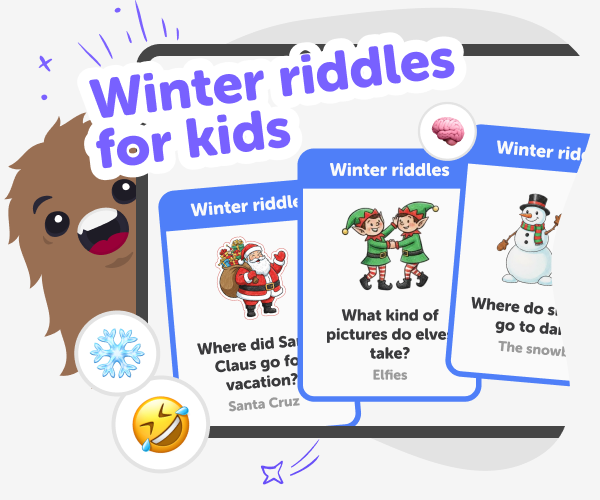
What are winter riddles for kids?
Winter riddles for kids are short, playful puzzles that use snowy themes, animals, and holiday ideas to make thinking fun. They give kids a reason to practise language, logic, and imagination while staying cozy indoors. Riddles can be spoken aloud, solved together, or turned into small group activities that build confidence and teamwork. A winter quiz for kids can combine riddles into a friendly challenge, with clues, multiple-choice answers, or team play. Quizzes help build listening skills, vocabulary, and gentle turn-taking. Best of all, they celebrate curiosity rather than competition, so every child can feel proud of their ideas and enjoy learning through playful challenges.
KidsGPT on DIY.org is a kid-safe assistant that helps children create winter riddles step by step. Instead of giving direct answers, KidsGPT suggests themes, wording ideas, and age-appropriate clues so kids practice writing and thinking. It uses simple language, suggests multiple riddle formats, and helps adjust difficulty so puzzles match a child’s age and reading level. Using KidsGPT, kids can ask for riddle prompts, request funny or tricky clues, and get sample multiple-choice options to build a winter quiz for kids. Parents and educators can review and edit results, keeping content warm and safe. KidsGPT guides rather than decides, so children stay in charge of the final riddles they make.
How do winter riddles help kids learn?
Riddles help kids build language, reasoning, and listening skills through playful problem-solving. Winter riddles encourage children to notice details — like textures, colours, and seasonal actions — and then use vocabulary to describe and deduce answers. If used in a winter quiz for kids, riddles also promote turn-taking, discussion, and gentle challenge. By creating their own riddles with KidsGPT, kids practise writing, editing clues, and choosing age-appropriate words, which builds confidence in storytelling and clear communication rather than focusing on right-or-wrong pressure. Teachers and parents can guide revisions to match reading levels and encourage curiosity.
Is KidsGPT safe for creating riddles?
Yes. KidsGPT is a kid-safe assistant on DIY.org, designed to help children create content without exposure to adult or unsafe material. It responds in age-appropriate language, offers guidance instead of giving direct answers, and lets kids learn by doing. When used to write winter riddles, KidsGPT suggests wording, difficulty levels, and family-friendly themes. Parents and educators can review and refine any suggested riddles before sharing. Importantly, KidsGPT keeps the child in control of choices and edits, supporting creative learning while maintaining a safe, moderated environment for kids to practise writing and problem-solving.
Can kids make a winter quiz with KidsGPT?
Absolutely. KidsGPT can help children turn individual riddles into a full winter quiz for kids by suggesting sets of questions, multiple-choice answers, and fun scoring ideas that keep play pressure low. Children can ask KidsGPT to make themed rounds, give varying difficulty levels, or create printable sheets for classroom use. With a parent or teacher’s help, kids can edit wording and facts to ensure clarity. Saving and sharing is optional; DIY.org supports kid-safe posting when families choose to show their quizzes. This process teaches planning, sequencing, and how to present questions clearly.
Create Winter Riddles Using KidsGPT
Ask KidsGPT for winter riddle ideas
Open KidsGPT and ask for five to ten winter-themed riddle prompts, saying the target age and topics you want included.
Pick riddle type and difficulty
Tell KidsGPT whether you want rhymes, short clues, or trick riddles, and choose easy, medium, or hard difficulty.
Edit, kid-proof and save
Read each suggested riddle, ask KidsGPT to simplify language or add hints, then save favourites to your account or notes.
Make the most of Winter riddles
Try different themes Ask KidsGPT for riddles about animals, snow, holidays, or cozy objects to see how clues change. Iterate and improve Pick one riddle and ask KidsGPT to reword lines, change difficulty, or suggest rhymes. Turn riddles into games Make a short winter quiz for kids with multiple-choice questions or team rounds. Share safely With a parent’s help, post quizzes using DIY.org’s kid-safe sharing and use feedback to improve.
Frequently asked questions
What age group are these riddles for?
Suitable for kids aged 5–15. Prompts and difficulty can be adjusted to match reading and thinking levels.
Do kids need an account to use KidsGPT?
No—kids can try simple prompts, but signing up saves favourites and unlocks sharing and saved projects.
Can KidsGPT help make riddles simpler?
Yes. Ask it to use shorter words, give hints, or turn riddles into rhymes for younger readers.
Can I make a winter quiz from the riddles?
Yes. Use KidsGPT to create question sets, add choices, and format quizzes for print or group play.
Should parents review the riddles?
We recommend parents or teachers review and edit riddles before sharing to ensure clarity and age-appropriateness.
Can riddles be used in class activities?
Absolutely. Teachers can turn riddles into warm-up games, small-group quizzes, or writing prompts for creative lessons.
How do kids save their favourite riddles?
Sign up and use DIY.org’s project tools to save drafts, organise sets, and keep riddles private or shareable.
Is this suitable for holiday or non-holiday learning?
Yes. Winter riddles work for seasonal celebrations and general winter-themed learning activities throughout the season.
More tools
Build a Slime Game Game
Build a slime game game by turning a gooey game idea into something you can actually play, test, and improve. Kids can explore what makes a game fun, practice creative problem-solving, and use guided support to shape their own interactive slime project.
Build a Slither IO Game
Build a slither io game by exploring how movement, timing, and simple rules can turn a snake-style idea into a fun interactive project. Kids can learn what makes this kind of game exciting, then use Vibe Coding to shape, test, and improve their own version step by step.
Build a Slitherio Game
Build a slitherio game by turning a simple snake-style idea into an interactive project kids can shape, test, and improve. This page explains the game concept in a kid-friendly way and shows how creative coding can help kids make something playful, safe, and uniquely theirs.
Build a Snake Game
Build a snake game with a kid-friendly creative coding studio that helps kids plan, test, and improve a playful game one step at a time. This hands-on project supports coding confidence, problem-solving, and creative technology skills while keeping the process clear and approachable for young makers.
Ready to start creating?
Join hundreds of thousands of kids already building cool stuff on DIY.ORG.
Your first game is on us.
Describe a game below - no sign-up needed to try.
Powered by AstroSafe
Make real games - not just chat