Super Draw for Kids – Online Drawing Tool
A powerful online drawing tool for kids to sketch, color, design, and create artwork safely. No downloads required.
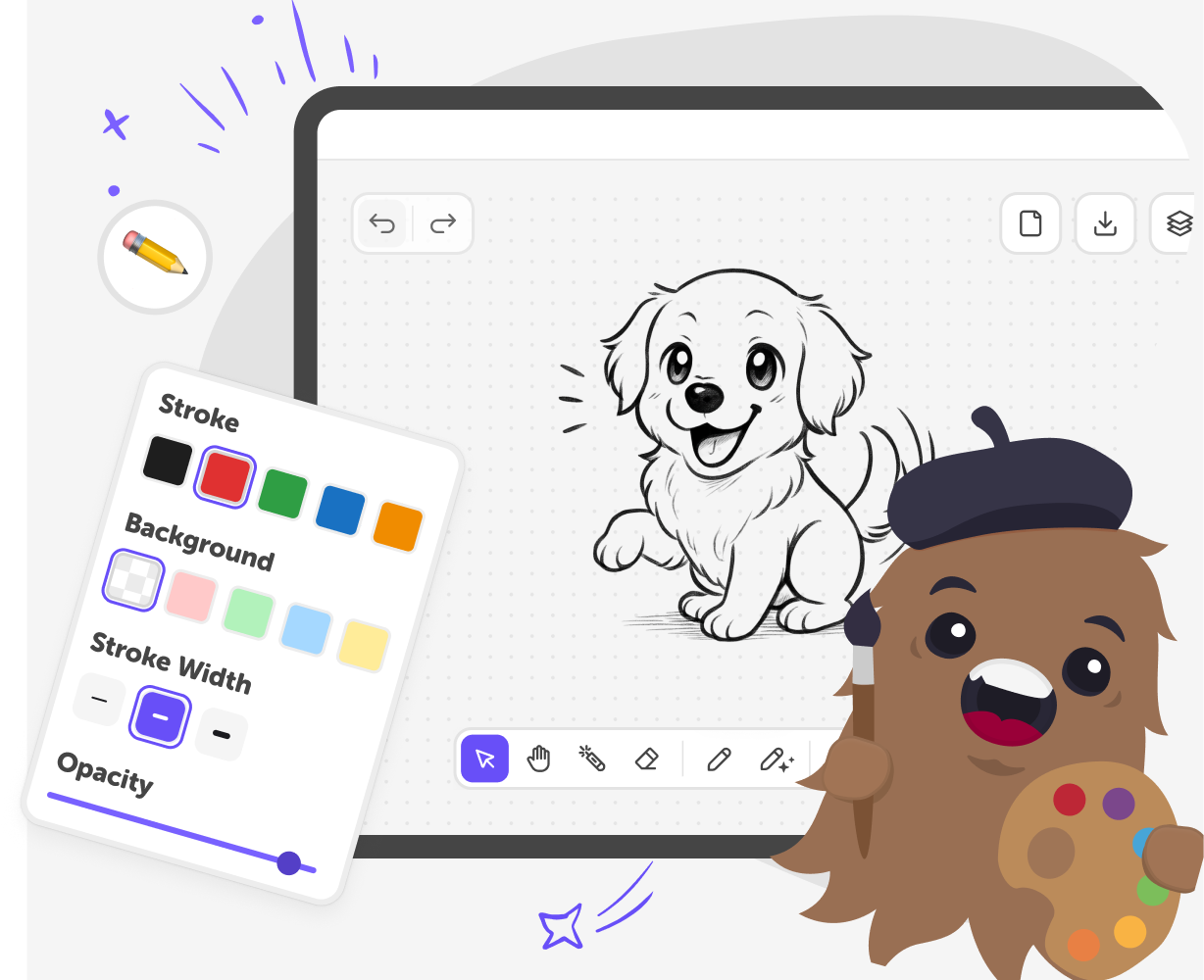
What is Super Draw?
Kids today grow up surrounded by screens, but finding creative tools that feel safe, simple, and genuinely useful can be challenging. When kids want to draw, experiment, or relax creatively, parents often look for something that works instantly, doesn’t require downloads, and feels appropriate for their age. Super Draw is a browser-based online drawing tool for kids that makes it easy to sketch, color, design, and paint online. It runs directly in the browser, so there’s no setup or installation required. Kids can open the tool and start creating straight away, whether they’re doodling for fun or exploring ideas through digital drawing.
As a kid-friendly drawing website, Super Draw focuses on clarity and ease of use. The tools are intentionally simple, helping kids build confidence as they learn how to draw digitally, experiment with color, and develop creative habits in a low-pressure environment. Super Draw is designed to support creativity without distraction. By keeping everything browser-based, it removes common barriers like complicated interfaces or unnecessary features, making it easier for kids to stay focused on creating. Parents can feel confident knowing their child is using a safe, accessible online drawing tool built specifically with kids in mind.
Is Super Draw a safe way for kids to paint online?
Yes. Super Draw is built specifically for kids, with safety and simplicity at its core. The interface is clean and distraction-free, with tools designed to be easy to understand and safe to use. As a paint online experience created for children, it avoids inappropriate content, ads, and unnecessary features that can overwhelm younger users. Kids can focus on drawing, experimenting, and expressing creativity without navigating complex menus. For parents, this provides reassurance that their child is using a digital drawing tool designed with age-appropriate boundaries, encouraging creativity in a secure and controlled environment.
What makes Super Draw a good online drawing tool for kids?
Super Draw is an online drawing tool designed to feel simple, fast, and welcoming for kids of all skill levels. It runs directly in the browser, so children can start drawing instantly without setup or instructions. The tools are intentionally limited to what kids need most, helping them build confidence as they experiment with colours, shapes, and ideas. By removing clutter and complexity, Super Draw allows kids to focus on creativity rather than learning software. This makes digital drawing feel approachable, fun, and rewarding for beginners and growing young artists alike.
Is Super Draw a drawing website suitable for beginners?
Yes. Super Draw is a drawing website created especially for beginners, including kids who may be new to digital drawing. The tools are designed to be intuitive, allowing children to learn step by step without pressure. Kids can freely doodle, sketch ideas, or use guided trace tools to help them get started. There’s no expectation to be perfect, which makes experimenting feel safe and enjoyable. This beginner-friendly approach encourages creativity, helps build confidence, and supports the development of early digital drawing skills at a comfortable pace.
Do kids need to download anything to use this digital drawing tool?
No downloads are required to use Super Draw. It works entirely in the browser, allowing kids to paint online instantly on supported devices. This removes common barriers such as installing software, managing updates, or dealing with complicated setup processes. Kids can open the tool and start drawing straight away, whether at home or in the classroom. For parents and teachers, this makes Super Draw easy to access and manage. It’s a simple, reliable way for kids to enjoy digital drawing without technical hurdles.
How to use Super Draw
Click “Start drawing” to open the canvas
Click the Start drawing button at the top of the page. The canvas opens instantly, with stickers, drawing tools, and comics ready to use.
Switch colours, pencils, and try tools like Trace to Video
Draw freely using brushes and colours, or explore Trace tools and draw-along videos to spark ideas and guide your creativity. Our digital drawing tool is rich with features and useful creative ideas for drawings.
Get creative with helpful AI Drawing tools.
Use our free AI drawing tools to generate a character, improve a drawing, or add a background. Coupled with our safe KidsGPT, kids can turn ideas into stunning visuals and additions that enhance creativity.
Make the most of our digital drawing tool
Add layers Use layers to separate backgrounds, characters, and details. This makes it easier to edit without starting over. Try Trace tools Trace shapes or images to get started. It’s a great way to learn new drawing techniques. Draw along with videos Follow step-by-step draw-along videos from trusted creators for inspiration. Pause and replay as often as you like. Experiment with brushes Switch brush styles and colours as you draw. Small changes can completely change how your artwork feels.
Frequently asked questions
Is Super Draw free to use?
Yes. Super Draw is available for free with a DIY.org account. Some advanced features may require a subscription.
Do kids need an account to use Super Draw?
Kids can try Super Draw without an account, but creating an account is required to save drawings or share them.
Is Super Draw safe for children?
Yes. Super Draw is designed specifically for kids, with a simple interface and no unsafe content.
Can parents see their child’s drawings?
Yes. Parents can view saved drawings and shared posts through their child’s DIY.org account.
Do drawings save automatically?
No. Drawings must be saved manually, which helps kids learn to manage and finish their work.
Does Super Draw work on tablets and computers?
Yes. Super Draw works in modern browsers on tablets, laptops, and desktop computers.
Do kids need to download anything to use Super Draw?
No. Super Draw runs entirely in the browser with no downloads or installation required.
Can kids share their drawings with others?
Yes. Kids can share drawings safely through the DIY.org community by creating a post.
More tools
Build an Encanto Game
Build an Encanto Game with a kid-friendly creative tool that helps children turn their ideas into a playful interactive project. Kids can imagine characters, choose challenges, and build step by step while learning coding confidence, problem-solving, and creative technology skills.
Build an Ice Cream Clicker Game
Build an ice cream clicker game and learn how simple game ideas can become fun interactive projects. Kids can explore tapping, scoring, upgrades, and playful rewards while practicing creativity, problem-solving, and coding confidence.
Build an Idle Breakout Game
Build an idle breakout game and explore how simple game rules can turn into a fun, repeatable challenge. Kids can learn how bouncing balls, broken blocks, and gentle upgrades work together to create a game that keeps moving even when you are just watching it play.
Build an Impossible Quiz Game
Build an impossible quiz game with playful questions, surprising answers, and clever twists that make players think twice. Kids can turn a simple idea into an interactive challenge while practicing creativity, problem-solving, and confident making.
Ready to start creating?
Join hundreds of thousands of kids already building cool stuff on DIY.ORG.
Your first game is on us.
Describe a game below - no sign-up needed to try.
Powered by AstroSafe
Make real games - not just chat