Draw Digital Cat Characters with DIY Star TinyIsFiney!
Create cute digital cat characters and add DIY star accessories using a basic drawing app, simple shapes, layers, and step by step practice.


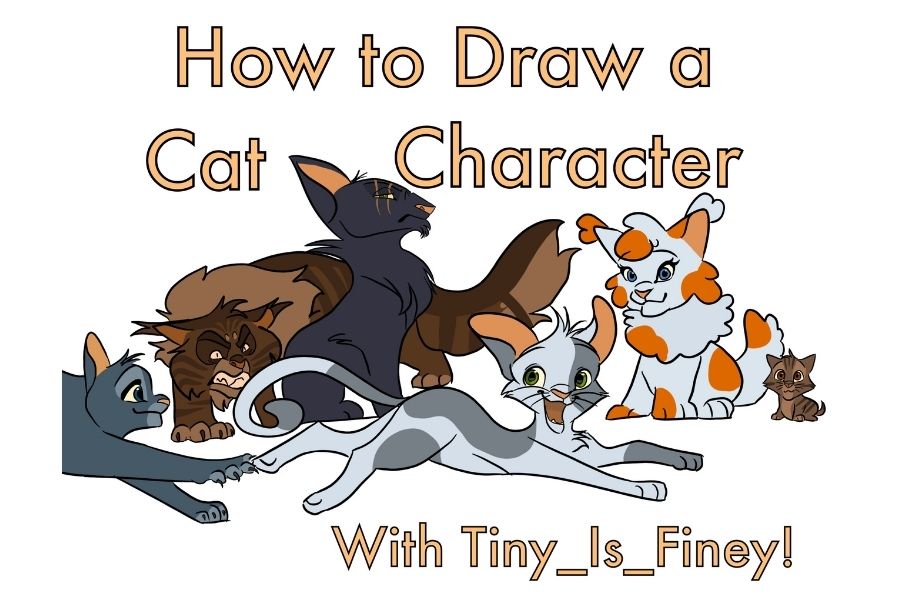

Step-by-step guide to draw digital cat characters with DIY star TinyIsFiney!
Step 1
Open your drawing app and create a new square canvas.
Step 2
Create a new layer and name it "Sketch".
Step 3
Choose a simple brush or pencil tool.
Step 4
On the "Sketch" layer draw a simple cat outline using an oval head two ears and a rounded body.
Step 5
Add eyes a nose and a mouth to the sketch to give your cat expression.
Step 6
Create a new layer and name it "Color".
Step 7
Pick colors from the palette for the fur eyes and accessories.
Step 8
On the "Color" layer fill in the cat shapes with your chosen colors using a fill tool or brush.
Step 9
Create a new layer and name it "Stars".
Step 10
On the "Stars" layer draw a small star accessory and place it near the cat's ear or collar.
Step 11
Decorate the star with a tiny face sparkles or patterns using a small brush.
Step 12
Save or export your artwork as a PNG or JPG file.
Step 13
Share your finished creation on DIY.org.
Help!?
What can we use if we don't have a drawing app, square canvas, or tools like layers and a fill tool?
If your app lacks layers or a square canvas, use a free program that supports layers and fills (Krita, Autodesk SketchBook, Ibis Paint), or draw the same Sketch/Color/Stars steps on paper and photograph or scan it to save as a PNG/JPG for DIY.org.
My fill color bleeds outside the lines or the tiny star details get messy—how can I fix that?
Make sure your 'Sketch' lines form closed shapes, lock transparency on the 'Color' layer or use a selection/magic-wand before using the fill tool, and switch to a smaller brush when decorating the 'Stars' layer to keep details tidy.
How can I adapt this activity for different ages or skill levels?
For younger kids simplify by tracing a large printed square canvas cat outline and coloring on one layer, while older kids can add extra layers for shading, textures, multiple 'Stars', and finer facial expressions before exporting a high-resolution PNG.
What are some fun ways to extend or personalize the cat drawing after finishing the basic steps?
Personalize it by adding a 'Background' layer with a scene, creating different star accessories and patterns on the 'Stars' layer, applying layer blend modes or textures to the 'Color' layer, or exporting multiple frames to make a sparkling-star GIF to share on DIY.org.
Watch videos on how to draw digital cat characters with DIY star TinyIsFiney!
THE BEGINNER'S GUIDE TO DIGITAL ART (from an art teacher)
4 Videos
THE BEGINNER'S GUIDE TO DIGITAL ART (from an art teacher)
How To Make Digital Art | Full Tutorial For BEGINNERS

How to Draw a Cute Cat Easy for Kids and Toddlers
How To Draw Cartoon Faces + Adding Texture To Illustrations • Cute Art • Procreate Tutorial
Facts about digital drawing and character design for kids
🐱 Cats have 32 muscles in each ear — great reference for making expressive cartoon ears!
✨ The five-pointed star is one of the oldest decorative symbols and appears in art and flags around the world.
🎨 Artists began making computer-generated art in the 1960s, and digital art tools have evolved ever since.
🧩 Layers in drawing apps work like transparent sheets so you can edit hair, face, or accessories separately.
🔺 Many cute character designs start from simple shapes — circles for heads, triangles for ears, and rounded rectangles for bodies.
How do I draw cute digital cat characters and add DIY star TinyIsFiney accessories using a basic drawing app?
What materials or tools do I need to draw digital cat characters with DIY star TinyIsFiney?
What ages is drawing digital cat characters with DIY star TinyIsFiney suitable for?
What are the benefits of drawing digital cat characters and adding DIY star TinyIsFiney accessories?
