Build something awesome with LEGO®
Design and build your own LEGO creation—vehicle, robot, or building—then test, modify, and explain how it works to learn engineering.


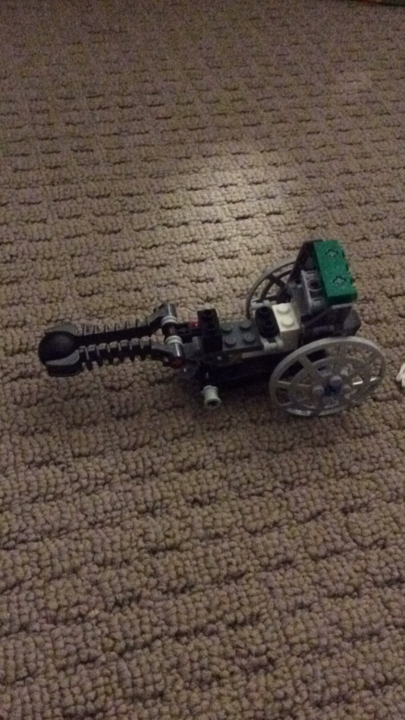

Step-by-step guide to build something awesome with LEGO
How To: Build a LEGO Fairy House
Step 1
Gather all the LEGO bricks and the paper and pencil listed in Materials Needed.
Step 2
Choose whether you will build a vehicle robot or a building.
Step 3
Draw a simple sketch of your idea on the paper showing the main parts.
Step 4
Pick the main LEGO pieces you will need from your pile to match your sketch.
Step 5
Build a basic prototype of your design using the pieces you picked.
Step 6
Test your prototype by rolling it on a flat floor or checking if it stands steady.
Step 7
Write down one problem or thing that could be better after the test.
Step 8
Change one specific part of your design to fix the problem you wrote down.
Step 9
Test your modified creation to see if the change helped.
Step 10
Write one short explanation of how your creation works and what you improved.
Step 11
Share your finished creation on DIY.org
Help!?
What can we use instead of LEGO bricks or the paper and pencil listed in Materials Needed?
Use Duplo or wooden/foam blocks in place of LEGO bricks and a notebook, sticky notes, or cardstock plus a crayon or marker instead of the paper and pencil.
My vehicle won't roll or my building keeps toppling during the Test your prototype step—what should we check?
If it won't roll, check that wheels are mounted on straight axles and remove pieces that rub the floor, and if it won't stand, rebuild with a wider base plate and interlock the bricks more tightly at the base.
How can I change the activity to suit younger or older children during the Draw a simple sketch and Build a basic prototype steps?
For preschoolers (3–5), use larger Duplo pieces, have them do a very simple sketch and one quick prototype, while older kids (8+) should make more detailed sketches, choose specialized pieces, and create and test multiple prototypes.
What are ways to extend or personalize the project after the Write one short explanation step?
Enhance your creation by adding a small motor or extra moving parts, decorating to match a theme, writing a step-by-step instruction sheet using your sketch and test notes, and recording a short video to share on DIY.org.
Watch videos on how to build something awesome with LEGO
How to build a LEGO Rocket! EASY LEGO Academy Rocket Build | DIY Tutorial
4 Videos
How to build a LEGO Rocket! EASY LEGO Academy Rocket Build | DIY Tutorial

10 FUN LEGO Building IDEAS!!
TOP 10 Easy LEGO Building Ideas Anyone Can Make

I built ANOTHER 100 LEGO things from 10 pieces each...
Facts about engineering and building with LEGO
🧱 LEGO comes from the Danish phrase 'leg godt' meaning 'play well', and the company now makes tens of billions of bricks every year.
🤖 LEGO Mindstorms debuted in 1998 and lets kids build programmable robots used in competitions like the FIRST LEGO League.
⚙️ Gears change torque and speed—use larger gears for more power and smaller gears for higher speed when building LEGO mechanisms.
🔁 Real engineers test, learn, and iterate—most designs improve a lot after a few rounds of testing and modification.
🚗 Wheels and axles are simple machines; smart placement of these parts helps LEGO vehicles roll farther and carry heavier loads.
How do I guide my child to design and build their own LEGO creation?
What materials do we need to build a LEGO engineering project at home?
What ages is designing and building LEGO projects suitable for?
What are the learning benefits and safety tips for LEGO engineering projects?
