How to do long division | Learn with KidsGPT
Use KidsGPT to learn how to do long division step-by-step. Kid-safe guidance, practice prompts, and tips for parents and teachers.
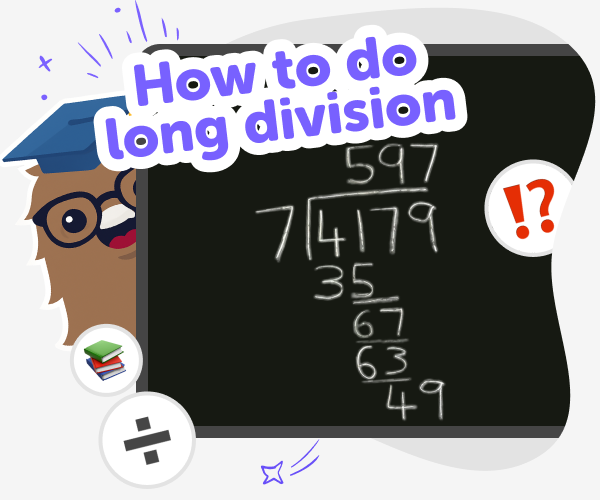
How to do long division
Long division is a step-by-step way to divide numbers by breaking a problem into smaller, repeatable actions: divide, multiply, subtract, then bring down the next digit. This method helps kids see how each digit contributes to the answer and understand remainders. Instead of doing everything in your head, long division makes the process visible on paper and shows the logic behind each action. Teaching long division works best with clear examples, short practice problems, and chances to explain thinking aloud. Simple language and repeated patterns help learners build confidence and number sense. Stepwise practice encourages neat work, checking each line, and knowing when to adjust. It’s a useful bridge between basic division facts and later math.
KidsGPT on DIY.org is a kid-safe helper that guides children through long division step-by-step. Instead of giving quick answers, KidsGPT explains each action, asks questions to check understanding, and suggests small problems to try. It uses language aimed at kids, offers hints when children get stuck, and encourages them to write out each step so they practice real math skills. Parents and teachers can ask KidsGPT for practice prompts, patterned examples, or printable problem sets. Kids can repeat explanations, try variations, and build confidence through guided practice without exposure to inappropriate content.
What is long division and why use it?
Long division is a step-by-step method for dividing larger numbers. Instead of trying to divide everything in your head, the process breaks a problem into repeatable actions: divide, multiply, subtract, and bring down the next digit. This structure helps kids see what each part of the calculation does and why remainders appear. Learning long division gives a clear pattern to follow, which builds number sense and confidence. Kids learn to organise work on paper, check each step, and spot small mistakes. Teachers often use models and place-value charts to make the steps visible.
How does KidsGPT help with long division?
KidsGPT is a kid-safe assistant that helps children learn long division by explaining each step in friendly, child-appropriate language. It never just hands over answers; instead it asks learners to try a step, offers hints, and shows why each action matters. Kids can ask for examples, request slower explanations, or ask for practice problems at different levels. Parents and teachers can use suggested prompts to guide lessons and create printable problem sets. Because KidsGPT only outputs text and is designed for kids, the experience stays safe, predictable, and focused on learning through doing.
Is KidsGPT safe for kids to use?
Yes. KidsGPT on DIY.org is designed with children's safety in mind. It uses age-appropriate language, limits replies to the current conversation, and cannot show images or external links, reducing exposure to harmful content. The assistant frames answers as guidance, prompting kids to work through steps rather than giving direct answers. Parents and teachers can supervise sessions, use suggested prompts to control difficulty, and turn practice into shared activities. Because KidsGPT focuses on helping kids learn how to do long division step-by-step, it complements classroom learning in a controlled, safe environment.
Can kids make and share their own problems?
Absolutely. Kids can use KidsGPT to craft their own long division problems, vary difficulty, and invent real-world story problems. Try prompts like 'give me five two-digit divisor problems' or 'turn 372 ÷ 6 into a cookie-sharing story.' After solving, kids can ask KidsGPT to generate similar problems or produce step-by-step explanations they can read aloud. Teaching others is a powerful test: ask KidsGPT to create a simple script for a child to explain a solution to a friend or parent. This turns practice into creative learning and helps build communication and math confidence.
Learn long division step-by-step with KidsGPT
Start with a simple problem
Type a basic division problem into KidsGPT, like 124 ÷ 4. Ask for a step-by-step explanation for kids.
Ask KidsGPT to explain steps
Have KidsGPT show divide, multiply, subtract, and bring-down actions one at a time, with simple language and examples.
Practice problems and check
Ask KidsGPT for five practice problems at the same level, then explain each answer and check your work step-by-step together.
Make the most of KidsGPT
Try different numbers Change the digits and divisors to see how the steps repeat with new values and patterns. Slow and explain Ask KidsGPT to slow down and explain the 'why' behind each action so learners build true understanding. Make practice sets Request tailored practice sets that mix numeric drills and word problems to target tricky parts. Share and teach Encourage kids to teach a friend or parent using KidsGPT prompts; explaining aloud reinforces learning.
Frequently asked questions
What age is this for?
Designed for kids aged 5–15, KidsGPT uses short explanations and step practice to match different learning stages.
Do kids need to be good at math?
No. Kids can start with simple problems; KidsGPT gives step-by-step help and builds skills with practice.
Will KidsGPT give the answer right away?
No. It guides kids to attempt each step, offers hints, and explains the reasoning rather than just giving answers.
Can parents help during sessions?
Yes. Parents can use suggested prompts, supervise practice, and turn explanations into teachable moments with their child.
How do I get practice problems?
Ask KidsGPT for sets of problems by level, topic, or story; include the number of questions you want.
Do kids need an account?
No, they can try explanations without signing up, but creating an account lets them save progress and revisit practice.
Can KidsGPT help with homework?
Yes. It helps students understand steps and practice similar problems, while encouraging students to try before checking answers.
How do prompts look?
Use clear prompts like 'explain 256 ÷ 8 step-by-step for a 9-year-old' to get age-appropriate explanations.
More tools
Create a Minecraft Shield
Create a Minecraft Shield and learn how this simple in-game item can help players stay protected, plan ahead, and build with confidence. Kids can explore the idea of defense, design, and creativity while trying Vibe Coding, a guided creative coding studio that helps turn ideas into hands-on projects step by step.
Create a Minecraft Skeleton Skin
Create a Minecraft skeleton skin and turn a blocky character idea into a custom look you can test, tweak, and make your own. This kid-friendly project helps young makers explore game design, character style, and creative coding with guided support.
Create a Minecraft Survival Game
Create a Minecraft Survival Game is a kid-friendly way to explore game ideas, survival challenges, and creative problem-solving. Kids can imagine a simple world, think about goals and rules, and use Vibe Coding to build and improve an interactive project step by step.
Create a Minecraft Sword
Create a Minecraft sword and turn a game idea into a hands-on creative project. Kids can imagine the look, shape, and purpose of their sword, then use Vibe Coding to build, test, and improve an interactive version step by step. It’s a fun way to practice problem-solving, creativity, and coding confidence while making something inspired by the world of Minecraft.
Ready to start creating?
Join hundreds of thousands of kids already building cool stuff on DIY.ORG.
Your first game is on us.
Describe a game below - no sign-up needed to try.
Powered by AstroSafe
Make real games - not just chat