Create a Minecraft Warden Skin
Learn how to create a Minecraft Warden Skin with a kid-friendly creative workflow that helps you plan, make, and improve a bold in-game look step by step. Explore colours, shapes, and details while building confidence through hands-on making.
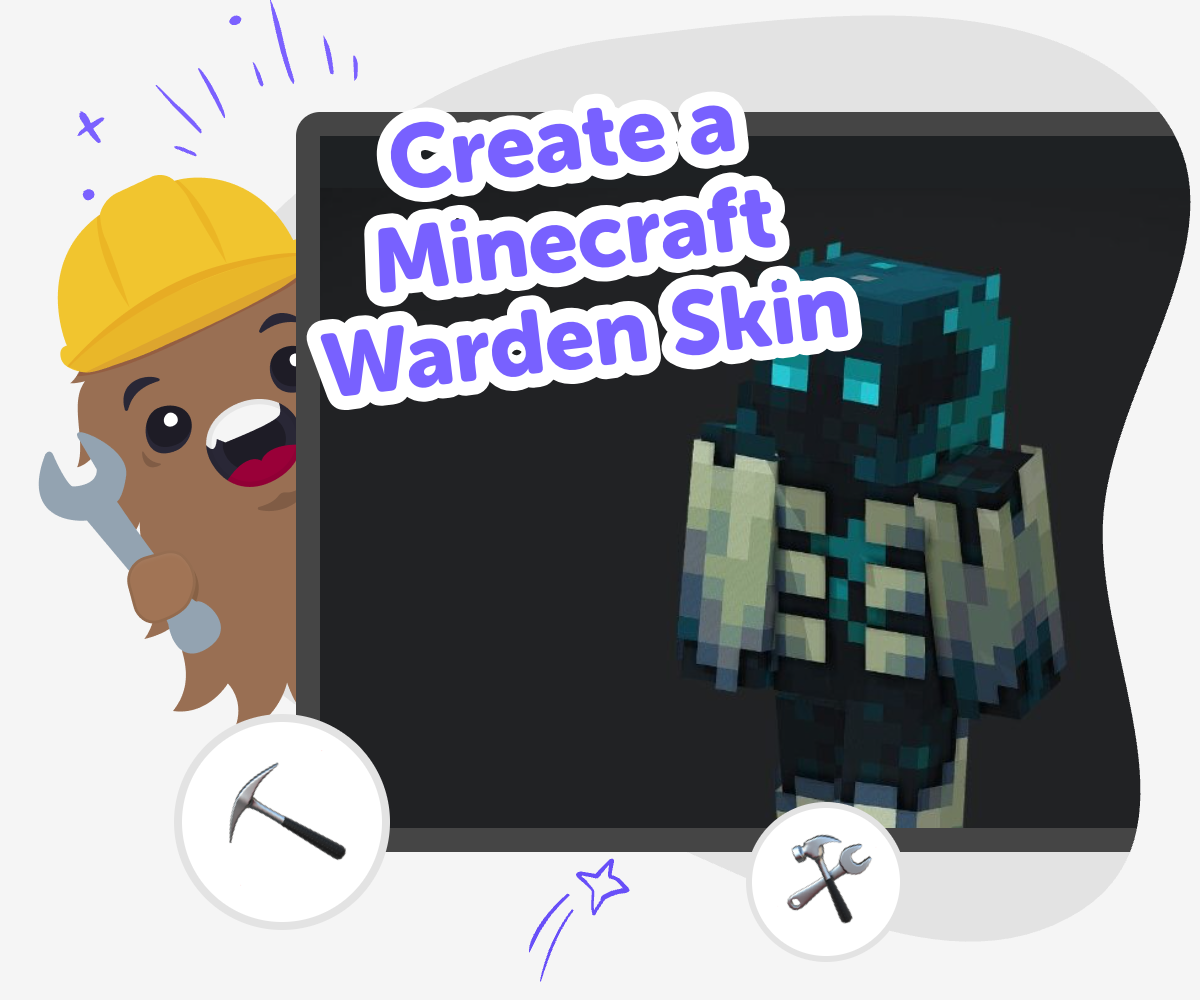
Wardenskin ideas
A create a minecraft warden skin project is a fun way to turn a scary Minecraft mob into a design you can build yourself. Kids can think about colours, shapes, and tiny details that make the skin feel recognisable, then use those choices to create something original and personal. This kind of project matters because it builds creative confidence. Instead of just copying a character, kids practice noticing features, making design choices, and improving their work until it feels right.
Vibe Coding gives kids a guided place to explore the idea without making it feel overwhelming. They can describe the skin they want, test ideas, and refine the design step by step while keeping the process playful, safe, and hands-on. The goal is not instant perfection. It is learning how to build, check, adjust, and enjoy the creative process while making a Warden skin that feels uniquely theirs.
What makes a Warden skin easy to recognise?
A Warden skin is easy to recognise because of a few strong visual clues. The Minecraft Warden is known for its deep dark colours, glowing teal accents, and powerful, monster-like shape. When kids design a skin, those details help other players understand what the character is supposed to be, even if the design is stylized or simplified. The best skins usually keep one or two clear features instead of trying to include everything at once. That makes the design easier to read in the game and easier for kids to build with confidence. It also teaches an important creative lesson: a good design does not need lots of parts, just the right parts arranged clearly. That is why planning first can make the whole project feel calmer and more successful.
Why do kids learn from making a skin?
Making a skin is a small creative project that teaches a lot. Kids practice noticing details, choosing colours, and deciding what to keep simple. They also learn that design gets better through testing, not by being perfect right away. If a first version feels too busy or too plain, they can change it and try again. That kind of repetition builds problem-solving skills and helps kids feel more comfortable with trial and error. It is also a nice way to explore personal style, because two kids can start with the same Warden idea and still make very different results. One may choose a spooky look, another may choose a playful one, and both can be right. The learning is in making choices and seeing how those choices change the final skin.
How can kids keep the design safe and friendly?
A Minecraft Warden skin can look dramatic without being upsetting. Kids can keep the design friendly by focusing on fantasy style instead of extreme horror. Simple shapes, clear lines, and bold colour choices help the skin feel fun and creative rather than too intense. It can also help to talk about the audience for the skin. Is it for playing with friends, showing a class, or making a personal character idea? Once kids know the purpose, they can match the design to the moment. Parents and educators can support this by asking what the child wants the skin to feel like: mysterious, brave, silly, or powerful. That conversation helps kids make creative choices with intention, which is a useful habit far beyond Minecraft.
What does Vibe Coding add to the process?
Vibe Coding gives kids a guided place to work through the steps of making a Minecraft Warden skin without turning the process into a guessing game. Kids can describe the idea they want, shape the design with support, and make changes as they go. That matters because creative projects often improve when kids can see what works, notice what does not, and adjust their plan. The tool supports experimentation, which is one of the best ways to learn. It also helps kids stay active in the process, because they are still making choices, testing ideas, and improving the result themselves. Instead of rushing to a final answer, kids get to build confidence through each small step. That makes the project feel approachable for beginners and still interesting for experienced makers.
How to make it
Notice the Warden
Look at the Warden’s most important features, like its dark colours, glowing parts, and strong shape, so you know what makes the skin easy to recognize.
Plan your look
Choose the parts you want to include in your skin, such as the head, body markings, and accent colours, then sketch a simple idea before you build.
Build and test
Use guided coding help to shape your Warden skin idea, check how the design looks, and change small details when something does not feel quite right.
Make the most of testing
Try a remix Change one colour, shape, or glowing detail so the skin still feels like a Warden but has your own style. Check the fit Look at each part together to make sure the head, body, and details feel balanced and easy to read in Minecraft. Share safely Show your skin to a trusted parent, teacher, or friend and ask what they notice first, then use their feedback to improve it kindly. Keep improving Save your favourite version, make another one with a different mood, and keep experimenting so you learn something new each time.
Frequently asked questions
What is a Minecraft Warden skin?
A Minecraft Warden skin is a custom character design inspired by the Warden mob in Minecraft. Kids can use dark colours, glowing accents, and bold shapes to make the skin feel recognisable while still adding their own style.
How do I start designing one?
Start by noticing the Warden’s main features, then pick the ones you want to include in your skin. A simple plan for colours, shapes, and highlights makes the next steps much easier.
Do I need to copy the Warden exactly?
No. A good skin can be inspired by the Warden without copying every detail. In fact, changing small things is a great way to make the design feel more creative and personal.
Can younger kids make one too?
Yes. Younger kids can keep the design simple and focus on a few clear features. With guidance from a parent, teacher, or helper, they can still make something fun and recognisable.
What if my first version looks messy?
That is normal. Most creative projects improve after a few tries. You can simplify the design, change one colour, or adjust a detail and then test it again.
Is this a good project for learning coding skills?
Yes, because it teaches planning, problem-solving, and iteration. Kids practice making choices, checking results, and improving their work, which are useful creative technology skills.
How can I make the skin feel spooky but not too scary?
Use dark colours, strong shapes, and glowing details, but keep the overall design clean and playful. You can aim for mysterious or powerful instead of extra scary.
Can I use Vibe Coding to help?
Yes. Vibe Coding gives kids a guided way to build, test, and improve their Warden skin idea step by step, so the project stays hands-on and approachable.
More tools
Build a Fart Simulator Game
Build a fart simulator game and turn a silly idea into a real interactive project. Kids can design sounds, reactions, and playful timing while learning how games are planned, tested, and improved step by step.
Build a Fart Soundboard
Build a fart soundboard is a funny kid-friendly project that helps kids make a simple interactive sound tool, test ideas, and practice creative coding with confidence. It turns a silly joke into a hands-on way to learn how buttons, sounds, and timing can work together in a project they can change and improve.
Build a Fight Simulator Game
Learn how to build a fight simulator game with simple, kid-friendly steps that turn ideas into an interactive project. Kids can imagine characters, set up rules, test how the game plays, and improve it while building coding confidence and creative problem-solving skills.
Build a Flappy Bird Game
Build a flappy bird game by learning how simple game ideas turn into something playable, fun, and full of tiny choices. Kids can explore how movement, timing, obstacles, and scoring work together while they make a game that feels like their own.
Ready to start creating?
Join hundreds of thousands of kids already building cool stuff on DIY.ORG.
Your first game is on us.
Describe a game below - no sign-up needed to try.
KidsGPT has moved!
Log into ChatDino to access your chats
Powered by AstroSafe
Make real games - not just chat