Build a Minecraft Soundboard
Build a Minecraft soundboard by choosing game-inspired sounds, arranging them into playful buttons, and making your own interactive project with guided coding support. Kids can explore how sound, timing, and simple controls work together while creating something they can share and improve.
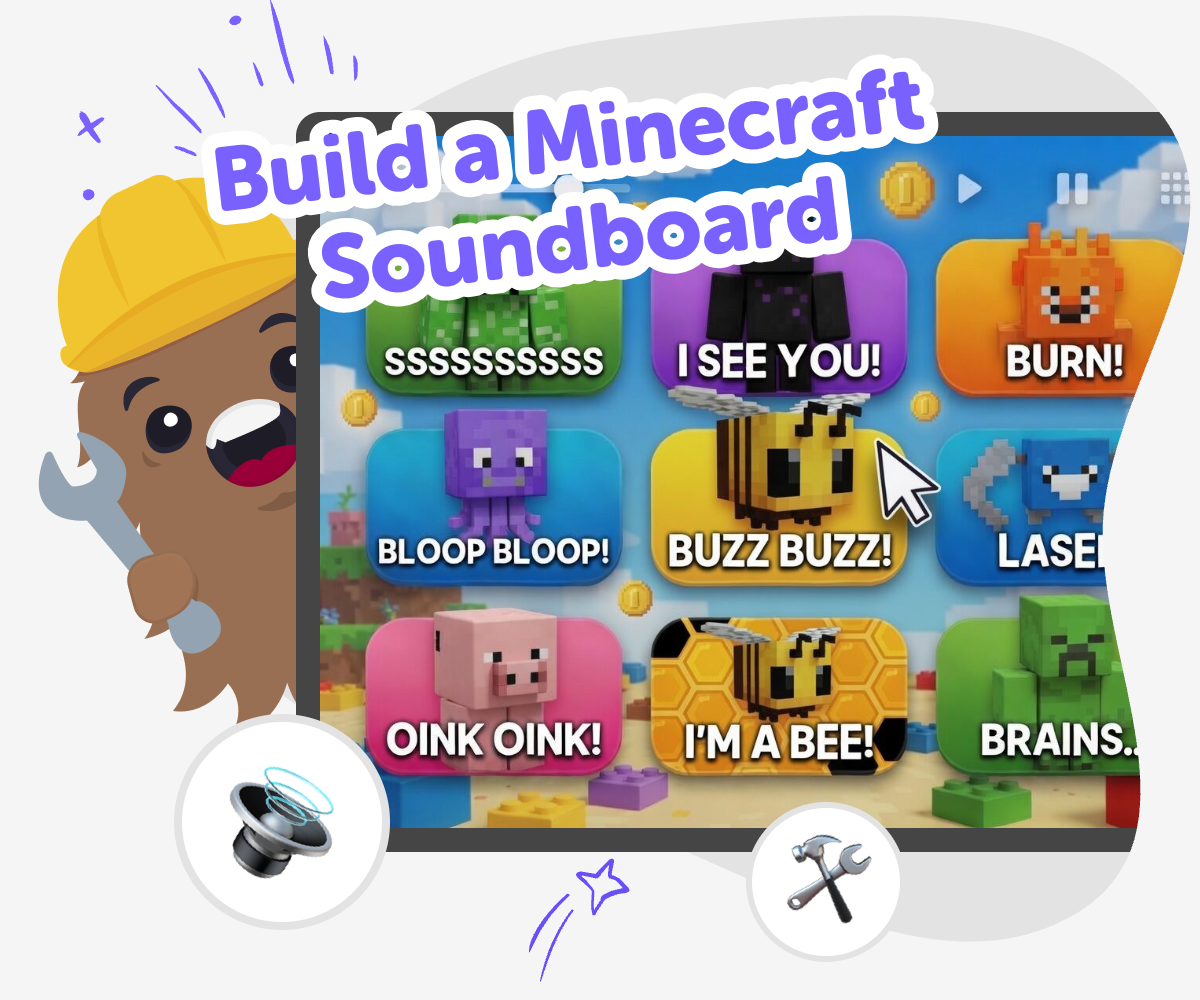
Make a Soundboard
A build a minecraft soundboard project lets kids turn game-inspired sounds into a simple interactive tool they can press, play, and share. It is a fun way to learn how buttons, sound, and timing work together while making something creative and easy to understand. This kind of project matters because it helps kids practice planning, problem-solving, and trying ideas again when something does not feel quite right. They get to think like makers, not just players, and build confidence by making their own version step by step.
Vibe Coding gives kids a guided place to build a Minecraft soundboard by shaping ideas into a real project, testing what happens, and improving it over time. Kids can explore safely, change the sounds or layout, and keep making the board clearer, faster, and more fun to use. The tool supports creative learning without doing the work for them, so the project stays hands-on. Kids stay in charge of the choices while getting support that makes coding feel approachable and playful.
What makes a soundboard fun to build?
A soundboard is fun to build because it turns a simple idea into something people can actually use. Instead of just imagining Minecraft sounds, kids get to place those sounds on buttons, test what happens, and hear the project come alive. That mix of choice and instant feedback is exciting for young makers. It also helps kids understand that creative technology is built from small parts working together. One button can play one sound, but the full board feels more playful when the sounds are organized well. Kids learn that clear labels, smart spacing, and careful timing can make a project feel polished even when it is still simple. This is a great first coding project because it feels familiar, creative, and easy to improve. Each try gives the maker new ideas about what to change next, which is how real building works.
Why is Minecraft a good theme for kids?
Minecraft is a good theme for kids because many children already know the world, sounds, and actions from play or videos, so the idea feels familiar right away. Familiar themes help kids start faster because they do not have to invent everything from scratch. They can focus on making choices: which sounds to include, how to name the buttons, and what should happen when someone taps them. That makes the project more personal and more manageable. A Minecraft soundboard also encourages kids to think about what makes the game recognizable. Sounds can suggest mining, crafting, walking, or building, even without pictures. This helps kids notice how sound can tell a story. When they make their own version, they are not copying the game; they are using its style as inspiration for a new interactive project they designed themselves.
How does this project build coding confidence?
This project builds coding confidence because it starts with something small and clear, then grows through testing and changes. Kids do not need to solve everything at once. They can make one button, listen to the result, and improve from there. That step-by-step process helps children feel capable, even if they are new to coding. It also teaches an important lesson: mistakes are useful because they show what needs fixing. If a sound does not play the way they expected, they can adjust the project and try again. Over time, kids learn that coding is not about getting it perfect on the first try. It is about making a choice, seeing what happens, and shaping the result. That kind of practice helps kids feel braver when they face other creative problems, too.
How can kids use Vibe Coding safely and creatively?
Vibe Coding gives kids a guided place to explore their soundboard idea without needing to figure everything out alone. Kids can describe what they want, build the buttons, test the sounds, and keep improving the project in a controlled, creative space. That supports safe experimenting because the focus stays on making and learning, not on complicated tools or unsafe sharing. It also keeps the work age-appropriate by letting kids stay centered on simple choices like sound, layout, and labels. A guided studio is helpful for parents and educators because it turns a screen activity into a maker activity with a clear purpose. Kids are not just watching something happen. They are building it, checking it, and changing it. That process supports problem-solving, creativity, and confidence while keeping the project friendly and manageable.
How to Build It
Pick your sounds
Choose a few Minecraft-inspired sounds you want on your board, like block hits, steps, or tool actions. Keep the first version small so it is easy to test.
Plan the buttons
Decide what each button should do and give it a clear name. A simple layout helps players understand the soundboard quickly.
Build and test
Create the soundboard in Vibe Coding and press each button to check that the right sound plays. Fix any labels, spacing, or timing that feels confusing.
Make the most of remixing
Try a remix Change one sound, label, or button order so the board feels different while staying easy to use. Check the flow Press every button again and make sure each one is simple to find, read, and understand. Test with a friend Let someone else try it and notice where they pause, smile, or get confused so you can improve the board. Save your best version Keep the version you like most, then come back later to add more sounds or make it even smoother.
Frequently asked questions
What is a Minecraft soundboard?
A Minecraft soundboard is a simple interactive project with buttons that play sounds inspired by the Minecraft world. It can include sounds like mining, building, or walking, and it helps kids learn how sound and buttons work together.
Why would a kid make one?
Kids make one because it is a creative way to turn a favorite game theme into something they can build themselves. It teaches planning, testing, and improving while still feeling playful.
Do I need to know coding first?
No. This is a beginner-friendly project, and kids can start with a small idea and grow it step by step. Guided tools like Vibe Coding help them learn as they build.
Can kids make their own sounds and buttons?
Yes. Kids can choose which sounds to include and decide how the buttons should look and work. That makes the project feel personal instead of copied.
How many sounds should I start with?
It is best to start with just a few sounds so the project stays easy to test and understand. Kids can always add more later after the first version works well.
Is building a Minecraft soundboard safe for kids?
Yes, when it is done in a kid-friendly, guided space. The focus stays on creative making, simple testing, and age-appropriate sharing instead of complex software or unsafe content.
What can kids learn from this project?
Kids can learn coding confidence, problem-solving, and how to improve a project by trying again. They also learn how sound, labels, and layout can make a digital tool easier to use.
Can this be turned into something bigger later?
Yes. Once kids understand the basics, they can add more sounds, change the layout, or make a different themed soundboard. Small projects like this are a good starting point for bigger creative ideas.
More tools
Alternatives to Blockly Games
Find alternatives to Blockly Games and explore kid-friendly ways to learn coding through making, testing, and improving real projects with guided support.
Alternatives to Bloked
Alternatives to Bloked is a kid-first page about finding other ways to play, make, and explore when a block or limit gets in the way. Kids can learn what the topic means, why safe choices matter, and how to keep building confidence with creative tools like Vibe Coding.
Alternatives to Boblox
Alternatives to boblox are kid-friendly ways to make games, stories, and interactive projects when you want a fresh place to create. This page helps kids understand the idea, compare what matters, and try it through hands-on making with Vibe Coding.
Alternatives to Code.org
Alternatives to code.org help kids learn coding in ways that feel creative, gentle, and hands-on. This page explains the topic for families and shows how kids can explore it by making interactive projects with guided support.
Ready to start creating?
Join hundreds of thousands of kids already building cool stuff on DIY.ORG.
Your first game is on us.
Describe a game below - no sign-up needed to try.
Powered by AstroSafe
Make real games - not just chat