Build a Bluey Soundboard
Build a Bluey Soundboard is a kid-friendly creative project that helps kids explore sound, timing, and interactive design by making their own playful button board. With Vibe Coding, kids can build, test, and improve a soundboard step by step while learning how simple coding ideas turn into a fun project they can use and share.
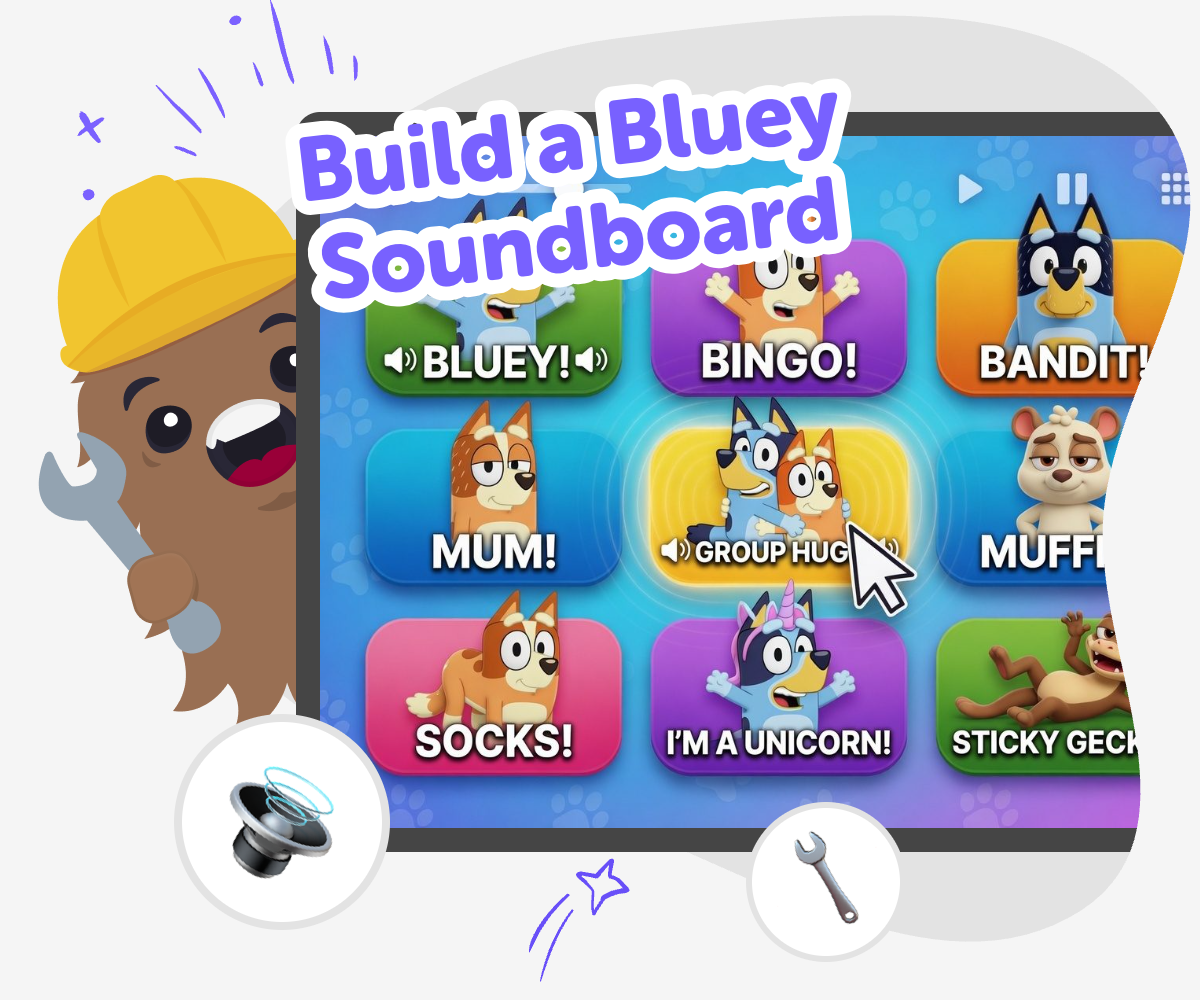
Make a Bluey Soundboard
A build a bluey soundboard project lets kids make a playful sound board with buttons, sounds, and simple interactions. It is a fun way to learn how digital tools can respond when someone taps, clicks, or presses a control, and it helps kids think about timing, choice, and cause and effect. This kind of project also gives kids a chance to tell a story through sound. They can try different layouts, compare how each button feels, and learn that clear design makes a project easier and more fun to use.
Vibe Coding gives kids a guided place to shape the idea, try it out, and improve it safely. Kids can build a Bluey Soundboard step by step, test each button, and make changes as they learn what works best. The tool keeps the process hands-on and creative, so kids stay in control of their choices while getting support when they need it. That makes it easier to explore sound, timing, and playful design without rushing or guessing.
What makes a soundboard fun?
A good soundboard feels easy to understand right away. Each button should do one clear thing, so kids can hear the result and connect it to their choice. That simple cause-and-effect pattern is powerful because it helps children think like makers: if I press this, then that happens. When the sounds are grouped well, the board becomes more playful, more useful, and easier for younger kids to explore without getting lost. A soundboard can be silly, story-based, or themed around a character idea, but the most important part is that it feels readable and responsive. Kids learn that good design is not only about making something work. It is also about making something pleasant, clear, and fun to use again and again.
Why do kids like making one?
Kids enjoy making soundboards because they get to turn favourite ideas into something interactive. Instead of just listening to sounds, they choose what should happen and where each sound should go. That gives them ownership, which makes the project feel personal and exciting. A Bluey-inspired soundboard can also spark storytelling, since kids may imagine scenes, games, or funny moments to match each button. This kind of project supports creativity because there is room to try different layouts, test new sounds, and change the order until it feels right. It also builds confidence. When kids see that they can build something useful and playful step by step, they start to trust their own ideas more and feel ready to keep making.
How does this help kids learn?
Building a soundboard teaches more than just sound choices. Kids practice problem-solving when they decide which button should do what, and they learn iteration when they test a version, notice a problem, and improve it. They also build coding confidence because they can see how small changes affect the whole project. That makes coding feel less mysterious and more like a creative tool they can shape. A project like this can introduce basic ideas such as sequence, feedback, and organization without making it feel like a lesson only. Children are learning through making, which often helps ideas stick better. The more they experiment, the more they understand that mistakes are part of the process and that improvements can come from careful testing.
Is it safe for younger makers?
Yes, it can be a safe and friendly project when it is kept age-appropriate and guided. The best soundboards use simple controls, clear labels, and sounds that are easy for kids to understand. Adults can help younger makers choose content that feels kind, playful, and appropriate for family sharing. That way the project stays focused on creativity instead of confusion or stress. Guided tools like Vibe Coding help kids make progress without feeling stuck, while still keeping them active in every step of the process. Kids still decide what they want to build, test it themselves, and improve it with support. That balance helps them learn safely while staying in charge of their own creative choices.
How to build it
Pick your sounds
Choose a few Bluey-style sounds, phrases, or playful effects that fit the board you want to make.
Lay out the buttons
Set up a simple screen with clear buttons so each sound has an easy place to live.
Link sound to tap
Connect each button to the sound it should play, then test that every tap does the right thing.
Make the most of testing
Try a remix Swap one sound or colour so the project feels fresh and playful while still matching the joke or moment you want people to notice. Check the flow Tap every button in order and rename anything confusing so the board stays quick, readable, and easy for younger users to follow. Share kindly Keep the sounds age-appropriate, friendly, and fun so the board feels welcoming for family play instead of teasing or upsetting anyone nearby. Keep improving Save your favourite version, test a new layout, and keep adjusting timing until the board feels smoother, clearer, and more fun to use.
Frequently asked questions
What is a soundboard?
A soundboard is a project with buttons or taps that play different sounds. Kids can use it to make a game, joke, story, or themed activity more interactive.
Why would a kid want to build one?
Kids like soundboards because they can choose the sounds, arrange the buttons, and make something that reacts when they tap it. It feels playful and personal.
Can kids make their own version?
Yes. Kids can make a version that fits their own ideas, like a silly sound board, a story helper, or a simple game tool with sounds.
What skills does this project build?
This kind of project builds coding confidence, problem-solving, and practice with testing and improving ideas. It also supports creative technology skills.
Is it hard to start?
It does not need to be hard. Kids can begin with a few sounds and simple buttons, then keep adding details as they learn what works best.
How does Vibe Coding help with it?
Vibe Coding gives kids a guided place to build, test, and improve their soundboard step by step. It helps the project feel manageable without doing the making for them.
Can younger kids do this safely?
Yes, with simple choices and adult guidance when needed. A safe version keeps the sounds friendly, the controls clear, and the project easy to understand.
What can kids make after a soundboard?
After making a soundboard, kids can try other interactive projects like quizzes, small games, or simple tools with buttons and responses.
More tools
Build a Moana Game
Build a Moana Game is a kids-first creative coding page where children can imagine an ocean adventure, turn it into an interactive project, and practice making it step by step. With guided support, kids can explore characters, challenges, choices, and game flow while building confidence as makers.
Build a Monkey Clicker Game
Build a monkey clicker game with creative coding that helps kids turn a simple idea into a playful interactive project. Kids can shape the game, test how it feels, and improve it step by step while learning to make and experiment with code.
Build a Moon Clicker Game
Build a moon clicker game with a kid-friendly creative coding studio that helps kids turn a simple moon idea into an interactive project. Explore tapping, scoring, upgrades, and playful space design while building, testing, and improving each part step by step.
Build a Nugget Clicker Game
Build a nugget clicker game and turn a simple idea into a playful coding project. Kids can shape the clicks, points, and upgrades, then test and improve their game as they learn by doing with Vibe Coding.
Ready to start creating?
Join hundreds of thousands of kids already building cool stuff on DIY.ORG.
Your first game is on us.
Describe a game below - no sign-up needed to try.
Powered by AstroSafe
Make real games - not just chat