Showcase your mic maintenance
Learn safe microphone maintenance: inspect, clean, and protect a mic using soft cloths, gentle brushes, and simple storage methods to preserve sound quality.
About this activity
Learn safe microphone maintenance: inspect, clean, and protect a mic using soft cloths, gentle brushes, and simple storage methods to preserve sound quality.
What you need
Step by step
- 1
Step 1
Gather all your materials and choose a clean well-lit table to work on.
- 2
Step 2
Turn off and unplug the microphone and remove any batteries.
- 3
Step 3
Look closely at the microphone body cable grille and connector for dents frayed wires or loose parts.
- 4
Step 4
Remove the foam windscreen or slide off the sock and place it on the towel.
- 5
Step 5
Use the soft-bristled brush to gently brush dust and loose dirt from the grille and around the microphone body.
- 6
Step 6
Dip a cotton swab in the bowl of warm soapy water and squeeze it so it is only slightly damp.
- 7
Step 7
Gently clean around the grille seams and connector with the slightly damp cotton swab without pushing liquid into openings.
- 8
Step 8
Wipe the microphone body and cable with the microfiber cloth to remove fingerprints and grime.
- 9
Step 9
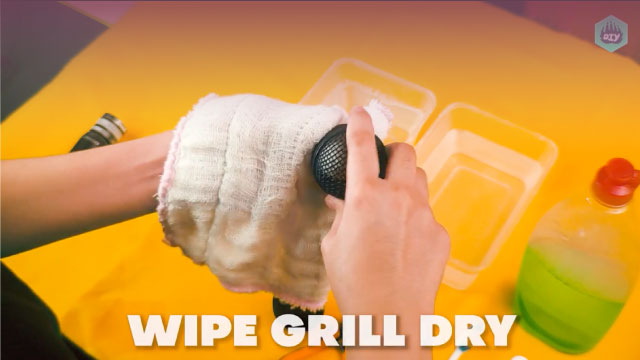
Dry the microphone and cable with a dry part of the microfiber cloth and let them sit to air-dry for a few minutes.
- 10
Step 10
Gently wash the foam windscreen in the bowl with a little mild dish soap by squeezing it to work the soap through.
- 11
Step 11
Rinse the foam windscreen under cool running water and gently squeeze out extra water then set it on the towel to air-dry completely.
- 12
Step 12
Once everything is completely dry put the foam windscreen or sock back on the microphone coil the cable loosely and place the mic and cable into the box or zip-top bag for storage.
- 13
Step 13
Share a photo and short note about your cleaned and protected microphone on DIY.org
Fun facts
How do I teach my child to safely maintain a microphone?
Start by showing kids how to inspect a powered-off mic for dust, dents, or loose parts. Remove any foam windscreen and gently brush the grille with a soft brush. Wipe the body and windscreen with a slightly damp microfiber cloth—never soak the mic. Reassemble, test the mic, and place it in a storage pouch. Supervise every step and demonstrate safe handling and where not to touch (diaphragm/grille openings).
What materials do I need for a child-friendly mic maintenance activity?
Gather a soft microfiber cloth, a small soft-bristle brush or paintbrush, cotton swabs, a gentle electronics-safe cleaner or lightly dampened cloth with water, foam windscreen cleaner or mild soap for removable windscreens, a padded storage pouch or case, and optional compressed air used only by an adult. Keep liquids and strong solvents out of reach and have adult supervision for any cleaning sprays or canned air.
What ages is this mic maintenance activity suitable for?
This activity suits a range: preschoolers (3–6) can watch and help hold soft items, early elementary kids (6–9) can do simple cleaning with close supervision, and older children (10+) can handle more detailed brushing and storage tasks independently with safety rules. Always supervise when using liquids, canned air, or when disassembling parts; adapt tasks to a child’s fine-motor skills and attention level.
What are the benefits of teaching mic maintenance and important safety tips?
Teaching mic care builds responsibility, respect for equipment, and basic maintenance skills while preserving sound quality and lifespan. It also boosts confidence when children learn tidy routines. Safety tips: always unplug microphones before cleaning, avoid spraying liquids directly, use minimal dampness on cloths, keep canned air and cleaners for adult use, and store mics in dry, padded cases to prevent drops and humidity damage.
Watch & Learn
Need help?
What can we use if we don't have a microfiber cloth, soft-bristled brush, or cotton swabs?
If you don't have a microfiber cloth, soft-bristled brush, or cotton swabs, substitute a clean lint-free cotton T-shirt for wiping, an unused soft toothbrush to gently brush dust from the grille and microphone body, and a slightly damp corner of the cloth or a folded paper towel for cleaning seams while keeping moisture out of openings.
What should we do if liquid gets into the grille or connector while cleaning?
If liquid gets into the grille or connector after using the slightly damp cotton swab, immediately pat the area dry with the microfiber cloth and let the microphone sit unplugged to air-dry fully for several hours before reassembling and storing it in the box or zip-top bag.
How can we adapt this activity for younger children or older kids?
For younger children, have an adult handle turning off/unplugging, battery removal, and all wet cleaning while the child gently brushes the grille and wipes the body with the microfiber cloth, and for older kids let them complete the full inspection for dents and frayed wires, wash and rinse the foam windscreen, coil the cable, and post the cleaned mic photo on DIY.org.
How can we extend or personalize the mic maintenance activity?
Extend the activity by adding a silica gel packet to the storage box before placing the cleaned microphone and coiled cable inside, decorating or labeling the zip-top bag or foam windscreen sock, and including a short before-and-after note with the photo when you share on DIY.org.