Make Wise Fluorine from LMN's - on Procreate!
Use Procreate to draw and color Wise Fluorine from LMN's, practicing sketching, layering, and digital brushes to create a polished character illustration.
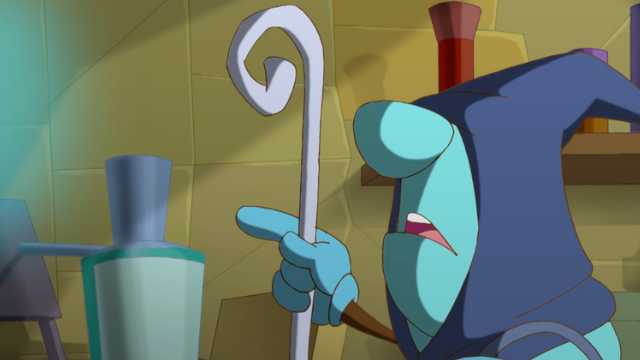
About this activity
Use Procreate to draw and color Wise Fluorine from LMN's, practicing sketching, layering, and digital brushes to create a polished character illustration.
What you need
Step by step
- 1
Step 1
Open the Procreate app on your iPad.
- 2
Step 2
Tap + to create a new square canvas roughly 3000 x 3000 pixels.
- 3
Step 3
Import your reference image of Wise Fluorine onto its own layer.
- 4
Step 4
Lower the reference layer opacity to about 30% so it becomes faint.
- 5
Step 5
Create a new layer above the reference layer for your sketch.
- 6
Step 6
Use a pencil brush to draw a rough sketch of Wise Fluorine with simple shapes.
- 7
Step 7
Create another new layer above the sketch for clean line art.
- 8
Step 8
Pick a smooth inking brush from the Brush Library.
- 9
Step 9
Trace clean outlines of your sketch on the line art layer.
- 10
Step 10
Create a layer beneath the line art for flat base colors.
- 11
Step 11
Fill in the flat base colors for each part of the character on the base color layer.
- 12
Step 12
Create a new layer for shadows and set its blend mode to Multiply.
- 13
Step 13
Paint soft shadows on the Multiply layer to add depth.
- 14
Step 14
Create a new layer for highlights set to Add or Overlay and paint bright highlights.
- 15
Step 15
Export your finished Wise Fluorine illustration as a high-quality image and share it on DIY.org.
Fun facts
How do I draw and color Wise Fluorine from LMN's in Procreate?
Start by opening Procreate and creating a canvas (3000×3000 px). Import or sketch a reference of Wise Fluorine on a low-opacity layer. Use a pencil brush to block basic shapes, then add a new layer to refine linework with an inking brush. Create separate layers for base colors, shadows (multiply), midtones, and highlights. Use textured brushes for details and a smudge tool for blending. Adjust layer opacity and export as PNG when finished.
What materials and tools do I need to make Wise Fluorine on Procreate?
You’ll need an iPad that runs Procreate, the Procreate app, and a pressure-sensitive stylus like Apple Pencil. Collect reference images of Wise Fluorine and a simple color palette. Extras: brush packs (sketch, ink, texture, blend), a paper-like screen protector, a fully charged iPad or power bank, and optional keyboard or cloud storage to save and share your finished illustration.
What ages is drawing Wise Fluorine on Procreate suitable for?
This activity suits children about 8 and up. Ages 8–11 benefit from guided support for tools like layers and selection, while 12+ can work more independently. Younger kids (5–7) can try simpler versions with basic sketching and coloring using large brushes and parental supervision. Adjust complexity, explain gestures and shortcuts, and keep sessions short to match attention spans.
What are the benefits of drawing Wise Fluorine from LMN's using Procreate?
Drawing Wise Fluorine on Procreate builds digital art skills: layering, brush control, color theory, and composition. It strengthens fine motor control and software navigation, boosts creativity and problem-solving as kids adjust poses and shading, and teaches file management and exporting. It’s low-mess, easy to undo, and encourages confidence through iteration—perfect for portfolio pieces or sharing with family, while fostering patience and focus.
Need help?
What can we use if we don't have an iPad or Procreate?
Use another drawing app that supports layers like Clip Studio Paint, Autodesk Sketchbook, or Procreate Pocket on a tablet or computer and follow the same steps: import a reference, lower its opacity, sketch, make a clean line art layer, add flat colors, multiply shadows, and Add/Overlay highlights.
My line art looks shaky or the inking brush isn't smoothing—what should I do?
Turn on StreamLine or increase stabilization for your chosen inking brush in the Brush Studio, choose a smoother inking brush from the Brush Library, or work at the recommended 3000 x 3000 canvas size so your strokes are less jittery when tracing on the line art layer.
How can I adapt this project for younger kids or older kids who want more challenge?
For younger kids reduce complexity to three layers (reference at 30% opacity, a combined sketch/line layer, and a base color layer) with large simple shapes, while older kids can add extra layers for textures, clipping masks, layer effects, and refined Multiply and Add highlight work.
How can we personalize or extend the finished Wise Fluorine illustration?
Add a custom background on a new layer, paint patterned clothing or props on additional layers, experiment with gradient maps and layer masks for different moods, or export a Procreate time‑lapse or short animated GIF to share on DIY.org.