Make minecraft papercraft
Build Minecraft papercraft models by printing, cutting, folding, and gluing paper templates to create characters and blocks, decorating and displaying your creations.
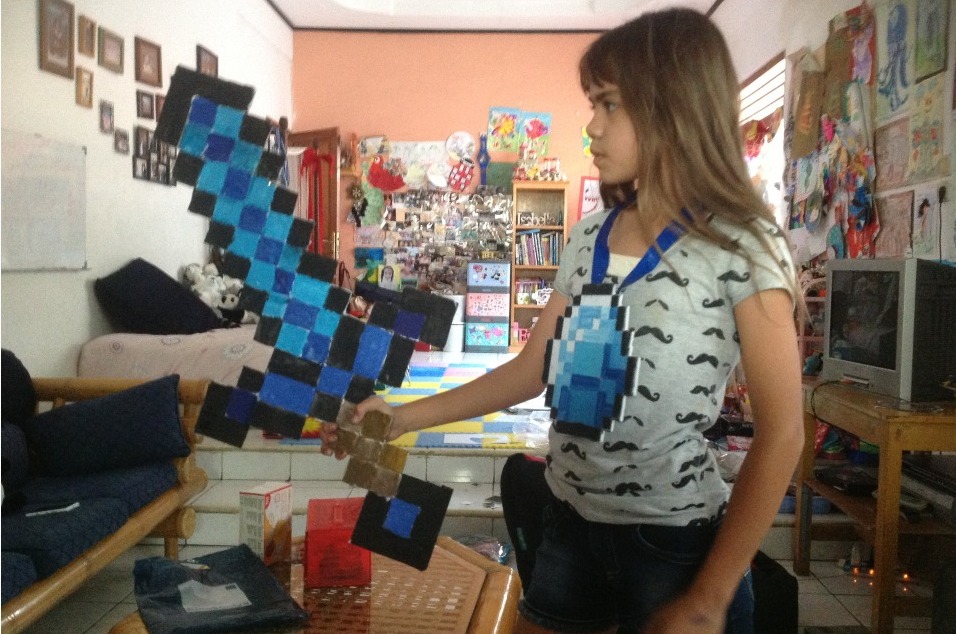
About this activity
Build Minecraft papercraft models by printing, cutting, folding, and gluing paper templates to create characters and blocks, decorating and displaying your creations.
What you need
Step by step
- 1
Step 1
Gather the materials listed.
- 2
Step 2
Pick one Minecraft template you want to make.
- 3
Step 3
Color and decorate the template pieces while they are still on the paper.
- 4
Step 4
Cut out each template piece carefully along the solid outer lines.
- 5
Step 5
Use the ruler edge to score along the dotted fold lines.
- 6
Step 6
Fold each piece along the scored lines so the tabs are ready to glue.
- 7
Step 7
Apply a thin layer of glue to one tab on a piece.
- 8
Step 8
Press the glued tab to its matching edge and hold until it sticks.
- 9
Step 9
Continue gluing one tab at a time to build the character body.
- 10
Step 10
Attach and glue the head piece onto the body.
- 11
Step 11
Make extra paper blocks or accessories and glue them to create a display base.
- 12
Step 12
Let your papercraft dry completely.
- 13
Step 13
Share a photo of your finished Minecraft papercraft on DIY.org.
Fun facts
How do I make Minecraft papercraft models step by step?
To make Minecraft papercraft, download and print a template on sturdy cardstock (110–160 gsm). Cut along solid lines with scissors or a craft knife, score fold lines with a ruler and blunt tool, then fold tabs inward. Dry-fit pieces, apply glue to tabs, and hold until set. Assemble blocks before combining characters, add skin details with markers or printed textures, let pieces dry fully, and display your models on a shelf or in a diorama.
What materials do I need to build Minecraft papercraft?
Materials needed: a printable Minecraft papercraft template, cardstock or heavy paper (110–160 gsm), color printer, scissors, craft knife and cutting mat, metal ruler and bone folder or blunt scoring tool, white craft glue or tacky glue, glue stick or double-sided tape for small tabs, markers or colored pencils for extra detail, clips or clothespins to hold glued parts, and optional clear sealant spray to protect finished models.
What ages is Minecraft papercraft suitable for?
Minecraft papercraft suits many ages. With adult help, kids as young as 4–5 can choose colors and glue pre-cut parts. Children 6–8 benefit from supervised cutting and scoring. Ages 9+ can usually handle the full process independently, while teens and adults enjoy complex builds and customizing skins. Tailor difficulty by choosing simpler block templates for younger kids or multi-piece characters for older builders.
What safety tips and variations can I use for Minecraft papercraft?
Safety and variations: Supervise young children around scissors and craft knives; use safety scissors for preschoolers and a cutting mat for knives. Avoid strong-smelling glues; ensure good ventilation for glue and sealant sprays. Watch for small parts that pose choking hazards. Variation ideas: scale up or down models, create a Minecraft diorama, add magnets to bases, use recycled cereal boxes for sturdier blocks, or design custom skins with printed photos or hand-drawn art.
Watch & Learn
Need help?
What can I use if I don't have cardstock or a printer for the Minecraft template?
Print the Minecraft template on regular printer paper and glue it onto cereal-box cardboard before cutting out each template piece and scoring the dotted fold lines so the pieces stay sturdy.
My tabs keep coming loose or the seams look messy—how can I fix that?
Apply a thin layer of glue to the tab as instructed, press the glued tab to its matching edge and hold until it sticks, and use clothespins or small binder clips to keep seams aligned while the glue dries.
How can I adapt this papercraft activity for younger or older kids?
For younger kids, have an adult pre-cut the template pieces and score the dotted fold lines with the ruler edge, while older kids can design custom templates, add detailed coloring, and build extra paper blocks or accessories.
What are some good ways to enhance or personalize the finished Minecraft papercraft?
Make extra paper blocks or accessories to expand a display base, add stickers or drawn details before gluing, and seal the finished papercraft with a clear craft varnish once it's completely dry to protect the colors before sharing a photo on DIY.org.