Identify the principle of squash & stretch in animations you see
Watch short animated clips and sketch frames demonstrating squash and stretch; compare shapes before and after motion to understand how elasticity affects character movement.
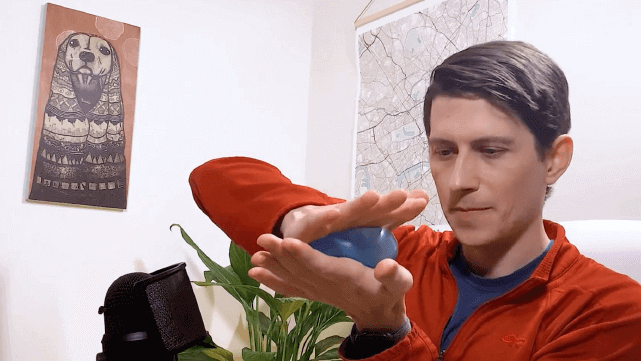
About this activity
Watch short animated clips and sketch frames demonstrating squash and stretch; compare shapes before and after motion to understand how elasticity affects character movement.
What you need
Step by step
- 1
Step 1
Gather your paper pencil eraser and colouring materials and set them on a flat surface.
- 2
Step 2
Choose three short animated clips (about 5–15 seconds) that look like they show a bouncing ball a character landing or any squishy motion.
- 3
Step 3
Watch the first clip all the way through to notice when things move quickly or hit the ground.
- 4
Step 4
Replay the clip and pause on a clear frame just before the object or character stretches or squashes.
- 5
Step 5
Sketch the paused "Before" frame quickly on your paper with simple shapes.
- 6
Step 6
Play the clip forward to the most squashed or most stretched frame and pause there.
- 7
Step 7
Sketch the paused "After" frame showing the squash or stretch with the same simple shapes.
- 8
Step 8
Label the two sketches "Before" and "After" and draw one arrow between them to show the change.
- 9
Step 9
Repeat Steps 3 to 8 for the second and third clips so you have three sets of Before and After sketches.
- 10
Step 10
Line up all your Before sketches and all your After sketches side by side to compare their shapes.
- 11
Step 11
Write three short observations about how the shapes changed for example longer flatter wider or taller.
- 12
Step 12
Make one extra drawing where you exaggerate the squash or stretch even more to practice the effect.
- 13
Step 13
Colour or shade your favourite sketches to make the squash and stretch easier to see.
- 14
Step 14
Share your finished set of sketches and observations on DIY.org
Fun facts
How do I teach my child to identify squash and stretch in animations?
Start by choosing short, simple clips (bouncing ball, jump, or stretchy character). Play the clip and pause at key moments: before motion, at extreme squash or stretch, and after. Ask your child to sketch those frames, exaggerating shapes to show compression or elongation. Compare the sketches, discuss how volume stays constant, and replay to see timing. Keep sessions short and encourage observation over perfection.
What materials do I need for the squash and stretch sketching activity?
You’ll need a device to play short animated clips, a selection of 5–20 second examples, paper or a sketchbook, pencils, eraser, and colored pencils or markers. Optional helpful tools: a stopwatch or slow-motion feature, tracing paper or a lightbox, and a simple frame-by-frame app. Comfortable seating and good lighting make sketching easier for kids.
What ages is this squash and stretch activity suitable for?
This activity suits ages about 5 and up with adaptations. Ages 5–7 can trace and draw obvious squashes and stretches; focus on simple shapes and fun comparisons. Ages 8–11 can sketch keyframes and note timing; introduce basic rules like constant volume. Teens can study frame-by-frame timing, use digital onion-skinning tools, and experiment with subtle physiological effects. Always supervise younger children with devices and scissors if used.
What are the benefits of practicing squash and stretch with children?
Practicing squash and stretch builds visual literacy, observation skills, and an intuitive sense of motion and weight. It improves fine motor control, sequencing ability, and creative problem solving by translating movement into shapes. The exercise introduces basic animation principles, boosts confidence through quick wins, and makes students more aware of exaggeration and timing—useful for drawing, storytelling, and even understanding physics in a playful way.
Watch & Learn
Need help?
What can we use if we don't have a pencil, eraser, or colouring materials listed in the first step?
Use any pen or marker and a scrap of printer or notebook paper in place of pencil and paper, a folded bit of scrap paper as an eraser substitute for smudging, and crayons, felt tips, or colored pencils you already have for the 'Colour or shade your favourite sketches' step.
I'm having trouble pausing on a clear 'Before' or 'After' frame—how do I fix that?
Use your video's frame‑by‑frame or slow‑motion controls, or take a screenshot while you 'Replay the clip and pause' so you can accurately 'Sketch the paused "Before" frame' and the most squashed or stretched 'After' frame.
How can I adapt the activity for younger children or make it more challenging for older kids?
For younger kids, do just one clip and have them trace big simple shapes during Steps 3–8, while older kids can quantify shape changes and turn their Before/After sets into a flipbook or timed sequence to extend Step 12 and Step 13.
What are some ways to enhance or personalize the finished set of sketches and observations?
After lining up your Before and After sketches in Step 10, make a quick flipbook or stop‑motion from those frames, push the exaggeration from Step 12 even further, and use contrasting colours in Step 13 to highlight which parts squash or stretch.