Design Pizzas on Scratch
Create an interactive pizza design game using Scratch, adding toppings, sizes, and simple code to serve virtual customers while learning programming basics.
About this tutorial
Create an interactive pizza design game using Scratch, adding toppings, sizes, and simple code to serve virtual customers while learning programming basics.
What you need
Step by step
- 1
Step 1
Open Scratch and start a new project so you have a blank stage to build your game.
- 2
Step 2
Delete the default cat sprite to clear the stage and make room for your pizza game.
- 3
Step 3
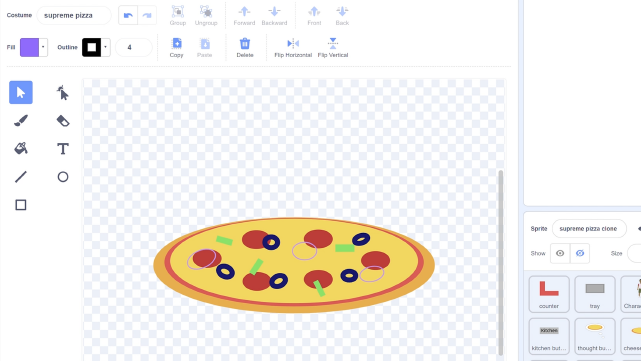
Create a pizza base sprite in the Paint Editor and name the sprite "PizzaBase".
- 4
Step 4
In the PizzaBase sprite make three costumes named Small Medium Large by duplicating and resizing the base to three different sizes.
- 5
Step 5
Create at least three topping sprites (for example pepperoni mushroom olive) using the Paint Editor and name each topping sprite.
- 6
Step 6
Program each topping to be draggable: add code so when green flag clicked it remembers its home position and when the topping is clicked it follows the mouse until released.
- 7
Step 7
Add to each topping this single extra rule: after you release it if it is touching PizzaBase then stay where it landed else glide back to its remembered home position.
- 8
Step 8
Make three small button sprites labeled S M L and add code to each button so when clicked it broadcasts the messages "Small" "Medium" or "Large" respectively.
- 9
Step 9
In the PizzaBase sprite add code so when it receives "Small" "Medium" or "Large" it switches to the matching costume.
- 10
Step 10
Make a variable called Score and set Score to 0 when the green flag is clicked so you can keep track of correct orders.
- 11
Step 11
Create a Customer sprite that chooses a random size and a random topping when it receives a "new order" message then shows the order by saying the size and topping and storing them in order variables.
- 12
Step 12
Make a Serve button and add code so when clicked it checks PizzaBase's costume and whether the requested topping is touching PizzaBase then updates Score and tells the player Correct or Try again and broadcasts "new order" to continue.
- 13
Step 13
Share your finished interactive pizza design game on DIY.org so others can see and play your creation.
Fun facts
How do I create an interactive pizza design game on Scratch that lets players add toppings and serve customers?
Start a new Scratch project and add a pizza base sprite. Make toppings as separate sprites or costumes that can be cloned. Add drag-and-drop scripts so players place toppings and use a variable for size. Create customer sprites that broadcast random orders and compare the player's pizza using if/else blocks. Update a score variable, play sounds, and add a timer or levels. Test and refine the order-matching logic.
What materials do I need to build a pizza design project in Scratch?
You need a computer or tablet with internet access for the Scratch website or the offline Scratch app, and a Scratch account to save projects (optional). A mouse or touchscreen works for dragging toppings. Optional extras: printable pizza templates, colored pencils or a whiteboard for planning, headphones for sound, and a microphone or webcam if you want to record or narrate the project.
What ages is a Scratch pizza design activity suitable for?
This activity fits children roughly 7–12 years old who can read simple instructions and use a mouse or touchpad. Younger kids (about 5–6) can join with adult help to drag and drop toppings. Older children and teens can extend the game with variables, lists, cloning, and scoring systems. Adjust complexity: use simple buttons for beginners and scripting challenges for more advanced learners.
What are the benefits of making a pizza design game on Scratch?
Building a pizza design game teaches sequencing, events, variables, conditionals, and debugging in a playful context. Kids practice creativity, counting, and problem solving while receiving immediate visual feedback. The project supports collaboration if children swap customer and developer roles. For variety, add timed rush orders, scoreboards, or themed menus to deepen learning and keep engagement high.
Watch & Learn
Need help?
I don't have a DIY.org account — where else can I share the finished interactive pizza design game?
Share your finished interactive pizza design game on the Scratch website by uploading the .sb3 project file or posting the project link instead of using DIY.org.
Why do my toppings always glide back to the wrong spot after release?
Make each topping set variables like HomeX and HomeY to its x and y positions when the green flag is clicked and then use those HomeX/HomeY values in the glide-back block so the sprite returns to its remembered home position.
How can I adapt this pizza game for different age groups?
For younger children remove the Serve button and Score and let them freely drag toppings onto the PizzaBase costumes; for elementary-age kids keep draggable toppings, the S/M/L size buttons, and the Serve check; and for older kids add a timer, a list for order history, and multi-topping orders with varied scoring.
How can we enhance or personalize the pizza game beyond the basic instructions?
Add sound effects and an animation when the Serve button shows 'Correct', create extra PizzaBase costumes or more topping sprites, let the Customer request two toppings and give bonus points to the Score variable, and allow players to customize the background and share their version.