Create a Mandala on Procreate
Use Procreate to draw a colorful mandala, practicing symmetry, layer management, brush choices, and color blending while experimenting with repeating shapes and patterns.


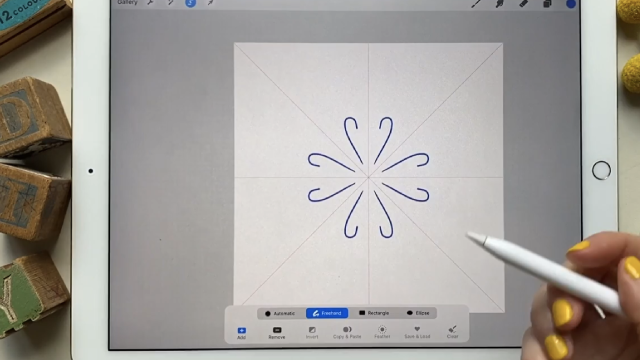

Step-by-step guide to create a mandala on Procreate
Step 1
Open Procreate and tap + to create a new square canvas sized 3000 by 3000 pixels.
Step 2
Turn on the Drawing Guide: Actions > Canvas > Drawing Guide > Edit Drawing Guide then choose Symmetry and select Quadrant.
Step 3
Create a new layer and tap the layer to enable Drawing Assist so your strokes will mirror around the center.
Step 4
Choose a thin sketching brush from the Pencil set and set the size to a comfortable small thickness.
Step 5
Draw one simple petal or shape near the center and watch it repeat around the circle!
Step 6
Add more shapes or a second ring of repeating patterns outward to grow your mandala.
Step 7
Create a new layer above the sketch layer named Line Art and pick a smooth inking brush.
Step 8
Trace your sketch on the Line Art layer with steady confident strokes to make clean outlines.
Step 9
Hide or lower the opacity of the Sketch layer so you can see only your clean line art.
Step 10
Create three new layers above Line Art and name them Base Color; Shading; Highlights and then pick and save a palette of 4 to 6 colors.
Step 11
On the Base Color layer fill shapes with flat color using color drop or a painting brush then use the Shading and Highlights layers with soft brushes and lower opacity to blend and add depth.
Step 12
Export your mandala as a PNG to your Photos or Files.
Step 13
Share your finished creation on DIY.org.
Help!?
What can we use if we don't have Procreate or an Apple Pencil?
If you don't have Procreate or an Apple Pencil, use another app that supports quadrant symmetry (for example Autodesk Sketchbook, MediBang, or Procreate Pocket) and draw with a capacitive stylus or your finger while activating the app's symmetry/Drawing Guide equivalent.
My strokes aren't mirroring — what did I miss?
Check that you set Actions > Canvas > Drawing Guide > Edit Drawing Guide to Symmetry and Quadrant and then tapped the sketch layer to enable Drawing Assist so your strokes will mirror around the center.
How can I make this activity easier for a 5‑year‑old or more challenging for a teen?
For younger kids use a larger sketching brush, a single simple petal, and only the Base Color layer with color drop, while teens can add a Line Art layer with a smooth inking brush, multiple rings of patterns, and detailed Shading and Highlights with lower opacity.
How can we personalize or improve the finished mandala before sharing on DIY.org?
Personalize by saving a custom 4–6 color palette, adding texture or glow with blend modes on the Shading and Highlights layers, exporting as a PNG to Files/Photos, and then sharing the result on DIY.org.
Watch videos on how to create a mandala on Procreate
You Can Draw This MANDALA in PROCREATE - Easy Tutorial for Beginners
4 Videos
You Can Draw This MANDALA in PROCREATE - Easy Tutorial for Beginners
Drawing a Colorful Mandala in Procreate — Relaxing Process 🌸🎨
How to Create an Easy Mandala in Procreate
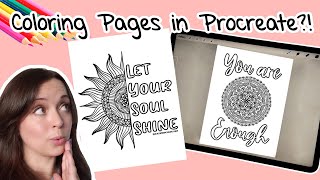
How to Make Coloring Pages on your iPad in Procreate! Inspiring Quote Mandala Coloring Page Tutorial
Facts about digital art for kids
🎨 Mandalas are circular designs used for meditation and ritual in many cultures, with examples dating back thousands of years.
🖌️ Procreate is a popular iPad drawing app made by Savage Interactive (an Australian company) and is loved by artists for its speed and features.
🔁 Mandalas rely on radial symmetry — repeating shapes arranged around a center — which makes them feel balanced and calming.
🧩 Procreate includes hundreds of brushes and lets you create or import custom brushes to get all kinds of textures and strokes.
🌈 Digital color blending uses layer blend modes (like Multiply and Overlay) and opacity controls so you can mix colors without any paint mess.
How do I create a colorful mandala on Procreate step by step?
What materials and Procreate settings do I need to draw a mandala?
What ages is drawing a mandala on Procreate suitable for?
What are the benefits and safety tips for kids making mandalas on Procreate?
