Click a Wide Shot on Stop Motion Studio
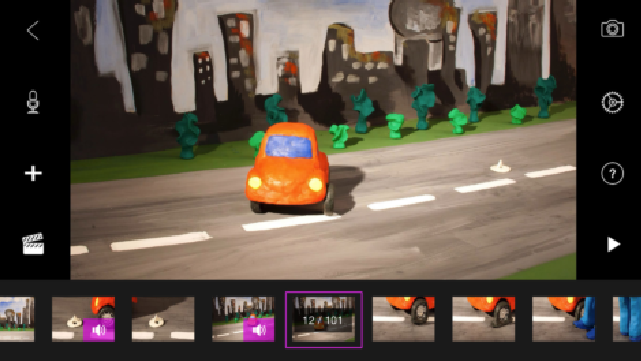
Click a wide shot in Stop Motion Studio by arranging characters and background, setting camera distance, and capturing frames to create a short animation.
About this activity
Click a wide shot in Stop Motion Studio by arranging characters and background, setting camera distance, and capturing frames to create a short animation.
What you need
Step by step
- 1
Step 1
Open the Stop Motion Studio app and tap New Project to start.
- 2
Step 2
Turn your device to landscape orientation so the wide shot is horizontal.
- 3
Step 3
Lay your background paper or cloth flat on the table and smooth out any wrinkles.
- 4
Step 4
Place your characters on the background where you want the story to begin.
- 5
Step 5
Move your device back until the whole scene fits inside the frame so it looks like a wide shot.
- 6
Step 6
Stabilize your device by placing it on a tripod or stacking books so it cannot move.
- 7
Step 7
Turn on the lamp and adjust the light so the whole scene is bright and clear.
- 8
Step 8
Tap the grid overlay to help line up your characters and background evenly.
- 9
Step 9
Tap the capture button to take your first frame.
- 10
Step 10
Gently move one character a tiny bit and tap capture to take the next frame.
- 11
Step 11
Repeat moving a tiny bit and capturing frames until your short animation is finished.
- 12
Step 12
Play your animation to watch it and then share your finished creation on DIY.org
Fun facts
How do I capture a wide shot in Stop Motion Studio for a child's animation?
To capture a wide shot in Stop Motion Studio, arrange background and characters across the frame, then place the phone or tablet farther back or use a wide-angle lens if available. Mount the device on a tripod, enable grid lines, and lock focus and exposure. Choose a frame rate, capture frames by moving figures slightly between shots, playback to review motion, and adjust camera distance or composition until the scene reads clearly as a wide shot.
What materials do I need to click a wide shot in Stop Motion Studio?
You’ll need a smartphone or tablet with Stop Motion Studio installed, a stable tripod or mount, characters or toys, a background or backdrop, and small props. Good continuous lighting (LED lamps) helps consistency. Optional extras: a remote shutter, extra batteries or power cable, craft supplies for custom figures, and foamboard reflectors. Keep tiny parts stored safely and label pieces so scenes are easy to rebuild.
What ages is clicking a wide shot on Stop Motion Studio suitable for?
This activity suits children roughly ages 5 and up with supervision. Ages 3–4 can participate in very simple setups with adult help. Ages 5–8 can plan short scenes and handle basic frame-by-frame moves. Ages 9–12 can manage camera distance, composition, and simple editing. Teens can explore advanced lighting, multi-plane setups, and sound. Always supervise around small parts, tripods, and power cables.
What are the benefits and creative variations of making wide shots in stop motion?
Wide-shot stop motion develops storytelling, sequencing, spatial awareness, and patience. It introduces basic cinematography—composition, scale, and scene staging. Variations include slow pans by moving the camera between frames, multi-plane depth by layering backgrounds, combining wide shots with close-ups for emphasis, or time-lapse lighting changes for mood. Safety tip: secure tripods, keep cords tidy, and store tiny props away from very young children.
Watch & Learn
Need help?
What can we use instead of a tripod or background paper if we don't have them?
If you don't have a tripod, follow the instructions and stabilize your device by stacking books, and replace background paper with poster board, a bedsheet, or a clean tablecloth laid flat and smoothed.
My frames look jumpy or the scene shifts—how do I stop the device or characters from moving between captures?
To stop jumpy frames, firmly stabilize the device on a tripod or stacked books, smooth and tape down the background paper so it won't wrinkle, and secure characters with a small bit of tape or Blu Tack before you tap capture each time.
How can I adapt the wide-shot stop-motion steps for different ages?
For younger kids (4–6) have an adult set up the wide shot, pre-place characters and guide bigger, fewer moves and captures, while older kids (10+) can plan a storyboard, make smaller incremental moves, and adjust the lamp lighting themselves for smoother animation.
What are some ways to extend or personalize this stop-motion activity after finishing the basic shots?
You can enhance your short animation by adding voiceovers or sound effects after you play the animation, layering different background papers for depth, decorating characters with costume details, and then share the finished creation on DIY.org as instructed.