Windows 7 Facts For Kids
Windows 7 is a major release of the Windows NT operating system developed by Microsoft, known for its user-friendly interface and improved performance over its predecessor.
Select reading age
Windows 7 Facts For Kids
Videos & Quizzesincluded

About this topic
Windows 7 is a special computer program created by Microsoft 🇺🇸, which helps people use their computers easily! It was released on October 22, 2009. This operating system is like the brain of your computer, telling it what to do! Windows 7 is known for being friendly and simple, which is why many people liked it and still do. ✨It made computers fun and efficient, letting users play games, watch videos, and learn new things. Before it, there was Windows Vista, but people wanted something better, and Windows 7 sure delivered! 😊
Explore with ChatDinoKey Points
Windows 7 has some super cool features!
Every good thing must come to an end, even Windows 7.
To use Windows 7, your computer needs to meet some special requirements!
Keeping your computer safe is super important!
There are different versions of Windows 7, each with unique features!
Windows 7 is known for its super speed and smooth performance!
Windows 7 lets you personalize your computer, making it feel like yours!
Windows 7 made computers look and work better!
Windows 7 works with many fun and useful programs!
Windows 7 is remembered as one of the best versions of Windows!
Photos of Windows 7

Action Center window, showing no problems detected

Windows 7 live thumbnails, showing Internet Explorer 11 tabs

When the Action Center flag is clicked on, it lists all security and maintenance issues in a small pop-up window.
👾 Key Features
Windows 7 has some super cool features! 👾One of them is the taskbar, which helps you see all your open programs easily. There's also "Aero Snap," which lets you quickly arrange windows by dragging them to the edges of the screen! 🌍You can even use "Libraries" to keep your photos, music, and documents organized. Plus, it has an improved search tool that finds things faster. And who could forget about Windows Media Player, which lets you play music and watch videos? 🎶Windows 7 makes everything easy-peasy!
Go deeper😢 End Of Support
Every good thing must come to an end, even Windows 7. 😢Microsoft stopped supporting it on January 14, 2020. This means they don’t provide new updates, which can help keep your computer safe and running well. So, if you’re still using Windows 7, it’s essential to be careful while browsing the internet! 🌍Use antivirus programs and be cautious of suspicious websites. Although it was great at its launch, it’s time to think about moving to newer versions, like Windows 10 or 11, for better features and security! 🔒
Go deeper🖥️ System Requirements
To use Windows 7, your computer needs to meet some special requirements! 🖥️ It needs at least a 1 GHz processor, 1 GB of RAM for 32-bit systems, or 2 GB for 64-bit systems. Also, you need at least 16 GB of free space on your hard drive! 💾It should have a DirectX 9 graphics card to enjoy cool graphics. Drivers are necessary too, as they help your computer talk to its hardware. Remember, if your computer fits these needs, you can enjoy all the fun features of Windows 7! 🎉
Go deeper🔒 Security Enhancements
Keeping your computer safe is super important! 🔒Windows 7 has cool features to protect you. First, it includes "Windows Defender," which helps block bad software called malware. It also features User Account Control (UAC) that asks for permission before making big changes. With "BitLocker," you can encrypt your files to keep them private, even if someone else uses your computer! 🔐And if you accidentally delete something, "System Restore" can help bring it back. These tools keep your computer safe and sound while you explore the internet! 🌐
Go deeper🎈 Versions Of Windows 7
There are different versions of Windows 7, each with unique features! 🎈The most popular ones are Home Premium, Professional, and Ultimate. Home Premium is great for families and fun activities, while Professional is for people who need extra business tools! 🌟Ultimate has everything, including advanced security and all languages! There's also the Starter edition for netbooks! Each version has something special, so you can pick the one that fits you best! With so many choices, there's a Windows 7 version for everyone! 😄
Go deeper🚀 Performance Improvements
Windows 7 is known for its super speed and smooth performance! 🚀It helps your programs run faster and uses resources more efficiently than previous versions. This means you can play games, browse the internet, and work on school projects without slowdowns! 💻Even turning your computer on is quicker! Windows 7 also has built-in troubleshooting tools that help fix common issues automatically. These improvements make using your computer more fun and less frustrating, so you can spend more time enjoying it! 🎉
Go deeper🎨 User Customization Options
Windows 7 lets you personalize your computer, making it feel like yours! 🎨You can change the background picture to show off your favorite places, like the beach or mountains! 🌅Plus, you can pick your favorite colors for windows and fonts. The themes let you mix and match colors and designs, making your desktop uniquely yours! You can also rearrange icons and pin your favorite apps to the taskbar so they're easy to find. Every time you sit down to use your computer, it’ll feel just right! 🖌️
Go deeper✨ User Interface Improvements
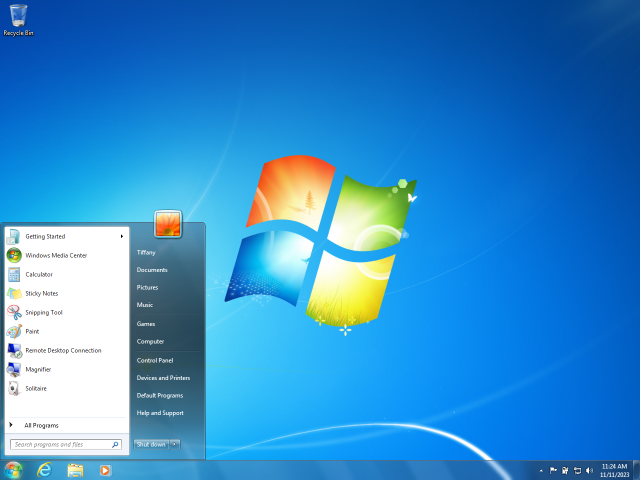
Windows 7 made computers look and work better! ✨The new taskbar is wider and shows your favorite programs right at the bottom. It’s colorful, and you can pin important apps there! The icons are neat and shiny, making them easy to spot. 🌟Windows 7 also introduced “Jump Lists,” which let you access your files quickly when you right-click an icon. The Start menu is more organized too, with everything you need just a click away. Overall, the new design helps even kids navigate their computers without any hassle! 🗂️
Go deeper🎮 Compatibility With Applications
Windows 7 works with many fun and useful programs! 🎮Whether you love playing games or doing schoolwork, you'll find lots of apps that work! Programs like Microsoft Office, Adobe Reader, and even games like Minecraft were made to work smoothly with Windows 7. 🌈It's designed to be compatible with software from earlier versions too, so it can run many popular programs. This means you can enjoy your favorites without a problem! Plus, developers love to create fun apps that run on Windows 7, so the possibilities are endless! 🚀
Go deeper🌈 Legacy And Impact On Future Windows Versions
Windows 7 is remembered as one of the best versions of Windows! 🌈It made using computers easy and fun, and its impact can still be seen in new versions today! Windows 10 and 11 took some of the best features from Windows 7, like the taskbar and search tools, and made them even better! Many ideas from Windows 7 shaped how people interact with computers. Its legacy is why millions of users still love it. It set a high standard for future Windows editions with its user-friendly design! 🏆
Go deeper