Sound Card Facts For Kids
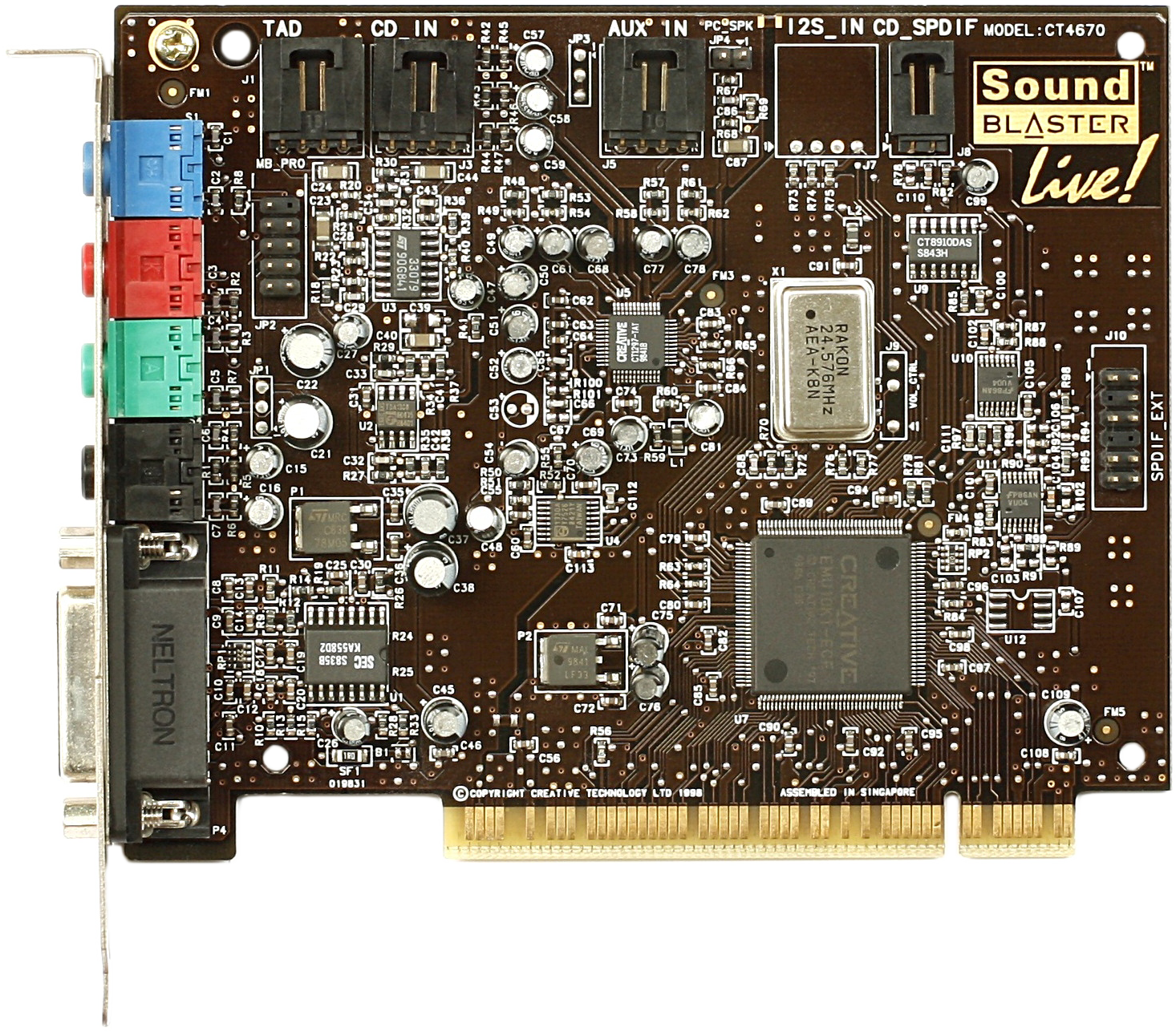
A sound card is an internal expansion card that converts digital audio signals into sound waves and manages input and output for audio devices on a computer.

Do more with AI
Introduction
A sound card is a special piece of hardware inside a computer that helps it make and hear sounds! 🎶It turns digital signals from the computer into sounds you can hear through speakers or headphones. Sound cards can also take sound from a microphone and change it into digital signals that the computer can understand. They help you enjoy music, play games with cool sounds, and even make voice recordings! The first sound cards changed how we used computers and made them much more fun! 🎤
Images of Sound Card
![Close-up of a sound card PCB, showing electrolytic capacitors, SMT capacitors and resistors, and a YAC512 two-channel 16-bit DAC.[1] The integrated circuit on the left is a 3403 single power supply quad operational amplifier.](https://upload.wikimedia.org/wikipedia/commons/thumb/c/c9/Computer_sound_card01.JPEG/960px-Computer_sound_card01.JPEG)
Close-up of a sound card PCB, showing electrolytic capacitors, SMT capacitors and resistors, and a YAC512 two-channel 16-bit DAC.[1] The integrated circuit on the left is a 3403 single power supply quad operational amplifier.

8-channel DAC Cirrus Logic CS4382 placed on Sound Blaster X-Fi Fatal1ty

The AdLib Music Synthesizer Card was one of the first sound cards c. 1990. Note the manual volume adjustment knob. ISA-8 bus.

Sound card Mozart 16 for ISA-16 bus

A Turtle Beach sound card for PCI bus

Echo Digital Audio's Indigo IO – PCMCIA card 24-bit 96 kHz stereo in/out sound card

A VIA Technologies Envy sound card for PC, 5.1 channel for PCI slot

Three early ISA (16-bit) PC sound cards showing the progression toward integrated chipsets

A pair of professional rackmount audio interfaces
How Sound Cards Work
Sound cards help change electrical signals into sound waves! It works like this: the computer sends digital audio data to the sound card. 📡The sound card processes this data and converts it into analog signals, which are what we can hear. These analog signals then travel to speakers or headphones. The opposite happens when you speak into a microphone. The sound waves from your voice are captured, converted to digital signals, and sent to your computer. So, sound cards act as translators between our ears and computers! 🎶
Types Of Sound Cards
There are two main types of sound cards: internal and external. 🖥️ Internal sound cards are inside the computer and connect directly to the motherboard. They usually offer great sound quality. External sound cards connect to the computer through USB. They're portable and can be used with laptops. 🎧Some sound cards are designed specifically for gaming, while others are made for music production, helping musicians mix and edit tracks. All sound cards help to create richer, more enjoyable audio experiences!
History Of Sound Cards
The first sound card was invented in 1980 by a company called Creative Labs. It was called the "Sound Blaster." 🎉 Before sound cards, computers were pretty silent! They could only beep. The Sound Blaster made it possible to hear music and sounds for the first time. By 1989, many different kinds of sound cards were being made. These cards allowed people to play music, record sounds, and even play arcade games with cool noise effects. As computers improved, so did sound cards, making our gaming and listening experiences much better! 🎮
Common Uses Of Sound Cards
Sound cards are used in many fun ways! 🎮People use them for gaming to hear sounds like footsteps or explosions while playing. Musicians use sound cards to record music, allowing them to mix different tracks together. 🎤Sound cards are also helpful for video chats, so we can hear and see our friends who are far away! Teachers use sound cards for educational videos and activities, making learning more exciting! 🎓They truly enhance how we interact with computers, making everything sound better!
Components Of A Sound Card
A sound card has several key components that work together! 🎛️ One important part is the Digital-to-Analog Converter (DAC), which changes digital signals into sound. Another is the Analog-to-Digital Converter (ADC), which does the reverse, turning sounds into digital signals. Sound cards also have output and input jacks for speakers and microphones. 🔌Some also include amplifiers to make sounds louder and clearer. Chips and circuits inside the card manage all the signals, allowing us to enjoy audio without any problems!
Sound Quality And Performance
Not all sound cards sound the same! 🎵Sound quality can vary based on the type of card you have. Higher-quality sound cards can provide clearer music and minimize noise. The number of channels is also important; cards with multiple channels can create surround sound, making you feel like you're part of the action in movies or games! 🎬Some sound cards even support high-definition audio formats. Overall, a sound card with better specifications can improve your listening experience a lot!
Troubleshooting Sound Card Issues
Sometimes sound cards can have problems, but don’t worry! 📞If you can’t hear anything, first check if the speakers or headphones are connected properly. Then make sure the volume is turned up. If there are weird sounds or buzzing, a driver update may help. Look for updated software on the manufacturer’s website. If the sound card is still not working, try restarting the computer or checking for hardware issues. Remember, asking an adult for help is always a good idea! 🔍
Future Trends In Sound Card Technology
The future of sound cards is exciting! 🚀New technology is being developed to improve sound quality even more. Some sound cards can now process 3D audio, creating an immersive experience in games and movies! 🎮There are also advancements in wireless sound cards, which don’t need cables, making them more convenient. Virtual reality (VR) is making sound cards even more important too, as they help create a realistic audio environment. 🎧With these trends, audio experiences will continue to get better and better!
Installing And Configuring Sound Cards
Installing a sound card can be easy! 🎧First, turn off the computer and unplug it. Then, open the case and carefully insert the sound card into a slot on the motherboard. Close the case and plug the computer back in. Next, you may need to install special software called drivers that help the sound card work. 🖥️ After the installation, use the computer's settings to choose your speakers or headphones. You can adjust the volume and other options to get the best audio experience!
Sound Card Quiz
Learn more about Sound Card
