Raspberry Pi 4 Facts For Kids
The Raspberry Pi 4 is a versatile, compact computer designed for education, development, and DIY projects, featuring enhanced processing capabilities and connectivity options.
Select reading age
Raspberry Pi 4 Facts For Kids
Videos & Quizzesincluded
About this topic
The Raspberry Pi 4 is a small, powerful computer invented in the UK by the Raspberry Pi Foundation in 2019. 🖥️ It's about the size of a credit card and is great for learning how to code and build fun projects! The Pi helps kids explore technology, linking creativity with science and engineering. With many colorful accessories like cases and keypads, it’s perfect for young inventors. 🚀It has different models, like 2GB, 4GB, and 8GB RAM, so you choose how much power you want! The tiny size makes it easy to carry, letting you take your creations anywhere! 🌟
Explore with ChatDinoKey Points
Raspberry Pi 4 can run different operating systems (OS)!
The Raspberry Pi community is huge!
Raspberry Pi 4 has amazing hardware features!
Raspberry Pi 4 can help you create awesome projects!
Sometimes, things might not work perfectly with your Raspberry Pi 4, and that’s okay!
The Raspberry Pi 4 is a great tool for learning various programming languages!
To start using your Raspberry Pi 4, you first need a few things!
Connecting the Raspberry Pi 4 to the internet is super easy!
Photos of Raspberry Pi 4

Raspberry Pi 4 with PoE HAT

Raspberry Pi Compute Module 4

Raspberry Pi 400 keyboard computer
🥧 Operating Systems
Raspberry Pi 4 can run different operating systems (OS)! The most popular one is called Raspberry Pi OS, which is made just for the Pi. 🥧It's user-friendly with a colorful desktop that’s easy to navigate! 🤩You can also use other OS like Ubuntu Mate, which is good for learning more advanced skills. If you want to program, you can try NOOBS, which helps you install several operating systems easily. Each OS lets you do different fun things, such as coding, creating games, or even watching videos! 🍿
Go deeper🌍 Community And Resources
The Raspberry Pi community is huge! 🌍Many people around the world share projects, tips, and inspirations. You can visit the official Raspberry Pi website for loads of free resources, including exciting tutorials. 📚Websites like Instructables and GitHub have many projects you can follow. Don’t forget to check online forums and join clubs at school or local libraries! 😊You can meet other young inventors sharing their ideas and learning together. Connecting with others makes learning much more enjoyable! 🙌
Go deeper🏎️ Hardware Specifications
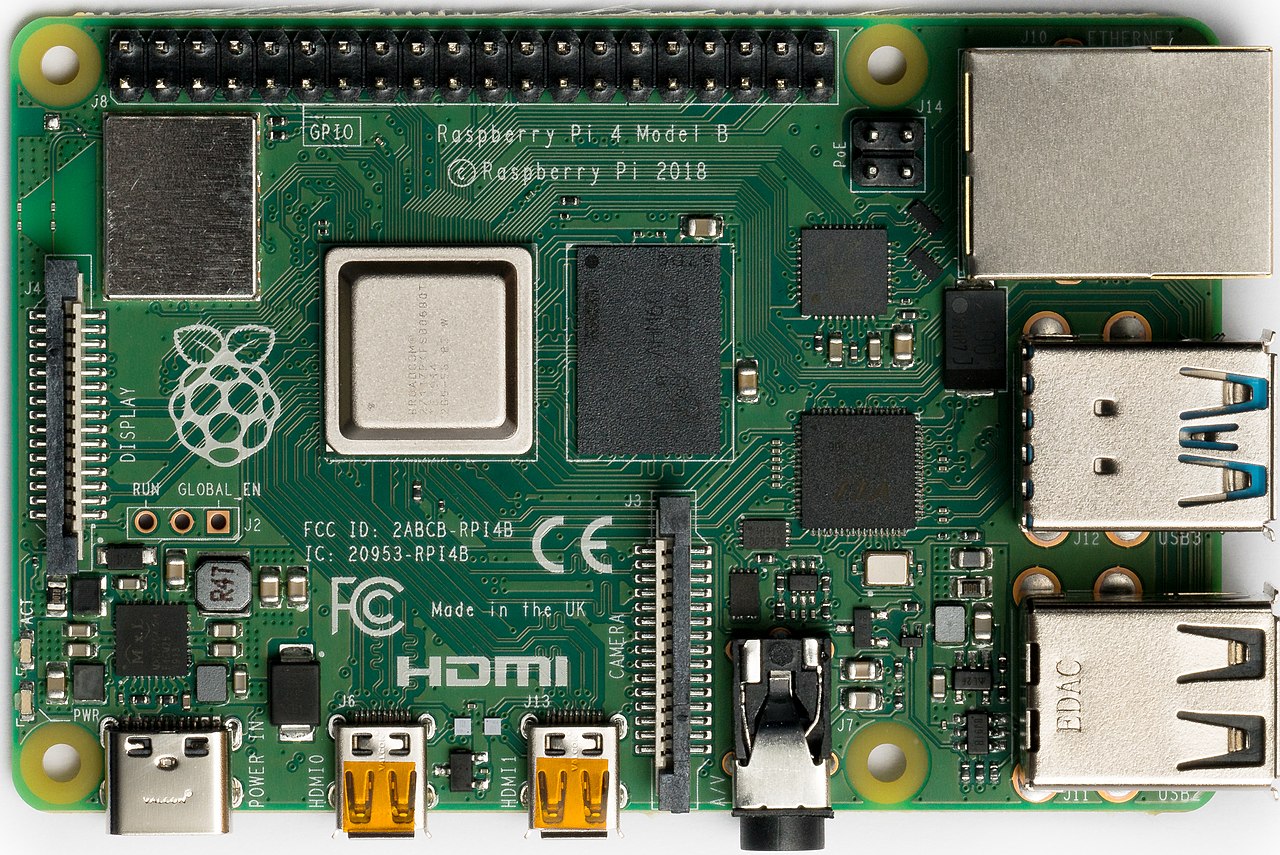
Raspberry Pi 4 has amazing hardware features! It has a speedy 1.5 GHz quad-core processor, which helps it run smoothly. 🏎️ It comes with two micro HDMI ports to connect to screens, allowing you to use two monitors! 🎨The Pi has USB 3.0 and USB 2.0 ports for connecting cool devices like keyboards and mice. You also have a dedicated Ethernet port for internet access! 🌐With Wi-Fi and Bluetooth built-in, you can connect to wireless devices easily. Plus, there’s a 40-pin GPIO header that allows you to plug in and control electronic components. ⚡
Go deeper🎨 Projects And Applications
Raspberry Pi 4 can help you create awesome projects! 🎨You could make a weather station to track the temperature and humidity outside! 🌦️ Want to play games? Try coding your own video game using Scratch! 🕹️ You can even build a robot that moves using sensors! 🤖Many fun ideas wait for you, like creating a digital photo frame or designing an interactive quiz! Raspberry Pi also enables you to build smart home gadgets, such as light controllers. The only limit is your imagination! ✨
Go deeper😅 Troubleshooting Common Issues
Sometimes, things might not work perfectly with your Raspberry Pi 4, and that’s okay! 😅If it won’t turn on, check if the power supply is connected correctly. If you can't see a screen, ensure the HDMI cable is plugged in! 🎥If your Raspberry Pi is running slow, try closing extra apps. Remember, updates are also essential! Make sure you keep your OS updated for the best performance. If you get stuck, turn to the internet or your friends for help! Learning through problem-solving is part of the fun! 💡
Go deeper🌈 Programming Languages Supported
The Raspberry Pi 4 is a great tool for learning various programming languages! 🌈You can start with Scratch, designed especially for kids, where you drag and drop blocks to create code! 📦If you want to dive deeper, you can learn Python, a powerful language used by many professionals. 🐍Other languages like Java and C++ are also supported. Learning to program lets you make videos, games, and even animations! It’s fun and can even lead to exciting careers in technology! 🌠
Go deeper🎉 Getting Started With Raspberry Pi 4
To start using your Raspberry Pi 4, you first need a few things! 🎉You will need a power supply, microSD card with Raspberry Pi OS, and a monitor. 💡After connecting everything, power it up and follow the easy setup instructions on the screen! Don't forget to add a mouse and keyboard for control! 🌈Once you are set up, you can explore the desktop, customize settings, and visit the internet. It’s like opening a treasure chest of possibilities! 🌟
Go deeper🌍 Networking And Internet Connectivity
Connecting the Raspberry Pi 4 to the internet is super easy! 🌍You can use Wi-Fi or a cable for fast access to the web. First, click on the Wi-Fi icon in the corner of the screen and choose your network. Enter the password, and you’re connected! 🔗This means you can browse safely, watch videos, or join online coding classes. You can even use your Raspberry Pi as a mini web server to host your website! Remember always to be safe online and only visit trusted websites! 🔒
Go deeper