Plug-in Facts For Kids
A plug-in is a special piece of software that adds new features to existing software systems, enhancing their functionality and user experience without requiring a complete overhaul of the software.
Select reading age
Plug-in Facts For Kids
Videos & Quizzesincluded
About this topic
Have you ever played a game or used an app that added cool features or new tools? 🎮✨ That’s where plug-ins come in! A plug-in is a special piece of software that adds extra abilities to an existing program. For example, if you have a music app and want to create funny sounds, a plug-in can help! Plug-ins let you customize your experience without changing the whole program. They’re like super accessories, just like how you can add stickers to your school folder! 🎨With plug-ins, you can make a computer program do amazing things!
Explore with ChatDinoKey Points
So, how do plug-ins work?
Plug-ins come in all shapes and sizes!
Think of a plug-in as a magic helper that makes your favorite software even better!
Plug-ins have been around since the 1990s!
Creating a plug-in might sound tricky, but it's like making a recipe!
There are lots of popular plug-ins that people use every day!
There are many benefits to using plug-ins!
The future of plug-ins looks bright and exciting!
Plug-ins are used in many applications to make them super cool!
While plug-ins are useful, they can sometimes be risky!
Photos of Plug-in

Example Plug-In Framework
🤔 How Plug-ins Work
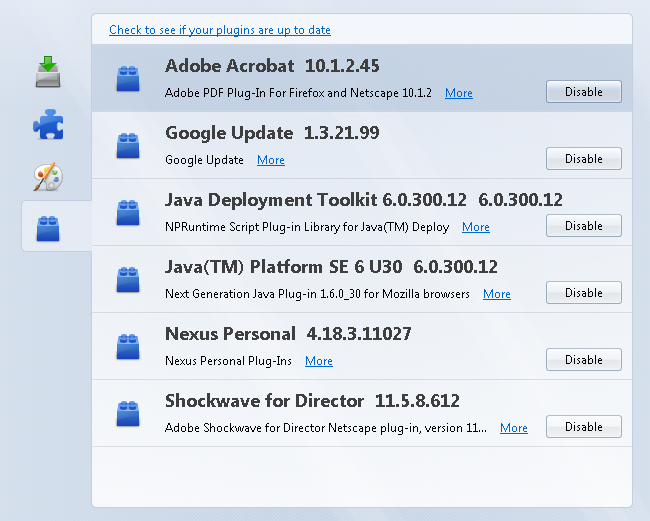
So, how do plug-ins work? 🤔🛠️ When you install a plug-in, it connects to the main software, just like a puzzle piece fitting into a puzzle! The original program sends instructions to the plug-in, telling it what to do. For example, when you browse the internet and click a plug-in, it adds a new feature like downloading a file. The best part is, you can have many plug-ins doing different jobs at once! This lets you enjoy a rich and fun experience when using your favorite programs! 🧩✨
Go deeper✨ Types Of Plug-ins
Plug-ins come in all shapes and sizes! ✨From web browsers to games, there’s a plug-in for nearly everything! Here are some common types:
1. Browser Plug-ins: Used in browsers like Chrome to add cool features!
2. Audio Plug-ins: Help musicians create amazing sounds in music software! 🎶
3. Game Plug-ins: Make video games more exciting by adding new characters or levels! 🎮
4. Photo Editing Plug-ins: Let you add effects or filters to your pictures! 📸
5. Security Plug-ins: Protect your computer from bad stuff on the internet! 🔒
Each type helps your software do even more!
Go deeper1. Browser Plug-ins: Used in browsers like Chrome to add cool features!
2. Audio Plug-ins: Help musicians create amazing sounds in music software! 🎶
3. Game Plug-ins: Make video games more exciting by adding new characters or levels! 🎮
4. Photo Editing Plug-ins: Let you add effects or filters to your pictures! 📸
5. Security Plug-ins: Protect your computer from bad stuff on the internet! 🔒
Each type helps your software do even more!
💫 What Is A Plug-in?
Think of a plug-in as a magic helper that makes your favorite software even better! 💫⚙️ When you use a program like a web browser (like Google Chrome), you might want to block annoying ads or save pictures easily. That’s what a plug-in does! It’s a tiny piece of software that connects with the main program, allowing it to do new tricks. Just like how you might add chocolate chips to a cookie recipe, a plug-in adds special features to your app! This way, it becomes more fun and useful to use while you’re learning or playing! 🍪💻
Go deeper🎉 History Of Plug-ins
Plug-ins have been around since the 1990s! 🎉🎈 The first one was created for web browsers, allowing them to display more exciting things, like videos and animations! One of the most famous early plug-ins was made by Adobe, called Flash Player. It helped play videos and games right in your browser! Over the years, plug-ins got better and better, helping everything from web browsers to music programs. More people began using them to enjoy more features! Today, they’re everywhere, making our digital world more amazing! 🌟📅
Go deeper👩🍳 Developing A Plug-in
Creating a plug-in might sound tricky, but it's like making a recipe! 👩🍳🧑🍳 You start with a main program and think about what new feature you want to add. First, choose a programming language, like JavaScript or Python, to write your plug-in code. Then, test it to make sure it works well with the main program. Once it’s ready, you can share it with others! Many people love to create plug-ins because they can help others enjoy their software even more! Just like sharing a tasty snack at school! 🍏🥳
Go deeper🌍 Popular Plug-in Examples
There are lots of popular plug-ins that people use every day! 🌍✨ Here are a few you might have heard of:
1. AdBlock: Blocks ads while browsing!
2. VST Plug-ins: Special tools for music creation! 🎸
3. Yoast SEO: Helps websites appear in Google searches!
4. Screencastify: Records what happens on your computer screen!
5. Grammarly: Helps improve your writing! ✍️
These plug-ins are popular with users because they make life easier and more fun in different ways!
Go deeper1. AdBlock: Blocks ads while browsing!
2. VST Plug-ins: Special tools for music creation! 🎸
3. Yoast SEO: Helps websites appear in Google searches!
4. Screencastify: Records what happens on your computer screen!
5. Grammarly: Helps improve your writing! ✍️
These plug-ins are popular with users because they make life easier and more fun in different ways!
🎁 Benefits Of Using Plug-ins
There are many benefits to using plug-ins! 🎁⭐ First, they let you customize your software, making it feel special just for you! Want a new tool? There’s a plug-in for that! Next, they save time. Instead of rebuilding a whole program, you can just add a plug-in! They also keep things up-to-date since creators often release new versions with improvements! Plus, using plug-ins can help your computer run better by adding helpful features! Overall, plug-ins make technology more exciting and personal for everyone! 🎉🎊
Go deeper🌟 Future Of Plug-in Technology
The future of plug-ins looks bright and exciting! 🌟🔮 Developers are always creating new ways to make plug-ins better. We might see even more customized plug-ins that can learn what you like! Imagine a plug-in that can suggest the best songs while you’re creating music! 🎶Or security plug-ins that become super smart at protecting your computer! Technology keeps changing, and plug-ins will keep improving to make our experiences more awesome! So, get ready for a tech-filled future where plug-ins do even greater things! 🚀✨
Go deeper🌈 Common Applications Of Plug-ins
Plug-ins are used in many applications to make them super cool! 🌈Here are a few common ones:
1. Web Browsers (like Chrome and Firefox): To enhance the browsing experience!
2. Music Programs (like GarageBand): To create unique sounds! 🎵
3. Video Editing Software (like Adobe Premiere): To add effects or transitions! 📽️
4. Graphic Design Programs (like Photoshop): To apply filters and tools!
5. Games (like Minecraft): To add new worlds or characters!
All these cool applications use plug-ins to help users like you have a better time!
Go deeper1. Web Browsers (like Chrome and Firefox): To enhance the browsing experience!
2. Music Programs (like GarageBand): To create unique sounds! 🎵
3. Video Editing Software (like Adobe Premiere): To add effects or transitions! 📽️
4. Graphic Design Programs (like Photoshop): To apply filters and tools!
5. Games (like Minecraft): To add new worlds or characters!
All these cool applications use plug-ins to help users like you have a better time!
⚠️ Security Considerations With Plug-ins
While plug-ins are useful, they can sometimes be risky! ⚠️🛡️ Some plug-ins can have bugs or even be harmful! That’s why it's important to be cautious. Always download plug-ins from trusted places, like official websites or app stores. Keep your software updated because that helps fix security problems. You should also check reviews from other users to make sure a plug-in is safe before installing it. Remember, while exploring the world of plug-ins, staying safe helps you enjoy all the fun features without worry! 🚦🚀
Go deeper