All Articles

Ibm Thinkpad

Ibm Thinkpad Facts For Kids

IBM ThinkPad is a line of business-oriented laptops known for their durability, innovative features, and ergonomic design.
🎨 Reading age for 6-8
Background blob
Ibm Thinkpad
Ibm Thinkpad
Facts for Kids!
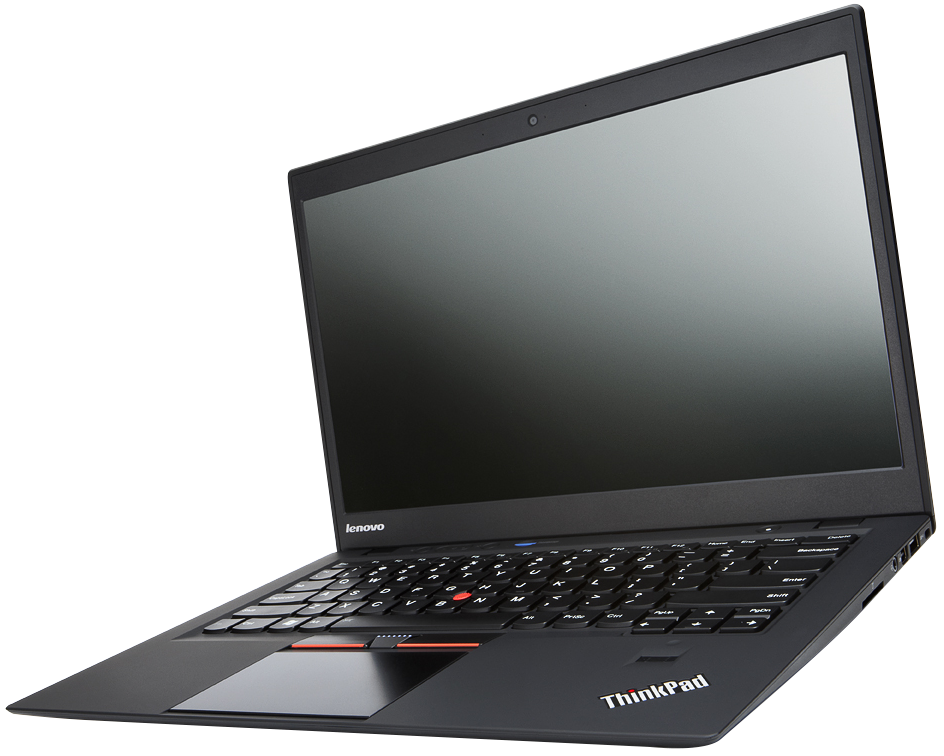
Image by Intel Free Press, licensed under Creative Commons Attribution-Share Alike 2.0

Do more with AI

Introduction

The IBM ThinkPad is a special type of laptop computer created by IBM, a big company in the USA 🌍! It was first made in 1992 and has become popular for its black color and unique design. ThinkPads are known for being strong and reliable, which makes them perfect for both work and play. Many people in schools and offices use them to write papers, create presentations, or play games! 🎮A special feature is the red dot called the TrackPoint, which helps you move the mouse without a touchpad. Isn’t that cool? 🖱️

Images of Ibm Thinkpad

A 1980s-era IBM THINK notepad (above), which inspired the laptop name, and the notepad refill information (below)Image by Centriciti, licensed under Creative Commons Attribution-Share Alike 4.0

A 1980s-era IBM THINK notepad (above), which inspired the laptop name, and the notepad refill information (below)

IBM/Lenovo's Yamato Lab where the Think line of products is developedImage by BigBlue010903, licensed under Creative Commons Attribution-Share Alike 4.0

IBM/Lenovo's Yamato Lab where the Think line of products is developed

Photos of Ibm Thinkpad
A ThinkPad's characteristic boxy black exterior (X201 on top of an X220)Image by Robert Kloosterhuis, licensed under Creative Commons Attribution 2.0

A ThinkPad's characteristic boxy black exterior (X201 on top of an X220)

A typical IBM design example (2000's ThinkPad T20)Image by J-P Kärnä, licensed under Creative Commons Attribution-Share Alike 3.0

A typical IBM design example (2000's ThinkPad T20)

This ThinkPad compact keyboard features a wired device, blue ThinkVantage button and Enter key, TrackPoint pointer and has no touchpad.Image by Ryosuke Hosoi, licensed under Creative Commons Attribution 2.0

This ThinkPad compact keyboard features a wired device, blue ThinkVantage button and Enter key, TrackPoint pointer and has no touchpad.

Touchpad + TrackPoint combination; modern keyboardImage by TAKA@P.P.R.S, licensed under Creative Commons Attribution-Share Alike 2.0

Touchpad + TrackPoint combination; modern keyboard

IBM ThinkPad 701 TrackWrite keyboard in mid fold (also known as the "Butterfly" keyboard)

IBM ThinkPad 701 TrackWrite keyboard in mid fold (also known as the "Butterfly" keyboard)

ThinkPad 7-row keyboard, replaced with a newer 'island' design in 2012. For user convenience, buttons with the same functions are located both above and below the touchpad.Image by Sloesch ( Diskussion ), licensed under Creative Commons Attribution-Share Alike 3.0

ThinkPad 7-row keyboard, replaced with a newer 'island' design in 2012. For user convenience, buttons with the same functions are located both above and below the touchpad.

A 1980s-era IBM THINK notepad (above), which inspired the laptop name, and the notepad refill information (below)

A 1980s-era IBM THINK notepad (above), which inspired the laptop name, and the notepad refill information (below)

IBM/Lenovo's Yamato Lab where the Think line of products is developed

IBM/Lenovo's Yamato Lab where the Think line of products is developed

Photos of Ibm Thinkpad
A ThinkPad's characteristic boxy black exterior (X201 on top of an X220)

A ThinkPad's characteristic boxy black exterior (X201 on top of an X220)

A typical IBM design example (2000's ThinkPad T20)

A typical IBM design example (2000's ThinkPad T20)

This ThinkPad compact keyboard features a wired device, blue ThinkVantage button and Enter key, TrackPoint pointer and has no touchpad.

This ThinkPad compact keyboard features a wired device, blue ThinkVantage button and Enter key, TrackPoint pointer and has no touchpad.

Touchpad + TrackPoint combination; modern keyboard

Touchpad + TrackPoint combination; modern keyboard

IBM ThinkPad 701 TrackWrite keyboard in mid fold (also known as the "Butterfly" keyboard)

IBM ThinkPad 701 TrackWrite keyboard in mid fold (also known as the "Butterfly" keyboard)

ThinkPad 7-row keyboard, replaced with a newer 'island' design in 2012. For user convenience, buttons with the same functions are located both above and below the touchpad.

ThinkPad 7-row keyboard, replaced with a newer 'island' design in 2012. For user convenience, buttons with the same functions are located both above and below the touchpad.

A 1980s-era IBM THINK notepad (above), which inspired the laptop name, and the notepad refill information (below)Image by Centriciti, licensed under Creative Commons Attribution-Share Alike 4.0

A 1980s-era IBM THINK notepad (above), which inspired the laptop name, and the notepad refill information (below)

IBM/Lenovo's Yamato Lab where the Think line of products is developedImage by BigBlue010903, licensed under Creative Commons Attribution-Share Alike 4.0

IBM/Lenovo's Yamato Lab where the Think line of products is developed

Photos of Ibm Thinkpad
A ThinkPad's characteristic boxy black exterior (X201 on top of an X220)Image by Robert Kloosterhuis, licensed under Creative Commons Attribution 2.0

A ThinkPad's characteristic boxy black exterior (X201 on top of an X220)

A typical IBM design example (2000's ThinkPad T20)Image by J-P Kärnä, licensed under Creative Commons Attribution-Share Alike 3.0

A typical IBM design example (2000's ThinkPad T20)

This ThinkPad compact keyboard features a wired device, blue ThinkVantage button and Enter key, TrackPoint pointer and has no touchpad.Image by Ryosuke Hosoi, licensed under Creative Commons Attribution 2.0

This ThinkPad compact keyboard features a wired device, blue ThinkVantage button and Enter key, TrackPoint pointer and has no touchpad.

Touchpad + TrackPoint combination; modern keyboardImage by TAKA@P.P.R.S, licensed under Creative Commons Attribution-Share Alike 2.0

Touchpad + TrackPoint combination; modern keyboard

IBM ThinkPad 701 TrackWrite keyboard in mid fold (also known as the "Butterfly" keyboard)

IBM ThinkPad 701 TrackWrite keyboard in mid fold (also known as the "Butterfly" keyboard)

ThinkPad 7-row keyboard, replaced with a newer 'island' design in 2012. For user convenience, buttons with the same functions are located both above and below the touchpad.Image by Sloesch ( Diskussion ), licensed under Creative Commons Attribution-Share Alike 3.0

ThinkPad 7-row keyboard, replaced with a newer 'island' design in 2012. For user convenience, buttons with the same functions are located both above and below the touchpad.

A 1980s-era IBM THINK notepad (above), which inspired the laptop name, and the notepad refill information (below)Image by Centriciti, licensed under Creative Commons Attribution-Share Alike 4.0

A 1980s-era IBM THINK notepad (above), which inspired the laptop name, and the notepad refill information (below)

IBM/Lenovo's Yamato Lab where the Think line of products is developedImage by BigBlue010903, licensed under Creative Commons Attribution-Share Alike 4.0

IBM/Lenovo's Yamato Lab where the Think line of products is developed

Photos of Ibm Thinkpad
A ThinkPad's characteristic boxy black exterior (X201 on top of an X220)Image by Robert Kloosterhuis, licensed under Creative Commons Attribution 2.0

A ThinkPad's characteristic boxy black exterior (X201 on top of an X220)

A typical IBM design example (2000's ThinkPad T20)Image by J-P Kärnä, licensed under Creative Commons Attribution-Share Alike 3.0

A typical IBM design example (2000's ThinkPad T20)

This ThinkPad compact keyboard features a wired device, blue ThinkVantage button and Enter key, TrackPoint pointer and has no touchpad.Image by Ryosuke Hosoi, licensed under Creative Commons Attribution 2.0

This ThinkPad compact keyboard features a wired device, blue ThinkVantage button and Enter key, TrackPoint pointer and has no touchpad.

Touchpad + TrackPoint combination; modern keyboardImage by TAKA@P.P.R.S, licensed under Creative Commons Attribution-Share Alike 2.0

Touchpad + TrackPoint combination; modern keyboard

IBM ThinkPad 701 TrackWrite keyboard in mid fold (also known as the "Butterfly" keyboard)

IBM ThinkPad 701 TrackWrite keyboard in mid fold (also known as the "Butterfly" keyboard)

ThinkPad 7-row keyboard, replaced with a newer 'island' design in 2012. For user convenience, buttons with the same functions are located both above and below the touchpad.Image by Sloesch ( Diskussion ), licensed under Creative Commons Attribution-Share Alike 3.0

ThinkPad 7-row keyboard, replaced with a newer 'island' design in 2012. For user convenience, buttons with the same functions are located both above and below the touchpad.

Legacy And Impact

The ThinkPad has been around for more than 30 years and has made a huge impact on technology! 🌟It’s known for its reliability, making it a favorite among many professionals. ThinkPads are often used in schools and businesses, helping people stay productive. They set a high standard for laptops, influencing how other companies design their computers. 💻The ThinkPad is a symbol of innovation and quality and has received many awards for its design and performance over the years.

Design And Features

ThinkPads are known for their unique design. They have a sturdy black casing that can withstand bumps and drops, making them super durable! 💪The keyboard is specially made for typing, making it comfortable and quiet. ThinkPads often have a TrackPoint, a little red dot on the keyboard that acts like a mouse. 🤖They also come with a touchscreen option, which means you can touch the screen to use it! Many models have great battery life, so you can use them for a long time without charging. ⚡

History Of Ibm Thinkpad

The story of the ThinkPad begins in 1992 when IBM introduced it to the world. The first model was called the ThinkPad 700C and had a colorful display and a special trackball! 🎉A famous engineer named Don Estridge helped create it. In 2005, IBM sold the ThinkPad brand to Lenovo, a company from China 🇨🇳, but it still kept many of its original features! The ThinkPad has been used by many famous people. For example, astronauts have used it in space! 🚀Isn’t that fascinating?

Key Models And Variants

There are many different models of ThinkPads! Some popular ones include the ThinkPad X1 Carbon, known for being very light and thin 💼, and the ThinkPad T series, praised for its performance. Another famous model is the ThinkPad Yoga, which can flip over to become a tablet! 🖥️ A unique feature in some models is the spill-resistant keyboard, which means that if you spill a little drink, your laptop is safe! 🥤Each model is made to help different types of users, whether for schoolwork, gaming, or business.

Technical Specifications

The IBM ThinkPad has some cool tech features! Most models use Intel processors, which are like the brains of the computer 🧠. They also have lots of memory (RAM), so you can run many programs at once without slowing down! 📈The storage is usually on a solid-state drive (SSD), which is faster than traditional hard drives. Some ThinkPads even have high-definition screens with stunning resolutions, perfect for watching videos! 🎥Other features can include Bluetooth for connecting to headphones and Wi-Fi to access the internet. 🌐

Comparison With Competitors

When comparing ThinkPads to other laptops, they often score high in durability and keyboard comfort! 🥇Other popular laptop brands include Dell and HP. While Dell laptops are known for their gaming capabilities, and HP laptops are stylish, ThinkPads are more about strength and reliability. 💪Some users say ThinkPads are best for work because they last long and are easy to type on. People often choose them when they want a dependable computer for school or work! 📚

Ibm Thinkpad In Popular Culture

The ThinkPad isn’t just a computer—it’s become famous in movies, TV shows, and even on astronauts' spacecraft! 🎬In the movie “The Social Network,” characters use ThinkPads to create Facebook! 📱Many tech fans love the ThinkPad’s design and features, and it’s often seen in workplaces. It even appeared in the popular video game “Fallout 3” as a nostalgic item for players! 🎮It’s cool to see how the ThinkPad has become a part of our entertainment!

Current Status And Future Developments

Today, Lenovo still makes ThinkPads and continues to improve their technology! 📈They now include features like fingerprint readers for security and more powerful processors. ThinkPads are also getting lighter and thinner while keeping their strength! 💼As we move into the future, ThinkPads might even include more advanced features, like artificial intelligence! 🤖So, the ThinkPad is not just a computer; it’s a part of our technology evolution, and we can’t wait to see what comes next! 🎉

Did you know?

💻 The IBM ThinkPad was first introduced in 1992 as a line of laptop computers.

🔒 ThinkPads are known for their robust build quality, designed to meet military specifications for durability.

🖊️ The distinctive red 'TrackPoint' pointing device was designed to be used without taking your hands off the keyboard.

📏 ThinkPads typically feature a minimalistic design, with a focus on functionality over flashy aesthetics.

📈 The ThinkPad series is particularly popular in business environments due to its reliability and performance.

🔋 Many models are praised for their long battery life, making them ideal for professionals on the go.

📚 IBM contains a wealth of innovations in the ThinkPad lineup, including the introduction of the first laptop with a built-in optical drive.

💾 The ThinkPad was the first laptop to come preloaded with the Microsoft Windows operating system.

🎨 The iconic black, boxy design has made ThinkPads easily recognizable and a symbol of reliability.

🛠️ IBM sold its PC division, including the ThinkPad brand, to Lenovo in 2005, but Lenovo continues to manufacture ThinkPads today.

Ibm Thinkpad Quiz

Q1
Question 1 of 10

Learn more about Ibm Thinkpad

Ready to create?

Make

To create a safe space for kid creators worldwide!

Create

Vibe Coding

Kids GPT

All Tools

Kibu

Resources

Worksheets

SafeTube

Blog

FAQ

Account

Pricing

Log-in

Sign-up

Data Deletion

Company

About

Community Guidelines

Privacy Policy

Terms of Service

2025, URSOR LIMITED. All rights reserved. DIY is in no way affiliated with Minecraft™, Mojang, Microsoft, Roblox™ or YouTube. LEGO® is a trademark of the LEGO® Group which does not sponsor, endorse or authorize this website or event. Made with love in San Francisco.