Flowchart Facts For Kids
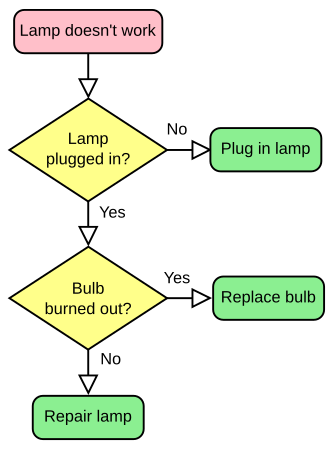
A flowchart is a type of diagram that visually represents a sequence of steps in a process, using shapes and arrows to guide the viewer.
Select reading age
Flowchart Facts For Kids
Videos & Quizzesincluded
About this topic
A flowchart is like a map 📍 for solving problems or completing tasks! It helps us understand the steps we need to take in a clear and simple way. Imagine you're baking a cake 🍰; a flowchart can show you the exact order of steps to make it delicious! Flowcharts are used in many places. For instance, teachers use them to explain lessons, and companies use them to organize projects. By following the shapes and arrows in a flowchart, everyone knows what to do next. So, let’s dive into the fun world of flowcharts! 🎉
Explore with ChatDinoKey Points
There are several types of flowcharts!
A flowchart is a visual way to show how we do something ✏️.
Flowcharts are used in many fun and educational ways!
Making a flowchart is easy and fun!
Today, making flowcharts can also be done with cool software!
Flowcharts use special shapes to represent different actions.
To make your flowchart super effective, keep these tips in mind!
Flowcharts are just one way to show ideas.
Flowcharts come in handy in many industries!
Photos of Flowchart

Flow diagram a C-style for loop, representing the following code: for(i=0;i<5;i++) printf("*"); The loop will cause five asterisks to be printed.

IBM flowcharting template

Flowchart — photo 3

A screenshot of the flowchart software Flowgorithm
🎨 Types Of Flowcharts
There are several types of flowcharts! 🎨The most common ones include:
1. Process Flowcharts: Show how a task is completed step-by-step.
2. Data Flowcharts: Illustrate how information moves through a system, like the internet 🌐.
3. Swimlane Flowcharts: Break down a process into lanes for different people or groups 👥.
4. Workflow Diagrams: Depict the flow of work and responsibilities in a team.
Each type has shapes and connections, making it easy to see what to do and when to do it! 🚦
Go deeper1. Process Flowcharts: Show how a task is completed step-by-step.
2. Data Flowcharts: Illustrate how information moves through a system, like the internet 🌐.
3. Swimlane Flowcharts: Break down a process into lanes for different people or groups 👥.
4. Workflow Diagrams: Depict the flow of work and responsibilities in a team.
Each type has shapes and connections, making it easy to see what to do and when to do it! 🚦
✏️ What Is A Flowchart?
A flowchart is a visual way to show how we do something ✏️. It uses simple shapes and arrows to connect ideas and actions. If you think of a treasure hunt, a flowchart could show you the path from the start of the hunt to finding the treasure! 🗺️ You begin at one point, make choices (like left or right), and continue until you reach your goal. Flowcharts make complex tasks easy to understand, so anyone can follow along! They are like fun puzzles that help us organize our thoughts and ideas!
Go deeper📚 Common Uses Of Flowcharts
Flowcharts are used in many fun and educational ways! 📚Here are some examples:
- School: Teachers may use flowcharts to explain homework or lessons.
- Cooking: Chefs create flowcharts to follow recipes step-by-step.
- Business: Companies make flowcharts to plan projects and organize tasks.
- Art: Artists might use them to plan out painting or crafting projects.
By using flowcharts, people can complete tasks more easily in lots of exciting activities! 🥳
Go deeper- School: Teachers may use flowcharts to explain homework or lessons.
- Cooking: Chefs create flowcharts to follow recipes step-by-step.
- Business: Companies make flowcharts to plan projects and organize tasks.
- Art: Artists might use them to plan out painting or crafting projects.
By using flowcharts, people can complete tasks more easily in lots of exciting activities! 🥳
😊 Steps To Create A Flowchart
Making a flowchart is easy and fun! 😊Here’s how to do it:
1. Choose a Topic: Decide what process you want to show.
2. List Steps: Write down each step in order from start to finish ✍️.
3. Select Symbols: Pick the right shapes for each step and decision.
4. Connect Steps: Use arrows to link the shapes following the correct path.
5. Review: Check if the flowchart makes sense and is easy to follow.
And voilà! You’ve created your own flowchart! 🎉
Go deeper1. Choose a Topic: Decide what process you want to show.
2. List Steps: Write down each step in order from start to finish ✍️.
3. Select Symbols: Pick the right shapes for each step and decision.
4. Connect Steps: Use arrows to link the shapes following the correct path.
5. Review: Check if the flowchart makes sense and is easy to follow.
And voilà! You’ve created your own flowchart! 🎉
💻 Flowchart Software And Tools
Today, making flowcharts can also be done with cool software! 💻Here are some popular tools:
1. Lucidchart: A user-friendly design tool for everyone!
2. Microsoft Visio: Great for more advanced flowcharts and diagrams.
3. Creately: Offers many templates to start your flowchart quickly!
4. Google Drawings: Free and easy for beginners to use!
These tools help you create colorful and creative flowcharts without needing to draw everything by hand! 🎨
Go deeper1. Lucidchart: A user-friendly design tool for everyone!
2. Microsoft Visio: Great for more advanced flowcharts and diagrams.
3. Creately: Offers many templates to start your flowchart quickly!
4. Google Drawings: Free and easy for beginners to use!
These tools help you create colorful and creative flowcharts without needing to draw everything by hand! 🎨
✅ Key Symbols Used In Flowcharts
Flowcharts use special shapes to represent different actions. ✅Here are some key symbols:
- Oval (Start/End): Shows where the flowchart begins and ends. 🎉
- Rectangle (Process): Represents a step in the process, like "Mix Ingredients" for baking!
- Diamond (Decision): Used for questions with yes/no answers, like "Is it baked?" 🍰
- Arrow: Connects shapes and shows the direction of the flow.
These symbols help everyone understand what to do, making flowcharts powerful tools! 💪
Go deeper- Oval (Start/End): Shows where the flowchart begins and ends. 🎉
- Rectangle (Process): Represents a step in the process, like "Mix Ingredients" for baking!
- Diamond (Decision): Used for questions with yes/no answers, like "Is it baked?" 🍰
- Arrow: Connects shapes and shows the direction of the flow.
These symbols help everyone understand what to do, making flowcharts powerful tools! 💪
💡 Tips For Designing Effective Flowcharts
To make your flowchart super effective, keep these tips in mind! 💡
1. Be Clear: Use simple words that everyone can understand.
2. Start from the Top: Begin your flowchart at the top and work your way downwards.
3. Be Consistent: Use the same shapes for actions so people won’t get confused!
4. Limit Decisions: Keep questions clear and don’t add too many choices at once.
5. Use Space Wisely: Keep your flowchart neat with enough space between shapes.
These tips will help your flowchart shine! ✨
Go deeper1. Be Clear: Use simple words that everyone can understand.
2. Start from the Top: Begin your flowchart at the top and work your way downwards.
3. Be Consistent: Use the same shapes for actions so people won’t get confused!
4. Limit Decisions: Keep questions clear and don’t add too many choices at once.
5. Use Space Wisely: Keep your flowchart neat with enough space between shapes.
These tips will help your flowchart shine! ✨
🛠️ Flowcharts Vs. Other Diagramming Techniques
Flowcharts are just one way to show ideas. 🛠️ Here’s how they compare to other techniques:
- Mind Maps: Great for brainstorming but less structured than flowcharts.
- Organizational Charts: Show hierarchy and relationships but focus on people rather than processes.
- Gantt Charts: Used for project timelines but don’t illustrate steps as flowcharts do.
Flowcharts are special because they clearly lay out steps and decisions, making it easy for everyone to follow along! 🥳
Go deeper- Mind Maps: Great for brainstorming but less structured than flowcharts.
- Organizational Charts: Show hierarchy and relationships but focus on people rather than processes.
- Gantt Charts: Used for project timelines but don’t illustrate steps as flowcharts do.
Flowcharts are special because they clearly lay out steps and decisions, making it easy for everyone to follow along! 🥳
🌍 Examples Of Flowcharts In Different Industries
Flowcharts come in handy in many industries! Here are some examples: 🌍
- Healthcare: Doctors use flowcharts to track patient care and treatment plans.
- Education: Schools use them to create lesson plans and guide students.
- Technology: Programmers design flowcharts to outline software programs.
- Manufacturing: Factories create flowcharts to manage production processes.
Thanks to flowcharts, different industries can clearly communicate plans and ideas to be more efficient! 💼
Go deeper- Healthcare: Doctors use flowcharts to track patient care and treatment plans.
- Education: Schools use them to create lesson plans and guide students.
- Technology: Programmers design flowcharts to outline software programs.
- Manufacturing: Factories create flowcharts to manage production processes.
Thanks to flowcharts, different industries can clearly communicate plans and ideas to be more efficient! 💼