Dos Facts For Kids
DOS (Disk Operating System) is a foundational operating system used primarily on IBM PC compatible computers, relying on a command line interface for user interaction.

Do more with AI
Introduction
DOS, or Disk Operating System, is like the brain of your computer! 🧠It helps the computer understand what to do, just like how a teacher helps students learn. DOS was popular in the 1980s and 1990s and is mostly used for IBM computers, which were some of the first types of personal computers. 💻DOS speaks to the computer using special commands, allowing users to create files, run programs, and even play games. It's like a magical spellbook, but instead of wands, you use words! ✨
Images of Dos

Arachne web browser

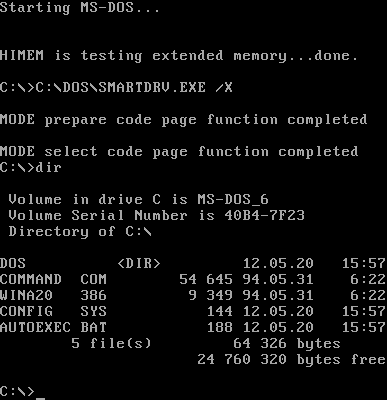
The boot screen and command-line interface of FreeDOS, showing version information and an example of its directory structure

Apple CP/M from Digital Research on a Z-80 SoftCard for the Apple II

The IBM Personal Computer (IBM 5150 PC)
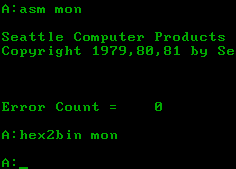
A simulated SCP 86-DOS session

Digital Research CP/M-86 for the IBM Personal Computer Version 1.0

OS/2 1.0 featured a text mode interface similar to MS-DOS.


Error message when attempting to use a reserved name while naming or renaming a file or folder
History Of Dos
DOS has an exciting history! It was created in 1981 by Microsoft, a company founded by Bill Gates and Paul Allen. 🏰The first version was called MS-DOS, which stands for Microsoft Disk Operating System. People loved DOS because it was easy to use! In just a few years, DOS became the core system for many computers. By 1995, it was replaced by Windows, which looks like a colorful world of boxes and buttons! 🌈However, DOS is still remembered for helping kickstart computer technology!
Configuring Dos
Configuring DOS is about adjusting settings to make it work best for you. 🎛️ When you start DOS, it uses a file called ‘CONFIG.SYS’ to set things up, like deciding what clothes to wear for the day! 👕You can add settings to customize things like memory usage and device drivers (which help the computer talk to other parts). Just like tuning a guitar before playing music, configuring DOS helps everything run smoothly together! 🎸
Common Dos Commands
Here are a few common DOS commands you can try! 🤖
1. DIR: This shows you the files in a folder!
2. CD: This allows you to change directories, like moving into different rooms in your house. 🚪
3. COPY: This makes a copy of a file, just like making a photocopy of your favorite drawing! 🖼️
4. DEL: This deletes a file, which is like throwing away a piece of paper you no longer need. 🗑️
Playing with these commands is like being a wizard in the world of DOS! ✨
Key Features Of Dos
DOS has some cool features! One main thing is it's a command-line interface, meaning you type commands instead of clicking on icons 🖱️. This helps you access files and run programs faster. DOS also manages files and folders, just like a library helps you find books! 📚Plus, it can work well with hardware, which are the parts of a computer like a keyboard and mouse. DOS can also run on computers with a small amount of memory, so it doesn't need super-fast technology to work! ⚡
File Management In Dos
Managing files in DOS is like organizing your school supplies! 📓You can create folders to keep things neat and tidy. You can use the command MKDIR to make a new folder (like creating a new shelf for your books!). 🗂️ With RMDIR, you can remove a folder you don't need anymore. Searching for files is also easy with the DIR command, where you can find a treasure of information! 🗺️ Remember, keeping your files organized is as important in DOS as it is with your toys or crafts! 🎨
Dos Utilities And Tools
DOS comes with handy utilities and tools that help you do even more! 🔧Some tools are like super helpers that can make your life easier. For example, CHKDSK checks if your disk is healthy, making sure your files are safe! 🛡️ Another tool is DISKCOPY, which makes an exact copy of a floppy disk. There are also text editors like EDIT where you can write stories or notes. 📝These tools are fantastic for exploring and learning with your computer! 🌍
Legacy And Impact Of Dos
Even though DOS is not as popular today, its impact is enormous! 🌍It helped many people learn how to use computers and paved the way for more advanced systems. Programmers learned to create software using DOS, and the skills they gained have helped build technologies today! It’s like planting seeds that grew into a giant tree! 🌳Many modern operating systems still borrow ideas from DOS, making it a legend in the computer world. So, next time you hear about DOS, remember its cool history and how it helped shape the technology we use today! 📈
Dos Command Line Interface
Imagine DOS as a special language that only computers understand! 🌌The Command Line Interface (CLI) is where you type in your commands, almost like writing a letter to your best friend! You’ll see a black screen with a blinking cursor where you can type. This is where you can tell the computer what you want it to do! For example, typing “DIR” shows you all the files in a folder. It's like checking your toy box to see what toys you have! 🧸
Comparison With Other Operating Systems
DOS is unique compared to other operating systems! 🌟For instance, while DOS uses a command line, modern systems like Windows use colorful images and buttons you can click. Imagine if DOS is a simple classroom with only desks and chairs, whereas Windows is a fun school with playgrounds and art rooms. 🏫While DOS is great for learning computer basics, other systems make it easier to do things quickly. Some people still love DOS because it's simple and powerful, like an old-fashioned bicycle that still gets you places! 🚲
Dos Quiz
Learn more about Dos
