Autoit Facts For Kids
AutoIt is a powerful scripting language primarily used for automating tasks on the Windows operating system with a focus on ease of use and rich functionalities.
Select reading age
Autoit Facts For Kids
Videos & Quizzesincluded
About this topic
AutoIt is a free programming language that helps people write scripts to automate tasks on their computers. 🌟Created in 2000 by Jason Hood in Australia 🇦🇺, it is designed to be simple and easy to learn. AutoIt scripts can perform many tasks, such as opening programs, clicking buttons, or even sending keystrokes, just like a robot! 🤖This means you can tell your computer what to do, and it can do it for you, saving you time and effort. It’s like giving your computer its own set of instructions!
Explore with ChatDinoKey Points
People use AutoIt for many exciting tasks!
The future of AutoIt looks bright!
AutoIt was first released in March 2000.
The AutoIt community is friendly and full of helpful people!
AutoIt has many fun features that make it super helpful!
In AutoIt, every script starts with a function called “main.”
Sometimes, your script may not work as planned.
AutoIt is special because it’s easier to pick up than some other languages like Python or Java.
Photos of Autoit

Autoit — photo 1

AU3 File Format Icon
✨ Common Use Cases
People use AutoIt for many exciting tasks! ✨It can automate software testing, making sure programs work correctly without a person clicking around. 🎮Users also use it to create installers that set up programs neatly on a computer. Additionally, AutoIt can run routines for video games, opening treasure chests or building items automatically! 🏆It’s also used to schedule tasks—like turning on apps at a certain time, so everything runs smoothly! 📅Automating boring tasks makes work feel more like play!
Go deeper🌞 Future Of Autoit
The future of AutoIt looks bright! 🌞As more people learn how to code, AutoIt could grow even more popular. New features and updates are always being added, making it smarter and faster. 🧠It may also start being used with other technology, like robots or smart homes, helping people automate their lives even further! 🤖Many schools are teaching coding, and AutoIt could be a great introduction for kids. Kids everywhere can learn to become computer wizards and create amazing programs! 🪄✨
Go deeper🌐 History Of Autoit
AutoIt was first released in March 2000. Jason Hood wanted to help users automate boring tasks on their computers. Over the years, it grew more popular, so people started sharing their scripts and ideas online 🌐. The biggest update so far, called AutoIt v3, came out in 2004! 🎉This version added many new features, making it easier to use. The AutoIt community continues to grow, with many users contributing to its development. Today, thousands of people from around the world use AutoIt to save time with programming! 🌍
Go deeper🌟 Community And Resources
The AutoIt community is friendly and full of helpful people! 🌟You can find forums where users share their scripts and ask for help. One great place to learn is the official AutoIt website, which has tutorials for beginners. 📘The community hosts events, too, where you can meet others who love coding. You can also check out YouTube for fun videos demonstrating what you can do with AutoIt! 🎥Online, you will find lots of code examples and resources to spark your imagination! 💡Learning together makes coding even more fun! 🎊
Go deeper😊 Features And Capabilities
AutoIt has many fun features that make it super helpful! 😊It can simulate keystrokes, mouse movements, and even interact with windows! 🖱️ For instance, if you wanted to click on a specific button in a game or program without touching the mouse, AutoIt can do that! It also allows you to create GUIs (Graphical User Interfaces), which are basically windows with buttons and text. 🖥️ Plus, AutoIt is lightweight, meaning it doesn’t need much space to run, and it’s easy to learn, making it great for beginners! 🎈
Go deeper📜 Basic Syntax And Structure
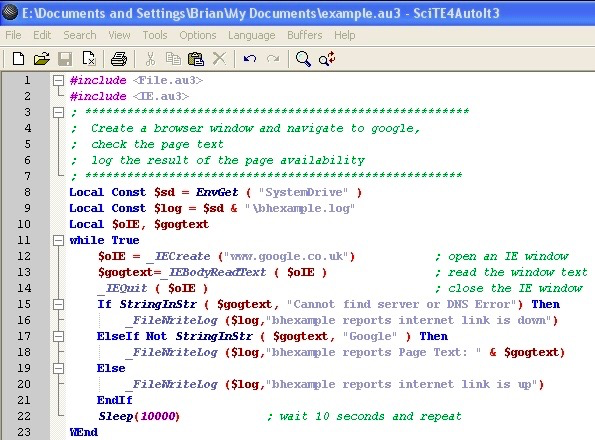
In AutoIt, every script starts with a function called “main.” You write simple commands, like “MsgBox,” to show messages on the screen. 📜For example, `MsgBox(0, "Hello", "Welcome to AutoIt!")` shows a message that says "Welcome to AutoIt!" 🗨️ Each command usually ends with a line break, making it easy to read. AutoIt uses keywords, which are special words telling the computer what to do. For example, `If...Then...Else` commands help make decisions in your script. It’s like giving your computer a map to follow! 🗺️
Go deeper😟 Troubleshooting And Debugging
Sometimes, your script may not work as planned. 😟But that’s okay! Debugging is like being a detective to find out what went wrong! 🔍You can use the AutoIt debugger, which helps you check your code step-by-step. If there’s an error, it will show you what happened. There are also online forums where you can ask for help or search for answers! 🗨️ Remember, every programmer makes mistakes! The key is to be patient and keep trying! With practice and support, you’ll get better at fixing problems! 🛠️
Go deeper🐍 Autoit Vs Other Scripting Languages
AutoIt is special because it’s easier to pick up than some other languages like Python or Java. 🐍While they are powerful, they can be tricky for beginners! 📚AutoIt focuses on automating tasks directly on Windows PCs, making it faster for certain projects. 🖥️ Other languages might not provide built-in commands for clicks and keystrokes, which make AutoIt very handy! 😊Though there are many languages out there, AutoIt stands out as a great choice for kids and beginners who want to start coding adventures! 🏄♂️
Go deeper