Arduino Facts For Kids
Arduino is a versatile open-source platform for creating interactive electronic projects that combine hardware and software.
Select reading age

Arduino Facts For Kids
Videos & Quizzesincluded
About this topic
Arduino is a tiny computer you can hold in your hand! 🖐️ It helps you create cool projects like robots, musical instruments, and even lights that blink! Arduino was made by a group of people in Italy in 2005. It’s perfect for kids because it's easy to use and fun to learn about technology. With Arduino, you can be an inventor! You connect it to your computer to send commands, and it helps your gadgets do awesome things. 🚀So, grab your imagination, and let’s dive into the world of Arduino!
Explore with ChatDinoKey Points
Arduino started in Ivrea, Italy.
There are many types of Arduino boards!
To start using Arduino, you need a few things!
Arduino boards have special parts that help them work.
There are so many fun projects you can make with Arduino!
Arduino is not just for fun at home – it’s used in all kinds of places!
Programming Arduino is like giving your mini computer instructions!
Joining the Arduino community is a great way to learn!
Photos of Arduino
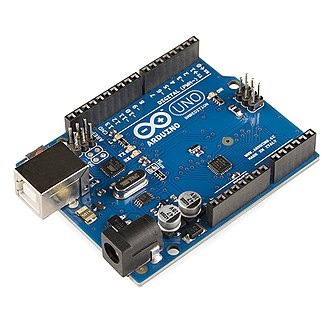
Arduino — photo 1
![The first prototype[3]](https://upload.wikimedia.org/wikipedia/commons/thumb/0/03/The_first_Arduino.jpeg/330px-The_first_Arduino.jpeg)
The first prototype[3]

Arduino-compatible R3 Uno board with no Arduino logo
![An early Arduino board[29] with an RS-232 serial interface (upper left) and an Atmel ATmega8 microcontroller chip (black, lower right); the 14 digital I/O pins are at the top, the 6 analog input pins at the lower right, and the power connector at the lower left.](https://upload.wikimedia.org/wikipedia/commons/thumb/6/6c/Arduino316.jpg/960px-Arduino316.jpg)
An early Arduino board[29] with an RS-232 serial interface (upper left) and an Atmel ATmega8 microcontroller chip (black, lower right); the 14 digital I/O pins are at the top, the 6 analog input pins at the lower right, and the power connector at the lower left.

An official Arduino Uno R2 with descriptions of the I/O locations


Arduino — photo 7


🌍 History Of Arduino
Arduino started in Ivrea, Italy. 🇮🇹 It was invented by some students and teachers who wanted to make it easy for everyone to create electronics projects. The first Arduino board was released in 2005, and it was named after a bar called Arduino, where the creators met to discuss their ideas. They wanted to help artists and students build things without needing a lot of money or complicated tools. Since then, Arduino has grown into a big community with many tools and boards. 🌍Anyone can learn how to use it!
Go deeper🎛️ Different Arduino Models
There are many types of Arduino boards! 🎛️ The most common one is the Arduino Uno. It has 14 digital pins for connecting parts like lights and sensors. Other models include the Arduino Mega, which has even more connections, and the Arduino Nano, which is super small! 🐜Each model is good for different projects. For example, if you want to build a robot, you might pick the Mega because it has more space to connect parts. Choose the one that fits your project best! 🎉
Go deeper🎉 Getting Started With Arduino
To start using Arduino, you need a few things! First, get an Arduino board (like the Uno! 🎉). You’ll also need a USB cable to connect it to your computer. Next, download the Arduino software, which helps you write the code for your projects. After that, connect the board to your computer, and you can send commands to make it do things! 📟Don’t worry if it sounds tricky at first; there are many tutorials and guides to help you along the way, making the adventure super fun! 🏁
Go deeper🔌 Basic Components And Features
Arduino boards have special parts that help them work. 🔌Each board has a microcontroller, which is like a tiny brain that processes information. You also find digital and analog pins for connecting other parts. 🔍There’s a power source, so you can plug it in or use batteries. Additionally, there’s USB for connecting to your computer to upload code. Finally, many Arduino boards have built-in lights (LEDs) to show you what’s happening as you work on your projects! 💡
Go deeper🌟 Popular Arduino Projects For Beginners
There are so many fun projects you can make with Arduino! 🌟Some popular beginner projects include making a flashing LED light, creating a digital thermometer, or building a simple robot that moves! 🤖You can even build a music player using a small speaker. These projects usually use basic components like LEDs, sensors, and motors, and they help you learn how to use Arduino step by step. Each time you complete a project, you become a better inventor! 💪
Go deeper🏭 Applications Of Arduino In Various Fields
Arduino is not just for fun at home – it’s used in all kinds of places! 🏭In schools, teachers use it to teach kids about coding and electronics. In science labs, researchers use Arduino to monitor experiments. 🎓It’s even used in art installations to create interactive displays! One famous project is the “Arduino-based Weather Station,” which collects weather data like temperature and humidity. 🌦️ Thanks to Arduino, people can invent and improve technology for everyone!
Go deeper📝 Programming Arduino: Basics And Languages
Programming Arduino is like giving your mini computer instructions! 📝The main programming language used is C/C++, which may seem big, but don’t worry! You can use a special program called the Arduino IDE, which makes it easier. 🖥️ You write simple code to tell the Arduino what to do, like turn on a light or read a temperature. Each piece of code you write is called a “sketch.” With practice, you’ll learn to write your own sketches in no time! 🖍️
Go deeper🌍 Community And Resources For Arduino Enthusiasts
Joining the Arduino community is a great way to learn! 🌍You can find many online forums where people share ideas and help each other. Websites like Arduino.cc have tons of tutorials, projects, and tips. 📚There are also books and YouTube channels dedicated to Arduino! You can even attend workshops or events where you can meet other young inventors and learn together. So, dive into the fantastic world of Arduino, and don't hesitate to share your projects and discoveries! 🛠️
Go deeper