All Articles

Ethernet

Ethernet Facts For Kids

Ethernet is a family of wired computer networking technologies that allows computers to connect and communicate with each other across local, metropolitan, and wide area networks.

🎨 Reading age for 6-8
Background blob
Ethernet
Ethernet
Facts for Kids!

Do more with AI

Introduction

Ethernet is a technology that helps computers talk to each other! 🖥️💬 It was invented in the 1970s by a smart scientist named Robert Metcalfe. Instead of using wireless signals like Wi-Fi, Ethernet uses cables to connect devices, such as computers, printers, and TVs. The main reason for using Ethernet is to share information quickly and safely. You can find Ethernet in homes, schools, and offices all around the world! 🌎It’s super important for making our daily tasks, like browsing the Internet or printing documents, easier and faster. Let’s learn more about how it works!

Images of Ethernet

An Intel 82574L Gigabit Ethernet NIC, PCI Express ×1 card

An Intel 82574L Gigabit Ethernet NIC, PCI Express ×1 card

Older Ethernet equipment. Clockwise from top-left: An Ethernet transceiver with an in-line 10BASE2 adapter, a similar model transceiver with a 10BASE5 adapter, an AUI cable, a different style of transceiver with 10BASE2 BNC T-connector, two 10BASE5 end fittings (N connectors), an orange vampire tap installation tool (which includes a specialized drill bit at one end and a socket wrench at the other), and an early model 10BASE5 transceiver (h4000) manufactured by DEC. The short length of yellow 10BASE5 cable has one end fitted with an N connector and the other end prepared to have an N connector shell installed; the half-black, half-grey rectangular object through which the cable passes is an installed vampire tap.
Older Ethernet equipment. Clockwise from top-left: An Ethernet transceiver with an in-line 10BASE2 adapter, a similar model transceiver with a 10BASE5 adapter, an AUI cable, a different style of transceiver with 10BASE2 BNC T-connector, two 10BASE5 end fittings (N connectors), an orange vampire tap installation tool (which includes a specialized drill bit at one end and a socket wrench at the other), and an early model 10BASE5 transceiver (h4000) manufactured by DEC. The short length of yellow 10BASE5 cable has one end fitted with an N connector and the other end prepared to have an N connector shell installed; the half-black, half-grey rectangular object through which the cable passes is an installed vampire tap.

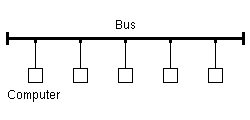
Bustopologie.
Bustopologie.

Photos of Ethernet
A 1990s ISA network interface card supporting both coaxial-cable-based 10BASE2 (BNC connector, left) and twisted-pair-based 10BASE-T (8P8C connector, right)

A 1990s ISA network interface card supporting both coaxial-cable-based 10BASE2 (BNC connector, left) and twisted-pair-based 10BASE-T (8P8C connector, right)

Patch cables with patch fields of two Ethernet switches

Patch cables with patch fields of two Ethernet switches

A core Ethernet switch

A core Ethernet switch

An Ethernet port on a laptop computer connected to a twisted pair cable with an 8P8C modular connector

An Ethernet port on a laptop computer connected to a twisted pair cable with an 8P8C modular connector

Symbol used by Apple and Google on some devices to denote an Ethernet connection

Symbol used by Apple and Google on some devices to denote an Ethernet connection

Accton Etherpocket-SP parallel port Ethernet adapter (c. 1990). Supports both coaxial (10BASE2) and twisted pair (10BASE-T) cables. Power is drawn from a PS/2 port passthrough cable.Image by Pratyeka, licensed under Creative Commons Attribution-Share Alike 4.0

Accton Etherpocket-SP parallel port Ethernet adapter (c. 1990). Supports both coaxial (10BASE2) and twisted pair (10BASE-T) cables. Power is drawn from a PS/2 port passthrough cable.

An Intel 82574L Gigabit Ethernet NIC, PCI Express ×1 cardImage by Dsimic, licensed under Creative Commons Attribution-Share Alike 3.0

An Intel 82574L Gigabit Ethernet NIC, PCI Express ×1 card

Older Ethernet equipment. Clockwise from top-left: An Ethernet transceiver with an in-line 10BASE2 adapter, a similar model transceiver with a 10BASE5 adapter, an AUI cable, a different style of transceiver with 10BASE2 BNC T-connector, two 10BASE5 end fittings (N connectors), an orange vampire tap installation tool (which includes a specialized drill bit at one end and a socket wrench at the other), and an early model 10BASE5 transceiver (h4000) manufactured by DEC. The short length of yellow 10BASE5 cable has one end fitted with an N connector and the other end prepared to have an N connector shell installed; the half-black, half-grey rectangular object through which the cable passes is an installed vampire tap.Image by Robert.Harker at English Wikipedia, licensed under Creative Commons Attribution-Share Alike 2.5

Older Ethernet equipment. Clockwise from top-left: An Ethernet transceiver with an in-line 10BASE2 adapter, a similar model transceiver with a 10BASE5 adapter, an AUI cable, a different style of transceiver with 10BASE2 BNC T-connector, two 10BASE5 end fittings (N connectors), an orange vampire tap installation tool (which includes a specialized drill bit at one end and a socket wrench at the other), and an early model 10BASE5 transceiver (h4000) manufactured by DEC. The short length of yellow 10BASE5 cable has one end fitted with an N connector and the other end prepared to have an N connector shell installed; the half-black, half-grey rectangular object through which the cable passes is an installed vampire tap.

Bustopologie.Image by Tomateus at Luxembourgish Wikipedia, licensed under Creative Commons Attribution-Share Alike 3.0

Bustopologie.

Photos of EthernetImage by Juan José Presa Domínguez, licensed under Creative Commons Attribution-Share Alike 3.0
A 1990s ISA network interface card supporting both coaxial-cable-based 10BASE2 (BNC connector, left) and twisted-pair-based 10BASE-T (8P8C connector, right)

A 1990s ISA network interface card supporting both coaxial-cable-based 10BASE2 (BNC connector, left) and twisted-pair-based 10BASE-T (8P8C connector, right)

Patch cables with patch fields of two Ethernet switchesImage by ShakataGaNai, licensed under Creative Commons Attribution-Share Alike 3.0

Patch cables with patch fields of two Ethernet switches

A core Ethernet switchImage by Dave Fischer, licensed under Creative Commons Attribution-Share Alike 2.0

A core Ethernet switch

An Ethernet port on a laptop computer connected to a twisted pair cable with an 8P8C modular connectorImage by Someone's Moving Castle, licensed under Creative Commons Attribution-Share Alike 3.0

An Ethernet port on a laptop computer connected to a twisted pair cable with an 8P8C modular connector

Symbol used by Apple and Google on some devices to denote an Ethernet connection

Symbol used by Apple and Google on some devices to denote an Ethernet connection

Types Of Ethernet

There are different types of Ethernet used for various needs! 💼The most common one is Fast Ethernet, which works at 100 Mbps. Another is Gigabit Ethernet, which works at an amazing 1,000 Mbps! 🌈For even faster speeds, there’s 10 Gigabit Ethernet used in big companies and data centers! 🏢Other types include Wide Area Network (WAN) Ethernet and Power over Ethernet (PoE), which can send electricity along with data. Each type helps computers connect depending on where they are and what they need to do. The choice of Ethernet depends on speed and distance! 📏

History Of Ethernet

Ethernet was first created in 1973 by Robert Metcalfe while he was working at Xerox's Palo Alto Research Center in California. 🏢He wanted to make it easier for computers to share information over a network using a special type of cable. The name “Ethernet” comes from the old word "ether," which means a medium for carrying signals. By 1980, the first official Ethernet standard was made, known as IEEE 802.3. With time, Ethernet grew in popularity and evolved to become faster and more efficient. Today, Ethernet is found everywhere, helping thousands of computers connect every second! 🌟

Applications Of Ethernet

Ethernet is used in many places! 🏢You’ll find it in schools to help kids learn, in offices where people work, and even in hospitals to keep important records safe. 🩺Ethernet ensures that everyone can communicate quickly and effectively. Major companies like Facebook and Google also use Ethernet to manage huge amounts of data! 📊What’s more, even gaming consoles use Ethernet for super-fast online gaming! 🎮So whether for study, work, or fun, Ethernet makes it all possible!

Ethernet Frame Structure

When computers send data over Ethernet, they use something called a frame. 📦Think of a frame as a special envelope! Each Ethernet frame has several parts: a header, which includes the sender's and receiver's addresses; the data section, which has the actual information being sent; and a footer, which helps check for errors. This organization helps ensure that the right information gets to the right place safely! 📬The frames are like mini packages traveling at high speeds through the cables to reach their destination.

Technical Specifications

Ethernet technology has many types of cables, like coaxial, twisted-pair, and fiber optic. 🌐Coaxial cables connect devices using a single copper wire, while twisted-pair cables, like the ones you use for the phone, are made of pairs of twisted wires. Fiber optic cables use light to send data super fast! Isn't that cool? Light can travel at incredible speeds! 🚀Ethernet speeds can go from 10 Megabits per second (Mbps) to 100 Gigabits per second (Gbps), which is super-duper fast! Imagine transferring a whole movie in just a few seconds! 🎬

Ethernet Security Considerations

Keeping data safe is very important! 🔒When using Ethernet, it's essential to protect the information being shared. One way to do this is by using strong passwords and encryption, which keeps prying eyes away. 📜Firewalls help block unwanted access to your network, acting like guards for your information! It’s also important to regularly update devices to protect them from threats. Remember, just like locking your door makes your home safer, making sure your Ethernet network is secure helps keep your information safe online! 🏰

Common Issues And Troubleshooting

Sometimes, you might notice problems with your Ethernet connection, like slow internet or disconnection! 😟To fix these, you can check if all the cables are plugged in correctly or restart your devices! 🖥️🔌 If your internet is still slow, it might help to ask someone for help or make sure no one is using too much bandwidth by downloading heavy files! Tools like ping tests can help understand where problems are happening. Troubleshooting is like solving a puzzle: once you find the missing piece, everything works just perfectly! 🧩

Ethernet In Local Area Networks (lans)

Most homes and schools use Ethernet to make Local Area Networks (LANs). 🏡✨ A LAN connects computers and devices that are close to each other through cables, allowing them to share information really fast! This is great for activities like online gaming or working on projects as a team! 🎉Ethernet can connect up to 100 devices in a single LAN depending on the type of switches and routers used! By using Ethernet in LANs, we can enjoy quick internet access and smooth file sharing, making everything simpler and more efficient!

Ethernet Vs. Other Networking Technologies

Ethernet is often compared to Wi-Fi, another way for devices to connect. 🌈Wi-Fi uses radio waves to help computers communicate without cables, which makes it super convenient! However, Ethernet is usually faster and more reliable for transferring large amounts of data. 🚀There are other technologies like Token Ring and Fiber Distributed Data Interface (FDDI) too! But Ethernet is the most popular choice because it is easier to use and can connect many devices without slowing down. Choosing between Ethernet and other technologies depends on what you need!

Future Developments In Ethernet Technology

Ethernet keeps getting better and faster! 🚀Scientists and engineers are continuously working on new ways to improve Ethernet technology. They are now creating even faster speeds, like 400 Gbps, and exploring ways to use Ethernet for advanced technologies like smart cities and self-driving cars! 🚗🌆 This exciting future means even more ways of connecting devices in homes and businesses. As technology evolves, Ethernet will help make everything work smoothly and quickly, proving its importance in our everyday lives! 🌟

Ethernet Quiz

Q1
Question 1 of 10

Learn more about Ethernet

Ready to create?

Drop Files here
Make

To create a safe space for kid creators worldwide!

Create

Vibe Coding

Kids GPT

All Tools

Kibu

Resources

Worksheets

SafeTube

Blog

FAQ

Account

Pricing

Log-in

Sign-up

Data Deletion

Company

About

Community Guidelines

Privacy Policy

Terms of Service

2025, URSOR LIMITED. All rights reserved. DIY is in no way affiliated with Minecraft™, Mojang, Microsoft, Roblox™ or YouTube. LEGO® is a trademark of the LEGO® Group which does not sponsor, endorse or authorize this website or event. Made with love in San Francisco.